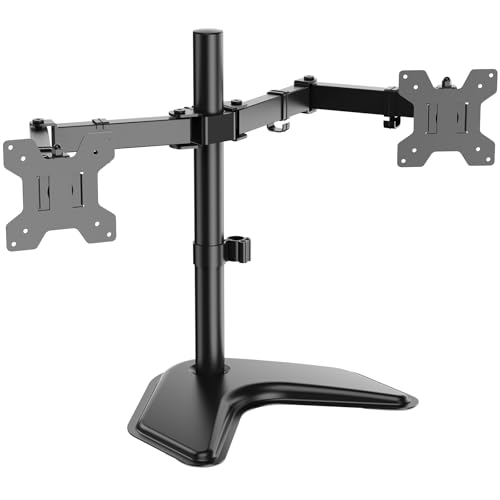
2 Monitor Desk Stand
Boost productivity and reclaim desk space with the perfect dual monitor stand. Find the ideal mount for your workflow.
All About Desks — A dual monitor desk stand is one of the most impactful upgrades for any workspace. It elevates your screens to eye level, frees up valuable desk surface, and helps you maintain a healthy posture throughout the day. Whether you're a programmer, designer, trader, or remote worker, the right 2 monitor desk stand transforms your desk into a command center.
Why a 2 Monitor Desk Stand?
Using two monitors without a proper stand often means cluttered desks, strained necks, and wasted space. A dedicated monitor stand solves these problems by lifting both screens off the desk. Here's why it matters:
- Ergonomics: Position monitors at the correct height to reduce neck and eye strain.
- Desk Space: Reclaim up to 30% of your desk surface for other essentials.
- Flexibility: Adjust angle, tilt, and rotation for the perfect viewing position.
- Clean Setup: Integrated cable management keeps your workspace tidy.
Types of 2 Monitor Desk Stands
Choosing the right stand depends on your desk type, monitor size, and workflow. Here are the most common options:
Gas Spring Arms
- Fully adjustable with smooth movement
- Supports monitors up to 32" each
- Clamp or grommet mount
- Best for frequent position changes
Fixed Pole Stand
- Sturdy, cost-effective design
- Height adjustable via pole
- Limited tilt/rotation
- Ideal for static setups
Stacked / Vertical Stand
- One monitor above the other
- Great for coding or reading
- Saves width on narrow desks
- Often includes gas spring top arm
How to Choose the Right Dual Monitor Stand
Before buying a 2 monitor desk stand, consider these key factors:
- Monitor Size & Weight: Check the stand's weight capacity per arm. Most stands support up to 17.6 lbs (8 kg) per monitor. Ensure compatibility with your screen size (e.g., 24", 27", 32").
- Mounting Type: Clamp-on mounts fit most desks with an overhang. Grommet mounts require a hole in the desk. Choose based on your desk design.
- Desk Thickness: Clamps typically fit desks up to 3.3" (85 mm). Measure your desk to ensure a secure fit.
- VESA Compatibility: Most monitors support 75x75 or 100x100 mm VESA patterns. Check your monitor's manual.
- Cable Management: Built-in cable channels keep wires organized and out of sight.
💡 All About Desks Pro Tip
- Measure your desk depth before buying — some stands require more clearance.
- If you have a corner desk, look for a mount with a longer reach to position monitors correctly.
- For gaming desks, choose a stand with a heavy-duty base to support ultrawide or curved monitors.
Best 2 Monitor Desk Stands Compared
Based on extensive research and user feedback, here are three of the best dual monitor stands on the market today.
Installation & Setup Guide
Setting up your 2 monitor desk stand is straightforward. Follow these steps for a safe and stable installation:
- Read the manual: Each stand has specific assembly steps.
- Attach the base: Clamp or grommet mount – ensure it's tightened securely to prevent wobbling.
- Install VESA plates: Attach plates to your monitors first.
- Hang monitors: Carefully place each monitor onto the arms.
- Adjust tension: Use the included hex key to balance gas spring pressure.
- Route cables: Use built-in channels for a clean look.
Ready to Elevate Your Workspace?
Browse the top-rated 2 monitor desk stands below and find the perfect match for your desk and workflow.
Explore more: monitor stand desk · corner desk · l-shaped desk · gaming desk top