
Desk Charging Stations: Power Your Workspace
Stay powered, organized, and productive. Find the perfect charging station for your desk – from USB-C hubs to wireless chargers and smart power strips.
Shop Top Charging Stations⚡ Desk charging stations are the nerve center of any modern workspace. Whether you're running a laptop, tablet, phone, or wireless earbuds, the right charging setup keeps your devices juiced without cluttering your surface. In this guide, we break down the best charging stations, key features to look for, and how to integrate them into a clean, organized desk.
Why a Dedicated Charging Station?
A dedicated desk charging station does more than just charge devices. It reduces cable chaos, protects your gadgets from power surges, and frees up valuable desk space. Instead of hunting for outlets or untangling cords, you get a single, sleek hub that powers everything. This is especially crucial if you have a home office desk or a gaming desk with multiple peripherals.
What to Look for in a Charging Station
🔌 Port Variety
USB-A, USB-C, AC outlets, and even wireless charging pads. Ensure compatibility with your laptop, phone, tablet, and other desk gadgets.
⚡ Power Delivery (PD)
For fast charging, look for USB-C Power Delivery (up to 100W) to juice up laptops quickly. Great for electric standing desks.
📏 Size & Design
Compact, under-monitor, or clamp-on styles. Choose one that fits your desk layout without crowding your workspace.
🧹 Cable Management
Integrated cable clips, trays, or raceways keep cords out of sight. Pair with cable trays and raceways for a pristine surface.
Types of Desk Charging Stations
Not all charging stations are created equal. Here are the most popular formats:
- 🔹 USB Charging Hubs – Compact boxes with multiple USB ports. Ideal for phones, tablets, and accessories. Often paired with a USB hub for data transfer.
- 🔹 Power Strips with USB – Traditional power strips with added USB ports. Great for desks with multiple AC-powered devices like monitors, lamps, and speakers.
- 🔹 Wireless Charging Pads – Cable-free charging for Qi-compatible phones and earbuds. Can be integrated into desk mats or standalone.
- 🔹 Under-Desk Mounts – Mounted beneath the desk to save surface space. Perfect for small standing desks or compact desks.
- 🔹 All-in-One Docking Stations – Combines power delivery, USB ports, video outputs, and Ethernet. Ideal for laptops that double as desktop replacements.
🧼 Pair with Smart Cable Management
Even the best charging station looks messy without proper cable organization. Use under-desk cable management solutions, cable sleeves, and desk grommets to route cords discreetly. For a truly wireless look, consider a wireless desk setup with hidden charging pads and battery packs.
Power Management & Safety Tips
Overloading a single outlet or using cheap chargers can damage devices or even cause fires. Follow these best practices:
- ✔️ Surge Protection: Always choose charging stations with built-in surge protection to safeguard your expensive gear.
- ✔️ Wattage Check: Ensure the total wattage of connected devices doesn't exceed the station's capacity. For high-power laptops, use a dedicated USB-C PD port.
- ✔️ Smart Plugs: Pair with smart plugs to schedule charging times or turn off devices remotely, saving energy.
- ✔️ Heat Dissipation: Place the station in a well-ventilated area, away from direct sunlight or heat sources.
Charging Stations for Every Desk
Your desk shape and size influence the best charging solution. For L-shaped desks, consider a dual-station setup with one hub on each side. Corner standing desks benefit from under-mount brackets to keep the surface clear. If you have a floating wall desk, opt for a slim, wall-mounted power strip to minimize visual bulk.
Ready to Power Up Your Desk?
Browse our curated selection of top-rated charging stations below. Each product is vetted for performance, safety, and value.
Shop NowTop Desk Charging Stations
⚠️ AFFILIATE DISCLOSURE: This website contains affiliate links. As an Amazon Associate, we earn from qualifying purchases. If you make a purchase through these links, we may receive a small commission at no additional cost to you. Read our full affiliate policy.

Anker Desktop Charger, 9-in-1 Power Strip with 300J Surge Protector, 100W | USB C Charger with 3 AC, 4 USB C, 2 USB A, 5ft Flat Plug Extension Cord with Multiple Devices, Home Office, Desk Accessories

Jgstkcity Desk Clamp Power Strip USB C,40W Total Fast Charging Station,4 PD 20W USB C Ports,Desk Edge Mount Surge Protector,5 Outlets,Fit 1.96" Tabletop Edge,ETL Listed
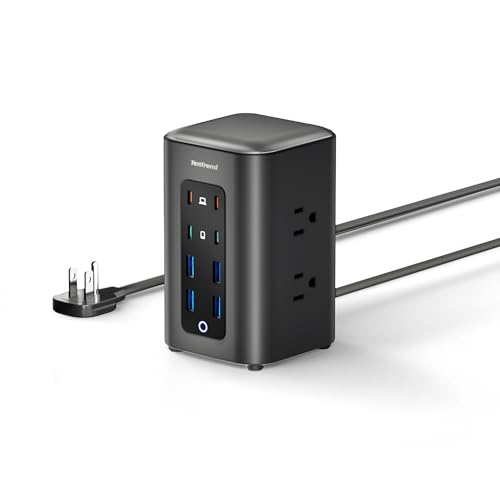
TenTrend Power Strip Tower, 230W Charging Station with Multiple Devices | 6 AC Outlets & 8 USB Ports(4 USB-C), Flat Plug, Black, 5 FT Extension Cord for Home Office, Dorm Essentials

Power Strip Tower, kakyanill Charging Station 9 AC Outlets 8 USB Ports | 6 Ft Retractable Extension Cord, 15W Wireless Charger, White

8-in-1 Retractable Charger for iPhone Duo/18 Pro Samsung Multiple Devices | 105W Charging Station Usbc Hub,Fast Charger Wall Plug for iPhone Duo/18 Pro,Galaxy,Pixel,iPad,Home Office,Desktop Accessories

Jgstkcity Desk Clamp Power Strip,40W Total Fast Charging Station,2 PD 20W USB C Ports,Desk Edge Mount Surge Protector for Home, Office,3 Outlets,Fit 1.96" Tabletop Edge,ETL Listed

FDTEK Power Strip USB C, 4 Outlets 3 USB Ports 5 FT Extension Cord Black | Space Saving Cube Shape Widely Spaced Outlets with USB C Port Flat Plug Power Strip for Travel Dorm Office Bedroom ETL Listed

Anker Nano Charging Station, 100W 7-in-1 Power Strip, Retractable Charger | 2.3ft InstaCord Cable, Gaming Desk Accessories for Multiple Devices, 3 AC, 3 USB C, 1 USB A, MacBook Charger, Home Office
Disclaimer
All About Desks provides educational content only. Not a substitute for professional ergonomist or interior designer services. Always consult a qualified professional for major structural or electrical work involving your desk. Some content may use AI. We are not responsible for product defects, injuries, or outcomes related to desk use. By using this site, you accept these terms. If you do not agree, please leave this website and discontinue its use. Read full disclaimer.