Tablet Mounts for Your Desk: The Ultimate Guide
Elevate your tablet experience with the perfect mount. Improve ergonomics, free up desk space, and boost productivity with our expert guide to tablet stands and holders.
Shop Top Tablet Mounts ↓What Is a Tablet Mount & Why Do You Need One?
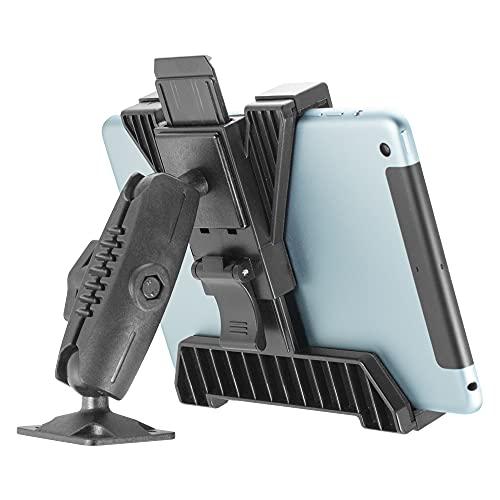
A tablet mount (also called a tablet stand or holder) is a desk accessory designed to securely hold your tablet at an optimal viewing angle. Whether you use an iPad, Samsung Galaxy Tab, or any other tablet, a mount transforms your device from a handheld screen into a stable, adjustable second monitor, recipe viewer, or video conferencing tool.
Using a tablet mount on your desk offers several benefits:
- Ergonomic viewing: Raises the screen to eye level, reducing neck and eye strain.
- Frees up desk space: Keeps your tablet upright and off the surface, giving you more room.
- Better multitasking: Use your tablet alongside your main monitor or laptop for enhanced productivity.
- Versatility: Great for reading, drawing, watching media, or following recipes while cooking.
If you're setting up a desk setup or looking for desk accessories that combine function and style, a tablet mount is an essential addition.
Types of Tablet Mounts
Tablet mounts come in various styles to suit different desks and user needs. Below are the most common types, along with their pros and typical price ranges.
Desk Stand (Fixed Angle)
$15–$40
A simple, sturdy stand that holds your tablet at a preset angle. Ideal for stationary use, such as watching videos or as a secondary display. Compact and easy to move.
Adjustable Articulating Arm
$25–$70
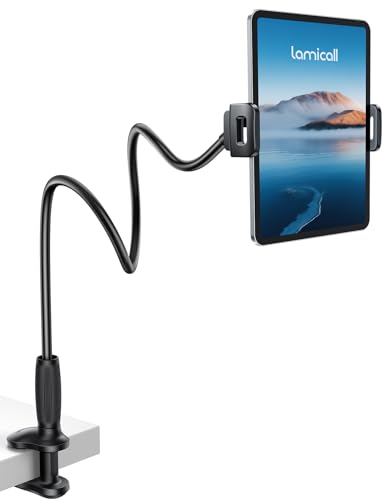
Features a clamp or weighted base with an articulated arm that allows full 360° rotation and height adjustment. Perfect for achieving the ergonomic desk setup.
Monitor-Mounted Tablet Holder
$20–$50
Attaches directly to the edge of your monitor or laptop screen, placing your tablet right next to your main display. Great for multi-screen workflows.
Weighted Base Stand
$15–$35
Features a heavy base that keeps the mount stable without clamping. Perfect for glass desks or surfaces where you can't use a clamp.
For small standing desks or compact desks, a clamp-based articulating arm is often the best choice because it saves surface space.
Key Features to Consider
When choosing a tablet mount for your desk, keep these features in mind to ensure you get the best match for your needs.
- 🔹 Adjustability: Look for mounts with tilt, swivel, and height adjustment to find the perfect viewing angle.
- 🔹 Compatibility: Check the mount's width range to ensure it fits your tablet model (with or without a case).
- 🔹 Desk Clamp vs. Weighted Base: Clamps are sturdy and save space; weighted bases are portable and don't mark surfaces.
- 🔹 Build Quality: Metal arms and reinforced joints offer better durability and stability than plastic.
- 🔹 Cable Management: Some mounts include built-in cable clips to keep your charging cable tidy.
For a clean and organized workspace, consider pairing your tablet mount with desk organization tools like cable trays and desk organizers.
Ergonomics & Health Benefits
Using a tablet mount is not just about convenience—it's also about protecting your health. Prolonged use of a tablet lying flat on a desk forces your neck into a forward, downward position, leading to "tech neck" and back pain.
A good tablet mount raises the screen to eye level, promoting a neutral spine posture. This reduces strain on your cervical spine and helps prevent headaches and shoulder tension. For those who use their tablet for drawing or note-taking, an adjustable mount can also reduce wrist fatigue by allowing a more natural arm angle.
Combine your tablet mount with other ergonomic desk accessories like a keyboard tray, wrist rests, or an anti-fatigue mat for a complete health-conscious workspace.
Top Tablet Mounts Comparison
To help you decide, here's a comparison of popular tablet mount types and their best-use scenarios.
For most users, an adjustable articulating arm offers the best balance of versatility and ergonomics, especially for home office desks.
How to Set Up Your Tablet Mount
Setting up a tablet mount is straightforward, but proper installation ensures stability and safety. Follow these steps:
- Choose the right location: Place the mount on your desk near your main monitor or laptop, within easy reach.
- If using a clamp mount: Secure the clamp firmly to the desk edge. Ensure the surface is thick enough to support the clamp (most support up to 2 inches).
- Adjust the arm: Loosen the joints, position the arm to your desired height and angle, then tighten securely.
- Attach your tablet: Expand the holder, place your tablet (with or without case), and release to secure it. Double-check that the grip is snug.
- Route cables: Use built-in clips or cable raceways to manage the charging cable and keep your desk tidy.
A well-mounted tablet integrates seamlessly into your desk setup, whether you're using it for productivity, creativity, or entertainment.
Frequently Asked Questions
Can I use a tablet mount with a thick case?
Yes, most adjustable mounts have a width range of 6–12 inches, accommodating tablets with cases. Always check the product specifications for maximum width.
Will a clamp mount damage my desk?
Clamp mounts include protective rubber pads to prevent scratches. For delicate surfaces, consider a weighted base stand instead.
Can I use a tablet mount for drawing?
Absolutely! An articulating arm lets you tilt the tablet to a comfortable drawing angle. Pair it with a desk mat for a smooth surface.
Final Tips: Choosing Your Perfect Tablet Mount
To make the best choice, assess your primary use case. If you're a multitasker who uses a tablet alongside a monitor, an articulating arm is ideal. For a minimalist setup, a sleek fixed stand might be all you need. And if you frequently move your tablet between rooms, a lightweight weighted base stand offers portability.
Remember, the right mount not only enhances your productivity but also contributes to a healthier, more enjoyable workspace. Browse our recommended products below to find the perfect match for your desk.