Desk Shelves: The Ultimate Guide to Organize & Elevate Your Workspace
Transform your desk from cluttered to curated. Discover how the right desk shelves can maximize vertical space, improve workflow, and bring style to your setup.
Shop Top Desk ShelvesAll About Desks – Desk Shelves Expert Guide: Whether you're a gamer, creative professional, or home office worker, desk shelves are the secret weapon for a clean, functional, and inspiring workspace. They free up surface area, keep essentials within reach, and add a layer of visual organization that boosts productivity.
Why Add Shelves to Your Desk Setup?
- Maximize Vertical Space: Utilize the area above your desk to store books, accessories, and decor without crowding your work surface.
- Boost Productivity: Keep frequently used items like notebooks, pens, and tech gadgets organized and easily accessible.
- Enhance Aesthetics: Create a curated look with plants, framed photos, and art pieces that reflect your personal style.
- Flexible Storage: From monitor risers with built-in shelves to wall-mounted units, there's a solution for every desk shape and size.
Types of Desk Shelves for Every Workspace
Monitor Risers with Shelves
Elevate your monitor to eye level while adding a shelf underneath for keyboards, tablets, or small accessories. Ideal for ergonomic setups and saving desk space.
Price range: $30–$120
Wall-Mounted Shelves
Free up every inch of your desk surface by mounting shelves on the wall above. Perfect for books, plants, and decorative items. Available in wood, metal, and glass.
Price range: $20–$200+
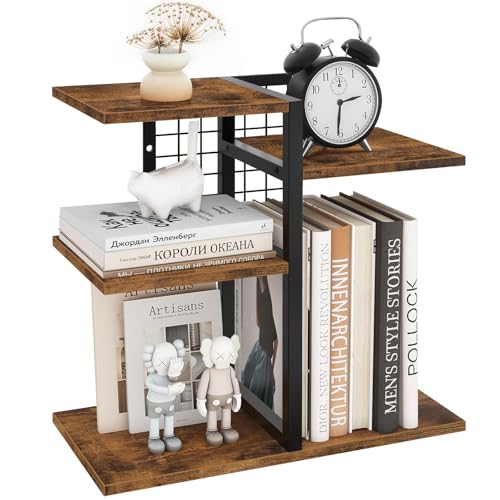
Freestanding Desktop Shelves
Portable and versatile, these units sit directly on your desk. They often feature multiple tiers and are great for organizing papers, small plants, and desk gadgets.
Price range: $25–$90
Under-Desk Shelves
Hidden storage solutions that attach beneath your desk. Ideal for stashing cables, power strips, or small items you want out of sight but within reach.
Price range: $15–$50
Corner Shelves
Make use of awkward corner spaces with triangular or angled shelves. Perfect for small desks or L-shaped setups to keep essentials organized without cluttering.
Price range: $18–$70
Adjustable & Modular Shelves
Customizable systems that let you rearrange shelves to fit your changing needs. Great for growing collections or evolving workstation setups.
Price range: $40–$150
Choosing the Right Material for Your Desk Shelves
The material of your desk shelves affects durability, weight capacity, and overall aesthetics. Here's what to consider:
🪵 Solid Wood
Durable, classic, and warm. Excellent for heavy items like books and monitors. Can be stained or painted to match any desk.
🛠️ Metal / Steel
Sleek and industrial. Offers high weight capacity and a modern look. Often combined with wood or glass for a mixed-material aesthetic.
✨ Glass
Light and airy. Perfect for displaying collectibles or plants. Requires regular cleaning to maintain its pristine look.
♻️ Engineered Wood (MDF / Laminate)
Affordable and versatile. Available in many finishes. Great for budget-friendly setups and lightweight storage.
How to Install & Arrange Your Desk Shelves Like a Pro
- Assess Your Desk Layout: Measure your desk dimensions and consider the height of your monitor, chair, and other desk setup elements.
- Choose the Right Placement: Place shelves within arm's reach for items you use daily. Higher shelves are great for decor and less-used items.
- Consider Weight Capacity: Always check the manufacturer's weight limit. Distribute weight evenly to prevent tipping or damage.
- Style with Intention: Combine functional items (like a pen holder or file holder) with decorative pieces for a balanced look.
- Think About Lighting: Position shelves to avoid blocking natural light or desk lamps. Use desk lamps or monitor light bars to illuminate lower shelves.
How Desk Shelves Enhance Your Setup Aesthetic
Desk shelves are more than just storage—they're a design statement. Whether you prefer a minimalist desk style, a cozy desk vibe, or an industrial style desk, shelves let you showcase personality while staying organized. Add plants, art, or collectibles to bring warmth to your workspace. For a modern edge, consider combining shelves with a RGB gaming desk setup for a dynamic and visually engaging environment.
If you're working with a small space desk, shelves are a game-changer. They allow you to store vertically and keep your main surface clear for work. Pair them with floating shelves or wall mounted organizers to maximize every inch.
Pairing Shelves with Other Desk Accessories
To create a truly functional workspace, integrate your desk shelves with complementary accessories. Use desk organizers to sort small items on lower shelves, and place monitor arms to keep your screen floating for more shelf space below. For cable management, route wires behind or under shelves using cable trays or cable raceways.
If you're a gamer or content creator, consider a stream deck or desk microphones placed on dedicated shelves to keep your main desk clutter-free. Shelves also work well with headphone stands and desk speakers to elevate your audio setup.
Ready to Upgrade Your Workspace with Desk Shelves?
Browse our curated selection of top-rated desk shelves below. Each product is chosen for quality, design, and value to help you build the perfect desk setup.
Shop Now