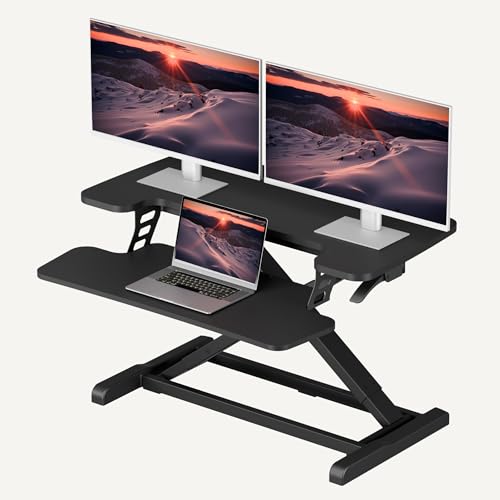
Straight Desk Setup: The Ultimate Guide to a Productive Workspace
All about desks for your straight desk layout! Whether you're setting up a home office, a gaming station, or a minimalist workspace, a straight desk offers a clean, focused environment. This guide covers everything from monitor placement to cable management, helping you create a setup that boosts productivity and looks great.
START YOUR DESK JOURNEYWhy a straight desk? A straight desk is the most versatile and space-efficient choice for any workspace. Its simple, linear design fits seamlessly against walls, in corners, or as a centerpiece in a room. With the right setup, it can support everything from a dual monitor setup to a gaming desk configuration. This guide will help you unlock the full potential of your straight desk.
1. Choosing the Right Straight Desk
Before diving into the setup, it's crucial to select a straight desk that fits your space and needs. Consider these factors:
Desk Size & Dimensions
Measure your available space carefully. A standard straight desk is around 48–60 inches wide and 24–30 inches deep. For dual monitor setups, opt for at least 55 inches wide. If you use large studio monitors or multiple devices, consider a deeper desk (30 inches or more) for proper viewing distance.
Material & Durability
The desk surface impacts both aesthetics and functionality. Solid wood desks offer timeless beauty and durability, while laminate desks are budget-friendly and easy to clean. For a modern look, consider a white desk or a glass desk to brighten up your space.
Height & Ergonomics
Proper desk height is essential for comfort. The standard desk height is 28–30 inches, but if you're taller or shorter, consider an adjustable stand-up desk or a desk height calculator to find your ideal measurement. For maximum flexibility, a electric standing desk allows you to switch between sitting and standing.
Style & Aesthetics
Your desk should reflect your personal style. A minimalist desk style keeps things clean and focused, while a cozy desk with warm wood tones creates a welcoming atmosphere. For gamers, a RGB gaming desk with built-in lighting adds excitement to the setup.
2. Optimizing Your Monitor Layout
The way you position your monitors significantly affects your posture, eye strain, and workflow efficiency. Here are the most effective layouts for a straight desk:
Single Monitor Setup
Perfect for focused work or limited space. Place the monitor directly in front of you at arm's length, with the top of the screen at or slightly below eye level. Use a monitor arm to free up desk space and achieve the ideal height and angle. This setup is ideal for writers, programmers, and anyone who values a clutter-free workspace.
Dual Monitor Setup
Boost productivity by up to 42% with a dual monitor setup. Position both screens side-by-side with the primary monitor directly in front of you and the secondary monitor angled slightly toward you. For a straight desk, a dual monitor arm is essential to keep both screens at the correct height and distance. This layout is excellent for multitasking, research, and creative work.
Ultrawide & Curved Monitors
An ultrawide setup provides a seamless panoramic view, perfect for immersive gaming or video editing. Place the monitor centrally with the curve facing you. Ensure the desk depth is sufficient (at least 30 inches) to maintain a comfortable viewing distance. Pair it with a desk speakers for a complete multimedia experience.
Vertical Monitor Setup
A vertical monitor setup is ideal for coding, reading documents, or browsing social media. Place the vertical monitor to the side of your primary display, angled slightly inward. This setup maximizes screen real estate without taking up too much horizontal space on your straight desk.
3. Accessories & Organization for a Clean Setup
Keep your straight desk tidy and functional with these essential accessories:
Cable Management
Tangled cables can ruin even the most beautiful desk. Use cable trays, cable raceways, and cable sleeves to route wires neatly under the desk. For a wireless look, consider a wireless charging desk mod or a desk grommet to pass cables through the surface.
Ergonomic Accessories
Invest in an ergonomic mouse, a mechanical keyboard, and a wrist rest to reduce strain during long work sessions. A footrest and an anti-fatigue mat are also great additions if you use a standing desk. These small changes can make a big difference in your comfort and health.
Storage & Organization
Keep your desk surface clear with smart storage solutions. Use desk organizers, pen holders, and file holders to corral small items. For a more permanent solution, consider adding desk shelves or a desk hutch to store books, decor, and documents vertically.
Decor & Personalization
Make your straight desk feel like your own. Add a desk plant for a touch of greenery, a desk lamp for warm lighting, or a mood board for inspiration. For a cohesive look, choose decor that matches your minimalist desk style or cozy desk aesthetic. Personalizing your workspace can boost motivation and creativity.
4. Boost Productivity with the Right Workflow
Your straight desk setup should support how you work. Here are some tips to optimize your workflow:
Distraction-Free Zone
Create a distraction-free desk by keeping only essentials on your desk. Use a desk timer to stay focused, and consider a desk acoustic treatment to reduce noise in a busy environment. A clean, organized desk leads to a clear mind.
Dual Monitor Productivity
Leverage your dual monitor productivity desk by assigning specific tasks to each screen. For example, keep your main work on the primary monitor and reference materials, chat apps, or media on the secondary screen. This setup is especially effective for desk setup enthusiasts.
Standing Desk Routine
If you have a electric standing desk, alternate between sitting and standing throughout the day. Follow a sit-stand routine to stay energized and improve posture. A desk stretching routine can also help relieve tension.
Feng Shui & Energy Flow
Arrange your straight desk according to desk feng shui principles. Place the desk facing the door for a commanding position, and keep the center of your desk clear to promote positive energy flow. This can improve your focus and reduce stress.
5. Common Straight Desk Setup Mistakes
Avoid these pitfalls to ensure your straight desk setup is both comfortable and productive:
- Improper Monitor Height: Not using a monitor arm or stand to adjust the screen height can lead to neck and back pain. Always position the top of the monitor at or slightly below eye level.
- Cluttered Desk Surface: Too many items on your desk create visual noise. Use desk organizers and shelves to keep the surface clean. Follow a minimalist desk style for a more focused environment.
- Poor Cable Management: Exposed cables are unsightly and can be dangerous. Use cable trays and cable sleeves to route wires neatly under the desk.
- Ignoring Ergonomics: Neglecting the desk height calculator and proper sitting posture can cause long-term health issues. Invest in an ergonomic mouse and a mechanical keyboard to reduce strain.
- Not Using a Monitor Arm: Without a monitor arm, you're limited in positioning your screens, which can lead to poor viewing angles and desk clutter.
Ready to build your straight desk setup? Start by measuring your space, choosing a desk that fits your needs, and selecting the right monitor arms and organizers. For more inspiration, explore our guides on desk setup, single monitor setup, and dual monitor setup. Remember, the best setup is one that works for you and supports your unique workflow.