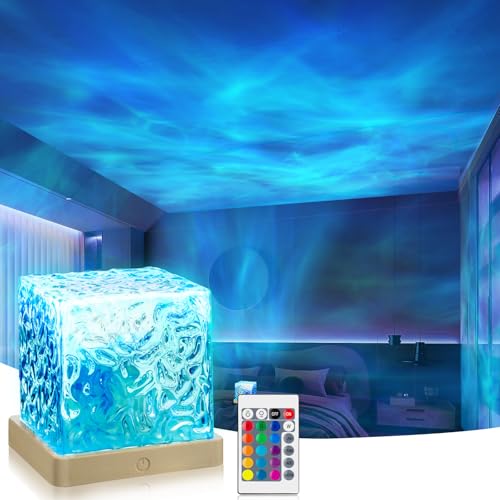
Ambient Mood Lighting for Your Desk
Transform your workspace with the perfect glow — reduce eye strain, boost focus, and create an inspiring atmosphere that adapts to your workflow and mood.
Why ambient lighting matters: Harsh overhead lights cause fatigue, while a well-designed ambient setup reduces contrast strain, improves sleep quality, and makes your desk feel like a sanctuary. Whether you're coding late, writing, or gaming, the right light changes everything.
1. Types of Ambient Desk Lighting
LED Strip Lights
Flexible, adhesive-backed strips that attach under desks, behind monitors, or along shelves. Available in RGB and white-tunable variants. Ideal for indirect, wash lighting that reduces screen glare.
$20–$80Choose high-density LEDs for smooth, even light. Look for color temperature adjustability (2700K–6500K) to shift from warm to cool.
Monitor Light Bars
Clamp onto the top of your monitor, casting light directly onto your desk surface without screen glare. They save space and provide focused, balanced illumination for reading and writing.
$40–$150Premium models offer auto-dimming, color temperature presets, and wireless controls via app or remote.
Smart Desk Lamps
Modern LED lamps with adjustable arms, touch controls, and smart home integration. Many support ambient modes that simulate sunrise, sunset, or candlelight for relaxation.
$50–$200Look for models with Ra > 90 color rendering for accurate color perception.
Smart Bulbs & Fixtures
Replace standard desk lamps with Wi-Fi/Bluetooth bulbs. Control brightness, color, and schedules via app or voice. Create dynamic presets for work, gaming, or reading.
$15–$60 per bulbCompatible with Alexa, Google Home, and Apple HomeKit for seamless automation.
2. How to Choose the Right Ambient Lighting
Key factors to consider:
- Color Temperature (Kelvin): Warm light (2700K–3000K) for relaxation, neutral (4000K) for focus, cool (5000K+) for detail work.
- Brightness (Lumens): For ambient lighting, aim for 300–800 lumens depending on desk size and task needs.
- Placement: Indirect light (bounced off walls/ceiling) reduces harsh shadows. Combine with task lighting for optimal coverage.
- Controls: Dimming, color presets, and scheduling help adapt lighting to your daily rhythm.
- CRI (Color Rendering Index): > 90 ensures accurate colors — essential for design or photo editing.
3. Placement & Setup for Maximum Impact
Behind the Monitor
Attach LED strips to the back edge of your monitor. This creates a soft halo effect that reduces contrast between the bright screen and dark room, minimizing eye fatigue.
Best for: long work sessions, coding, writing
Under-Desk Glow
Install strips along the back or underside of your desk. This creates a floating effect and provides indirect illumination that makes the room feel larger and more inviting.
Best for: gaming setups, creative spaces, relaxation
Shelves & Wall Accents
Place light strips on floating shelves or behind wall art to add depth and a premium, layered look. Sync colors with your monitor or music for immersive experiences.
Best for: streaming, content creation, aesthetic setups
Desk Lamp as Ambient Accent
Position a smart lamp with a wide shade to bounce light off the wall. Use warm, dim settings for evening work or cool, bright settings for morning focus.
Best for: dual-purpose work/relaxation desks
4. Smart Automation & Integration
Take your ambient lighting to the next level with smart controls:
- Voice Control: Adjust brightness and color with Alexa, Google Assistant, or Siri.
- Scheduling: Set lights to gradually brighten in the morning and dim in the evening to sync with your circadian rhythm.
- Scenes: Create presets like "Focus" (cool, bright), "Relax" (warm, dim), and "Game" (dynamic RGB) for one-tap transitions.
- Integration: Sync with your monitor or PC via apps like Philips Hue, Razer Chroma, or Corsair iCUE for immersive gaming or media experiences.
5. Health & Productivity Benefits
Reduced Eye Strain
Balanced ambient light reduces the harsh contrast between screen and surroundings, preventing dry eyes and headaches.
Better Sleep
Warm, dim lighting in the evening signals your brain to produce melatonin, promoting deeper and more restful sleep.
Enhanced Focus
Cool, bright light boosts alertness and concentration, making it easier to stay productive during deep work sessions.
6. FAQ — Ambient Mood Lighting
What color temperature is best for a desk?
For general use, 4000K (neutral white) is versatile. For evening work, 2700K–3000K (warm) reduces sleep disruption. For detail tasks, 5000K (cool) enhances visibility.
Can I mix different types of ambient lighting?
Absolutely. Combining a monitor light bar, LED strips, and a smart lamp creates a layered, professional look. Ensure color temperatures match or complement each other.
Are smart bulbs worth it for a desk?
Yes — they offer flexibility, automation, and energy efficiency. They're especially useful if you want to change ambiance without buying multiple lamps.
Ready to Transform Your Workspace?
Browse our curated selection of ambient lighting products below. Each item is handpicked for quality, value, and performance.
Shop Lighting →