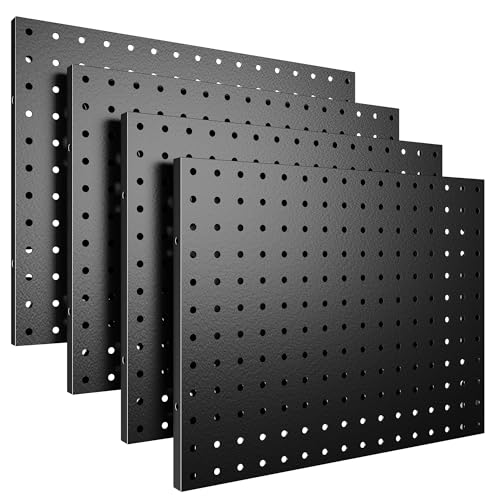
Pegboard Organization for Desks
Transform your workspace with a pegboard: the ultimate flexible storage solution. Keep tools, accessories, and essentials within reach while saving desk space.
Shop Top PegboardsWhy choose a pegboard for your desk? Pegboards are versatile, customizable, and space-saving. Whether you're a gamer needing quick access to controllers, a creator with art supplies, or a professional managing cables and office tools, a pegboard keeps everything visible and organized.
Why a Pegboard Belongs on Your Desk
📌 Flexible Layout
Arrange hooks, shelves, and bins in any configuration. Change it as your needs evolve.
🧹 Saves Desk Space
Move small items off the surface and onto the wall, freeing up space for monitors and notebooks.
🎯 Easy Access
See everything at a glance and grab what you need instantly—no more digging through drawers.
🎨 Customizable Aesthetics
Available in various colors and materials to match your desk style—from rustic wood to modern metal.
Pegboard Materials & Styles
Choosing the right pegboard depends on your desk setup and what you plan to hang. Here's a quick comparison to help you decide.
| Material | Durability | Weight Capacity | Best For | Price Range |
|---|---|---|---|---|
| Metal (Steel/Aluminum) | High | Heavy tools, monitors | Gaming setups, workshops | $35–$80 |
| Wood (Plywood/MDF) | Medium | Moderate (accessories, cables) | Home offices, creative spaces | $20–$60 |
| Plastic/Pegboard Panels | Light | Lightweight items | Kids' desks, temporary setups | $12–$30 |
| Pegboard with Shelf | Medium | Mixed (shelf + hooks) | Books, decor, and small tools | $40–$90 |
How to Install a Pegboard on Your Desk Wall
Installing a pegboard is a simple DIY project that can be completed in under an hour. Follow these steps for a secure and professional-looking setup.
- Choose the location: Measure the wall above your desk. Ensure there's enough space for the pegboard and that you can easily reach items.
- Select your pegboard: Pick the material and size that suits your needs. A 24"x36" board is a popular choice for most desks.
- Gather tools: You'll need a drill, level, stud finder, screws, and wall anchors (if not drilling into studs).
- Mark and drill: Hold the pegboard against the wall, use a level to keep it straight, and mark the mounting holes. Drill pilot holes and insert anchors if needed.
- Mount the board: Secure the pegboard with screws. For heavy loads, ensure screws are driven into wall studs.
- Add accessories: Start placing hooks, baskets, and shelves. Arrange items by frequency of use—most used items at eye level.
Must-Have Pegboard Accessories
The right accessories make your pegboard truly functional. Here are essential additions for an organized desk area.
- Hooks (straight, curved, and double): Hang headphones, cables, bags, and small tools.
- Bins and cups: Store pens, scissors, sticky notes, and charging cables.
- Shelves: Place phones, small plants, or a notebook for easy access.
- Cable clips and ties: Route charging cables neatly along the board.
- Magnetic strips: Attach metal tools, scissors, or knife holders (great for craft desks).
Styling Your Pegboard to Match Your Desk
A pegboard doesn't have to look utilitarian. With thoughtful styling, it can become a design feature that enhances your workspace aesthetic.
- Minimalist: Use a white or natural wood pegboard with a few matching accessories. Keep the layout clean and sparse. This pairs well with a minimalist desk style.
- Industrial: Opt for a metal pegboard and use dark-colored hooks and shelves. Perfect for an industrial desk style.
- Cozy/Scandinavian: Choose a light wood pegboard and add small plants, woven baskets, and warm-toned accessories. See our cozy desk guide for inspiration.
- Gaming RGB: A metal pegboard with RGB lighting strips can create an epic gaming vibe. Check our RGB gaming desk ideas.
- Nature-inspired: Use a bamboo pegboard and hang small planters and natural fiber baskets. Explore nature-inspired desk decor for more ideas.
Seasonal Pegboard Decor
Keep your desk fresh by swapping accessories seasonally. This is an easy way to refresh your workspace without a major overhaul. For more ideas, visit our seasonal desk decor page.
- Spring: Add bright-colored bins, artificial flowers, and light-themed prints.
- Summer: Use tropical-themed cups, mini fans, and bright hooks.
- Fall: Swap in warm-toned baskets, autumn-colored pens, and small pumpkins.
- Winter: Add cozy string lights, a small wreath, and warm fabric baskets.
Integrate your pegboard with other desk organization tools: Combine it with desk shelves, pen holders, and file holders for a fully optimized workspace. For a comprehensive desk organization strategy, explore our desk organization hub.
⚠️ AFFILIATE DISCLOSURE: This website contains affiliate links. As an Amazon Associate, we earn from qualifying purchases. If you make a purchase through these links, we may receive a small commission at no additional cost to you. Read our full affiliate policy.