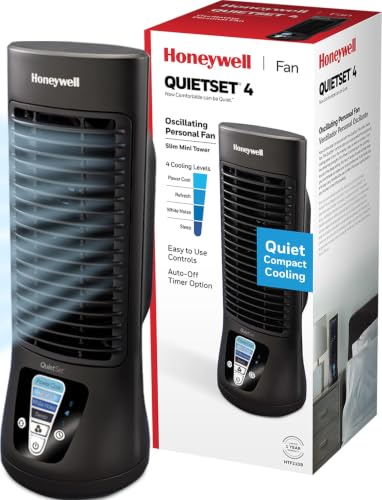
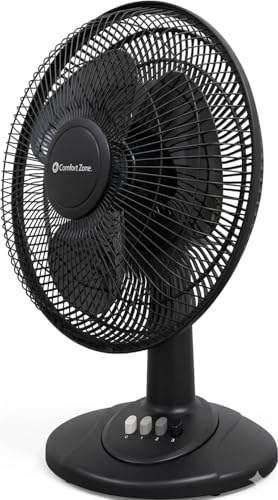
Best Desk Fans – Stay Cool, Focused & Productive
Discover the perfect desk fan for your workspace. From ultra-quiet USB fans to powerful bladeless models, our expert guide helps you choose the best personal fan to beat the heat and boost your productivity.
A desk fan is more than just a way to stay cool — it's a productivity tool that improves air circulation, reduces stuffiness, and keeps you comfortable during long work sessions. Whether you're in a home office, a bedroom desk setup, or a corporate workspace, the right personal fan can make all the difference. In this comprehensive guide, we'll explore the best desk fans of 2026, compare their features, and help you choose the perfect cooling companion for your desk setup.
What to Look for in a Desk Fan
🔇 Noise Level
Look for fans under 50 dB for quiet operation. Perfect for meetings, calls, and focused work.
💨 Airflow Power
Measured in CFM (cubic feet per minute). Higher CFM means stronger cooling.
🔌 Power Source
USB-powered, battery-operated, or AC plug-in. Choose based on your desk's power management needs.
🌀 Oscillation
Oscillating fans circulate air more evenly across your workspace.
📏 Size & Portability
Compact fans fit neatly on compact desks. Clip-on fans save valuable surface space.
Best Desk Fans of 2026 – Comparison
| Model |
Type |
Noise Level |
Power |
Price |
| Vornado Zippi |
Clip-on |
~40 dB |
USB |
$30–$40 |
| Rowenta Turbo Silence |
Desktop |
~35 dB |
AC |
$45–$60 |
| Dyson Pure Cool Me |
Bladeless |
~45 dB |
AC |
$300–$350 |
| OPOLAR USB Fan |
Portable |
~30 dB |
USB |
$15–$25 |
| Lasko Clip Fan |
Clip-on |
~42 dB |
AC |
$20–$30 |
| Air Multiplier AM06 |
Bladeless |
~40 dB |
AC |
$200–$250 |
Top Desk Fan Reviews
1. Vornado Zippi – Best Clip-On Fan
The Vornado Zippi is a versatile desk accessory that clips securely to your desk edge or monitor stand. Its compact size makes it ideal for small standing desks and compact desks. With two-speed settings and 360° adjustable head, it directs airflow exactly where you need it. The USB power allows easy connection to your laptop or desk charging station.
Price: $30–$40
2. Rowenta Turbo Silence – Best Quiet Desktop Fan
If noise is your biggest concern, the Rowenta Turbo Silence is the gold standard. Operating at just 35 dB, it's whisper-quiet — perfect for home office desks and open-plan workspaces. Its 5-blade design delivers powerful airflow up to 1,200 CFM, keeping you cool without distracting your colleagues or disturbing your focus.
Price: $45–$60
3. Dyson Pure Cool Me – Best Bladeless Fan
For the ultimate in style and performance, the Dyson Pure Cool Me offers bladeless technology that delivers a focused stream of purified air. It's a premium choice for executive desks and modern desk setups. The HEPA filter captures 99.97% of pollutants, making it a great choice for allergy sufferers. Its sleek design complements any desk decor aesthetic.
Price: $300–$350
4. OPOLAR USB Fan – Best Budget Portable Fan
For those on a budget, the OPOLAR USB Fan is an excellent choice. With ultra-quiet operation (~30 dB) and strong airflow, it's perfect for student desks and budget standing desks. Its compact size makes it easy to carry in a backpack, and the USB-C charging ensures you can power it from any laptop or USB hub.
Price: $15–$25
5. Lasko Clip Fan – Best Versatile Clip Fan
The Lasko Clip Fan is a reliable workhorse that clips onto any surface up to 2 inches thick. Its 90° tilt head and two speeds offer flexible cooling. A great option for gaming desks and L-shaped desks where you need airflow without sacrificing desk space.
Price: $20–$30
Why You Need a Desk Fan
- Boost Productivity: Studies show that cooler temperatures improve cognitive performance and reduce fatigue.
- Improve Air Circulation: Stagnant air can make you feel drowsy. A desk fan keeps fresh air moving around your desk setup.
- Save Energy: Instead of cooling an entire room with AC, a personal fan allows you to stay comfortable while saving on energy bills.
- Reduce Sweat & Discomfort: Stay dry and comfortable during intense work sessions or gaming marathons.
💡 Expert Tips for Using Your Desk Fan
- Positioning: Place your fan at a 45° angle to your face for optimal airflow without drying your eyes.
- Combine with a desk mat: A quality mat can help reduce heat buildup from your laptop or monitor.
- Use with monitor light bars: Improve visibility and comfort by pairing cooling with proper lighting.
- Maintenance: Clean your fan blades regularly to maintain efficiency and reduce dust accumulation.
Frequently Asked Questions
What type of desk fan is the quietest?
Bladeless fans and those with large, slow-spinning blades tend to be the quietest. The Rowenta Turbo Silence and Dyson Pure Cool Me are top contenders.
Can I use a desk fan with a standing desk?
Absolutely! Clip-on fans like the Vornado Zippi work great with electric standing desks. Just ensure the clip fits the desk thickness.
Are USB desk fans powerful enough?
Yes, many USB fans offer impressive airflow and are perfect for personal use on a desk. They're also energy-efficient and easy to integrate with your desk power management setup.
How do I clean my desk fan?
Use a soft brush or compressed air to remove dust from the blades. For deeper cleaning, disassemble according to the manufacturer's instructions and wipe with a damp cloth.
Stay Cool and Productive All Day
Choose the perfect desk fan from our top picks and transform your workspace comfort.
Shop Recommended Desk Fans ↓
Disclaimer
All About Desks provides educational content only. Not a substitute for professional ergonomist or interior designer services. Always consult a qualified professional for major structural or electrical work involving your desk. Some content may use AI. We are not responsible for product defects, injuries, or outcomes related to desk use. By using this site, you accept these terms. If you do not agree, please leave this website and discontinue its use. Read full disclaimer.