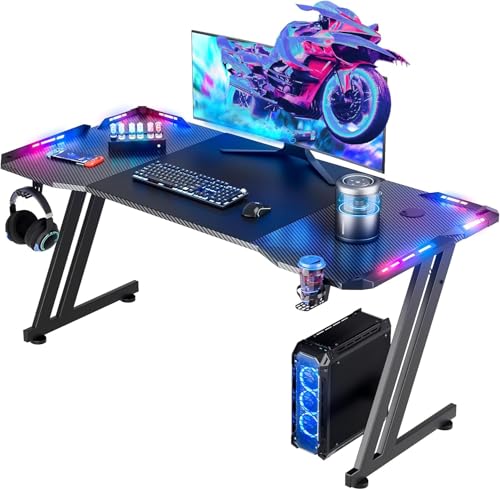
RGB Gaming Desk – The Ultimate Battle Station
Elevate your gaming experience with a fully customizable RGB gaming desk. Sync lighting, manage cables, and build a setup that performs as good as it looks.
Shop Top RGB Gaming DesksAn RGB gaming desk is more than just a place to put your monitor and keyboard — it's the centerpiece of your gaming identity. With customizable LED lighting, intelligent cable management, and ergonomic design, the right RGB gaming desk transforms your setup into an immersive battlestation. Whether you're a competitive player or a casual streamer, RGB lighting adds atmosphere, improves focus, and makes every session feel like an event.
In this guide, we'll explore everything you need to know about choosing, setting up, and optimizing an RGB gaming desk. From lighting integration and cable management to monitor placement and desk accessories, we'll help you build a desk that's both visually stunning and highly functional.
Why Choose an RGB Gaming Desk?
Customizable Lighting
Sync RGB strips, keyboard, mouse, and monitor with software like Razer Chroma, Corsair iCUE, or ASUS Aura for a cohesive look.
Perfect for Multi-Monitor
Ample surface space for dual or triple monitor setups with integrated cable channels to keep wires hidden.
Gamer-Centric Design
Ergonomic height, sturdy steel frames, and gamer desk features like headphone hooks, cup holders, and controller stands.
Smart Cable Management
Built-in cable trays, grommets, and under-desk organizers keep your cable management clean and clutter-free.
How to Build the Ultimate RGB Gaming Desk Setup
1. Choose the Right Desk Size & Shape
The foundation of any great RGB gaming desk is size and shape. For most gamers, a straight desk between 55–65 inches wide offers plenty of space for a dual monitor setup with room for a full-size keyboard, mouse, and speakers. If you have limited space, consider a corner desk setup or an L-shaped desk setup to maximize surface area without taking over the room.
For RGB integration, look for desks with built-in LED channels or diffuser strips. Many modern gaming desks come with pre-installed RGB lighting that can be controlled via remote or software, saving you the hassle of aftermarket installation.
2. Sync Your RGB Ecosystem
The magic of an RGB gaming desk lies in synchronization. Use compatible software to unify your mechanical keyboards, ergonomic mice, desk speakers, and even monitor reviews to create a single, harmonious light show. Popular ecosystems include Razer Chroma, Corsair iCUE, Logitech G Hub, and ASUS Aura Sync.
Don't forget about LED strip lighting for the back of your desk or monitor — this reduces eye strain and adds a professional streamer aesthetic. Pair with a monitor light bar for task lighting that doesn't wash out your screen.
3. Cable Management is Non-Negotiable
With multiple peripherals, monitors, and RGB controllers, cables can quickly become a mess. Invest in cable trays, cable raceways, and cable sleeves to route everything neatly under the desk. A wireless desk setup is ideal, but many gamers still prefer wired peripherals for zero latency.
Consider adding a desk grommet guide to pass cables through the surface, keeping your mouse and keyboard area completely clear. This is especially important for RGB gaming desk setups where visual cleanliness is key.
4. Monitor Placement for Comfort & Style
Your monitor setup defines your gaming experience. For competitive gamers, a single monitor setup with a high refresh rate is often preferred. For streamers and multitaskers, dual monitor setup or ultrawide setup offers more screen real estate. Use monitor arms to free up desk space and position screens at the ideal height — top of the monitor at or slightly below eye level.
For the ultimate RGB aesthetic, consider vertical monitor setup for chat, discord, or code, and place a monitor light bar to illuminate your keyboard area without adding glare to your screen.
5. Accessories That Complete the Look
No RGB gaming desk is complete without the right accessories. A desk mat with RGB edge lighting protects your surface and adds a soft glow. Headphone stands with USB passthrough keep your audio gear ready. And don't forget a wireless charging desk pad to keep your phone powered without extra cables.
For streamers, a desk microphone with a microphone arm and a stream deck are essential. These can be integrated into your RGB ecosystem for scene changes and lighting controls.
6. Ergonomics – Because Gaming Marathons Are Real
Long gaming sessions demand proper ergonomics. Use a desk height calculator to find the ideal height for your setup. Pair your RGB gaming desk with a high-quality ergonomic office desk chair that supports your posture. Add a footrest and wrist rests for keyboard and mouse to reduce strain.
Remember to follow proper sitting posture and take breaks using desk stretching and desk timer methods to stay healthy during those intense gaming marathons.
🎯 Quick RGB Gaming Desk Checklist:
- Desk size: 55–65" wide for dual monitors
- Built-in or aftermarket RGB strips (addressable)
- Software sync (Razer Chroma, iCUE, Aura, etc.)
- Cable management trays & sleeves
- Monitor arms for ergonomic placement
- Desk mat with RGB edge lighting
- Headphone stand & USB hub
- Wireless charging pad
Ready to build your dream RGB gaming desk? Browse our curated selection of top-rated gaming desks, RGB accessories, and ergonomic upgrades below. Each product is vetted for quality, performance, and visual impact — so you can game in style.