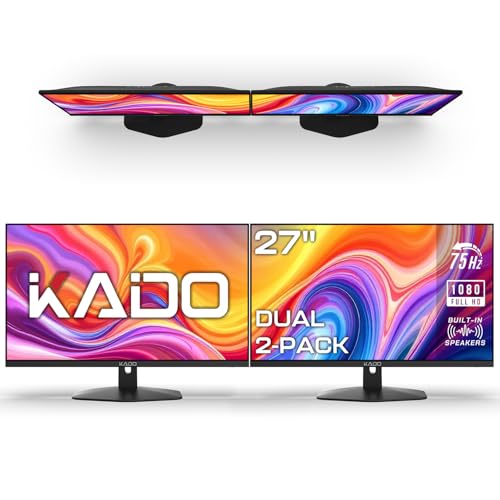
Dual Monitor Setup: The Ultimate Guide
Transform your workspace with a dual monitor setup. Boost productivity, improve ergonomics, and create a seamless workflow with our expert tips and recommendations.
Shop Recommended AccessoriesA dual monitor setup is one of the most effective ways to enhance productivity, streamline multitasking, and elevate your overall workspace experience. Whether you're a professional, a gamer, or a student, two screens can dramatically change how you work. This guide covers everything you need to know—from choosing the right monitors to ergonomic placement and essential accessories.
Why dual monitors? Studies show that a dual monitor setup can increase productivity by up to 42%. It reduces task-switching time and allows you to keep reference materials, communication tools, and project files visible simultaneously.
1. Choosing the Right Monitors
Selecting the best monitors for your dual monitor setup depends on your budget, desk space, and primary tasks. Here are key factors to consider:
- Size: Most users prefer 24-inch to 27-inch monitors for a balanced view. For immersive setups, 32-inch or ultrawide alternatives are popular.
- Resolution: 1080p (Full HD) is sufficient for most tasks, but 1440p (QHD) or 4K offers sharper images and more screen real estate.
- Panel Type: IPS panels provide better color accuracy and viewing angles, ideal for design and photo editing. VA panels offer higher contrast for media consumption.
- Refresh Rate: For gaming or smooth scrolling, look for 120Hz or higher. For office work, 60Hz is perfectly adequate.
When buying, consider buying identical monitors for a seamless aesthetic, or mix and match based on your primary and secondary screens. For detailed comparisons, check out our monitor reviews.
2. Monitor Layouts: Which is Best?
The layout of your monitors significantly impacts workflow and ergonomics. Here are the most common configurations:
- Side-by-Side (Horizontal): The most popular layout. Place one monitor directly in front (primary) and the other slightly angled to the side. This is excellent for multitasking, coding, and document editing.
- Stacked (Vertical): One monitor above the other. Great for saving desk width and for tasks like data analysis, reading long documents, or monitoring multiple feeds.
- Portrait + Landscape: One monitor in portrait mode (ideal for coding, reading, or social media management) and the other in landscape for general use.
Learn more about different setups like triple monitor or ultrawide configurations to see which fits your needs.
3. Ergonomic Placement
Proper ergonomics are essential to avoid neck strain and eye fatigue. Follow these guidelines for a comfortable dual monitor setup:
- Eye Level: The top of your primary monitor should be at or slightly below eye level. Your gaze should naturally fall on the upper third of the screen.
- Distance: Position monitors about an arm's length away (20-30 inches). Adjust for your vision.
- Angles: Tilt the side monitor slightly toward you, ensuring both screens are at the same angle and height to reduce head movement.
- Monitor Arms: Invest in a high-quality monitor arm to achieve precise adjustments and free up valuable desk space. They also make it easier to switch between sitting and standing positions.
For a deeper dive, visit our monitor placement guide and desk height calculator for personalized recommendations.
4. Essential Accessories
To fully optimize your dual monitor setup, consider these accessories:
- Monitor Mounts / Arms: Free up desk space and improve ergonomics. $80–$250
- Desk Mats: Protect your desk surface and provide a smooth mouse gliding experience. $15–$40
- Cable Management: Keep your desk tidy with cable management solutions like trays, sleeves, and clips. $10–$50
- USB-C Hubs / Docks: Connect multiple peripherals with a single cable. $50–$200
- Keyboard & Mouse: Ergonomic options like mechanical keyboards and ergonomic mice reduce strain.
- Lighting: A desk lamp or monitor light bar reduces eye strain and enhances focus.
For more inspiration, browse our desk accessories and tech gadgets categories.
5. Step-by-Step Setup Guide
- Position Your Desk: Ensure your desk has enough depth (at least 24-30 inches) for two monitors. Consider a corner desk or L-shaped desk for more space.
- Install Monitor Arms: Attach the arms to your desk securely. This step is crucial for stability.
- Connect Cables: Use high-quality DisplayPort or HDMI cables. Connect to your computer or docking station.
- Adjust Settings: In your operating system, arrange the displays to match your physical layout. Calibrate brightness, color, and scale for consistency.
- Organize Cables: Use cable ties or trays to hide and route cables neatly.
- Optimize Workspace: Place frequently used items within easy reach. Use desk shelves or pegboards for additional storage.
If you're new to monitor setups, our first desk setup guide provides a great foundation.
6. Productivity Tips
Use Virtual Desktops
Combine physical monitors with virtual desktops to organize apps and tasks efficiently.
Keyboard Shortcuts
Master shortcuts like Windows + Arrow keys (snap windows) to arrange windows effortlessly.
Dedicate Screens
Assign one screen for communication (email, Slack) and the other for primary work.
Take Breaks
Use the 20-20-20 rule to reduce eye strain. Look at something 20 feet away for 20 seconds every 20 minutes.
Explore more productivity strategies in our desk productivity habits article.
7. Common Mistakes to Avoid
- Uneven Heights: Monitors at different heights cause neck strain. Use monitor arms for perfect alignment.
- Poor Cable Management: Tangled cables create visual clutter. Invest in cable management solutions.
- Ignoring Ergonomics: Improper seating and monitor distance lead to discomfort. Refer to our proper sitting posture guide.
- Overcrowding the Desk: Keep your desk surface clean. Use desk organizers and file holders to maintain order.
- Using Mismatched Screens: Different resolutions or sizes can be jarring. If possible, use identical monitors for a cohesive experience.
For more pitfalls, check out our common desk setup mistakes article.
8. Conclusion
A well-executed dual monitor setup is a game-changer for productivity, comfort, and overall workspace satisfaction. By choosing the right monitors, prioritizing ergonomics, and investing in essential accessories, you can create a workspace that supports your goals and reduces strain.
We hope this guide has given you the clarity and confidence to build your ideal dual monitor setup. Ready to shop? Check out our curated product recommendations below to find the best accessories for your new setup.
If you're still unsure, our desk setup category offers more inspiration and expert advice.