Master Desk Cable Management with Cable Sleeves
Discover how cable sleeves can transform your workspace surface from cluttered to clean. Learn about types, installation, and the best cable sleeve products for a tidy, professional desk setup.
All About Desks — If you've been struggling with a messy tangle of wires under your desk, cable sleeves are the solution you've been looking for. These simple yet effective organizers bundle multiple cables into one sleek, protective tube, instantly reducing visual clutter and protecting your cords from wear. Whether you're setting up a home office desk, a gaming desk, or a writing desk, cable sleeves are an essential tool for a clean and professional workspace surface.
What Are Cable Sleeves?
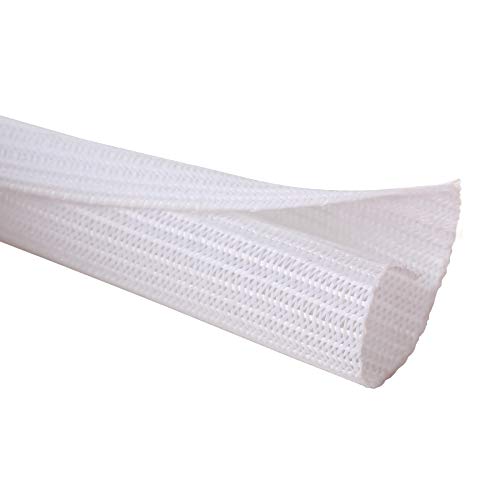
A cable sleeve (also called a wire sleeve or cable cover) is a flexible, tubular sheath designed to encase multiple cables along a single path. Made from durable materials like nylon, PET (polyethylene terephthalate), or neoprene, they protect cables from tangling, dust, and physical damage while keeping your desk organization on point. Unlike cable raceways that mount to walls or desks, sleeves are flexible and can follow any route — perfect for managing cables that run from your desk to the floor, behind monitors, or along the back of your desk surface.
Why Use Cable Sleeves for Your Desk?
🧹 Instant Clutter Reduction
Bundle 5–10 cables into a single, clean tube. Your desk surface and floor instantly look more organized and professional. Perfect for small desk organization where space is limited.
🛡️ Cable Protection
Prevent fraying, kinking, and accidental damage. Sleeves also reduce dust accumulation on cables, extending their lifespan — especially valuable for expensive desk accessories and peripherals.
🔌 Easy Access & Flexibility
Unlike fixed raceways, cable sleeves are flexible and split open along the length (using a zipper or hook-and-loop) for easy insertion and removal of cables whenever you change your desk setup.
✨ Aesthetic & Professional Look
Available in various colors (black, white, grey, even RGB-friendly options) to match your desk decor. Elevate your workspace surface with a sleek, cable-free appearance.
Types of Cable Sleeves for Desk Management
| Type | Material | Best For | Price Range |
|---|---|---|---|
| Nylon Split Sleeves | Nylon fabric | High-flexibility, easy cable insertion/removal | $10–$25 |
| PET Expandable Sleeves | Polyethylene terephthalate | Durable, heat-resistant, ideal for power cables | $12–$30 |
| Neoprene Zipper Sleeves | Neoprene rubber | Soft, flexible, excellent for thick cable bundles | $15–$35 |
| Braided Cable Sleeves | Polyester braid | Aesthetic look, moderate flexibility, good for desktop cables | $8–$20 |
Prices are approximate market averages for standard 6-foot lengths. Premium brands or longer lengths may cost more.
How to Choose the Right Cable Sleeve
- Measure Your Cable Bundle: Measure the total diameter of the cables you want to bundle. Choose a sleeve with an inner diameter slightly larger than your bundle for easy insertion.
- Consider Length: Measure the distance from your desk to the power outlet or along the desk edge. Add a little extra for flexibility. Standard lengths range from 3 to 10 feet.
- Check Material Flexibility: If your cables need to bend frequently (e.g., for a standing desk that adjusts height), choose a flexible nylon or neoprene sleeve. For fixed setups, PET or braided sleeves work great.
- Look for Split Design: A split sleeve with a zipper or hook-and-loop closure makes adding or removing cables much easier — essential for evolving desk setups.
- Match Your Aesthetic: Black is standard, but white, grey, and even colorful sleeves are available. Choose one that complements your desk decor and desk mat.
Step-by-Step Cable Sleeve Installation
- Unplug & Organize: Disconnect all devices from the power source. Group cables by destination (e.g., monitor cables, power cords, USB cables).
- Straighten & Bundle: Gently straighten each cable and bundle them together. Use reusable cable ties to hold the bundle temporarily.
- Measure & Cut: If using a bulk roll, measure the length needed and cut the sleeve cleanly. For pre-cut sleeves, ensure you have the right length.
- Insert Cables: Open the split (zipper or hook-and-loop) and place the cable bundle inside. For non-split sleeves, use a wire fish or guide to pull cables through.
- Close & Secure: Close the sleeve fully. If it's a zipper type, zip it up. For hook-and-loop, press firmly to secure. Use cable clips or adhesive mounts to anchor the sleeve to your desk or wall if desired.
- Route & Connect: Route the sleeved bundle along your desired path (e.g., under the desk, along the back edge). Plug in your devices and enjoy your clean desk surface.
Pro Tip: For an even cleaner look, combine cable sleeves with cable trays or desk grommets to hide cables completely under the desk surface.
Maintaining Your Cable Sleeves
Cable sleeves are low-maintenance, but a few simple habits will keep them looking great:
- Dust Regularly: Wipe the sleeve with a soft, dry cloth to prevent dust buildup.
- Check for Wear: Inspect the sleeve periodically for fraying or damage, especially if it rubs against sharp desk edges.
- Reorganize as Needed: Whenever you add or remove devices, take the opportunity to re-bundle cables and adjust the sleeve length.
- Use Cable Clips: Secure the sleeve to your desk or wall to prevent it from slipping or becoming a trip hazard.
All About Desks — Cable sleeves are a small investment that delivers a huge visual and functional upgrade to your workspace surface. By bundling and protecting your cables, you'll enjoy a cleaner, more professional desk setup that's easier to maintain and more pleasant to work at. Whether you're a digital declutter enthusiast or just starting your first desk setup, cable sleeves are an essential part of modern desk organization.
Ready to clear the clutter? Explore our recommended cable sleeves below — we've curated a selection of top-rated products to fit every desk and budget. Once you've chosen your sleeves, don't forget to check out our guides on cable raceways and under desk cable management for the ultimate wire-free workspace.