Wireless Desk Setup: The Ultimate Guide to a Cable-Free Workspace
Cut the cords and boost productivity. Learn how to build a clean, wireless desk setup with the right peripherals, cable management tricks, and smart accessories for a clutter-free surface.
Average setup cost: $400–$1,200What Is a Wireless Desk Setup?
A wireless desk setup minimizes or eliminates visible cables on and around your desk. It relies on wireless peripherals like keyboards, mice, and monitors, combined with clever under-desk cable management to keep power and display cables hidden. The goal is a clean, distraction-free surface that looks professional and improves focus.
Going wireless isn't just about aesthetics. A tidy desk reduces visual clutter, making it easier to concentrate. It also simplifies cleaning and allows you to reposition your gear without wrestling with tangled wires. Whether you're a remote worker, a gamer, or a student, a wireless setup can transform your daily workflow.
Essential Components of a Wireless Desk
Wireless Keyboard & Mouse
Bluetooth or RF keyboards and mice eliminate the two most common desk cables. Look for models with long battery life and low latency.
Wireless Monitor Connection
Use Wi-Fi, Miracast, or a wireless HDMI kit to connect your laptop or PC to your monitor without a display cable.
Under-Desk Cable Management
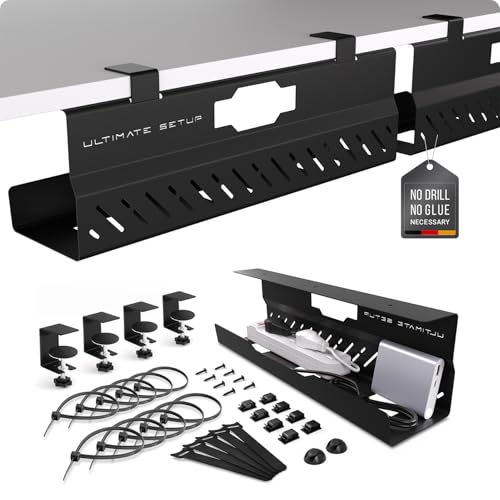
Hide power strips, adapters, and excess cable lengths with cable trays and raceways to keep the floor and desktop clear.
Wireless Charging
Qi charging pads for phones, earbuds, and smartwatches eliminate yet another set of cables from your desk surface.
How to Build Your Wireless Desk Setup
-
Step 1: Choose a Desk with Cable Management in Mind
Start with a desk that supports clean cable routing. Look for desk types with built-in grommets or modesty panels. A corner standing desk or an L-shaped desk can offer more surface area for your wireless gear.
-
Step 2: Select Wireless Peripherals
Invest in a quality wireless keyboard and mouse. Consider a mechanical keyboard with Bluetooth and an ergonomic mouse for comfort. For audio, desk speakers with Bluetooth are a great choice.
-
Step 3: Eliminate Display Cables
If your monitor supports Wi-Fi or Miracast, use that. Otherwise, a wireless HDMI transmitter can send video from your computer to your monitor without a cable. For dual monitors, consider a dual monitor setup with wireless adapters.
-
Step 4: Manage Power Cables Under the Desk
Use cable raceways and cable trays mounted under the desk to hide power strips and adapters. Bundle excess length with cable sleeves. This keeps the floor and desktop completely clear.
-
Step 5: Add Wireless Charging & Accessories
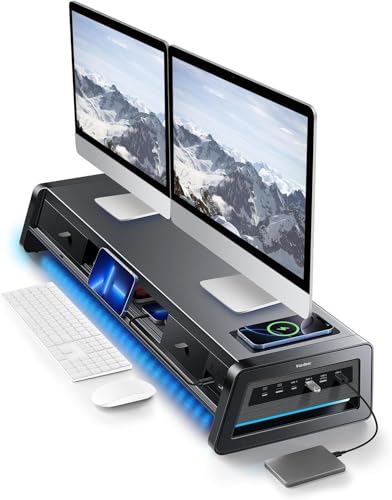
Place a charging station on your desk for phones and earbuds. Use a monitor arm to free up desk space, and consider a laptop stand to elevate your device for better airflow and viewing angle.
Benefits of a Wireless Desk Setup
- Improved Focus: A clean surface reduces visual distraction, helping you concentrate on work or gaming.
- Easier Cleaning: No cables to dust around; you can simply wipe the desk surface clean.
- Flexible Ergonomics: Wireless peripherals allow you to reposition your keyboard, mouse, and monitor freely to find the perfect posture.
- Professional Appearance: A cable-free desk looks polished and organized, ideal for video calls or client meetings.
- Simplified Maintenance: Fewer cables mean fewer connection issues and less time spent untangling.
Wireless Desk Setup Checklist
- Wireless keyboard (Bluetooth/RF)
- Wireless mouse (Bluetooth/RF)
- Wireless monitor connection (Miracast / HDMI kit)
- Under-desk cable tray & raceways
- Cable sleeves for power cords
- Wireless charging pad for phone
- Bluetooth speakers or headphone stand
- Monitor arm to free up surface
Recommended Products for Your Wireless Desk
Ready to go wireless? Here are our top picks for peripherals and accessories that will help you achieve the perfect cable-free workspace. From ergonomic keyboards to smart charging stations, these items are trusted by professionals and enthusiasts alike.
For a complete list of our tested and recommended wireless desk gear, scroll down to the product section below. You'll find everything from desk accessories to desk tech gadgets that make a wireless setup a reality.
If you're also interested in organizing the rest of your workspace, check out our guides on desk organization and minimalist desk challenge. For those who still have some cables, our cable management hub has more solutions.
Looking for the right desk to start your wireless journey? Explore our desk types and desk materials guides to find the perfect foundation.