Charger Organization: The Ultimate Guide to a Clutter-Free, Efficient Desk
Stop wrestling with tangled cables and messy power strips. Learn how to master charger organization with the best charging stations, cable management techniques, and power solutions for a clean, productive desk.
Charger organization is the foundation of a truly functional workspace. Whether you're a remote worker, a student, or a creative professional, a desk cluttered with chargers, cables, and power bricks is not just an eyesore—it's a productivity killer. A well-organized charging setup saves time, protects your devices, and reduces stress, allowing you to focus on what matters most. In this comprehensive guide, we'll explore the best desk charging stations, USB hubs, cable management tools, and power solutions to transform your desk into a model of efficiency.
Why Charger Organization Matters for Your Desk
🔋 Boost Productivity
No more searching for the right cable. Keep all your devices charged and ready to go.
🧹 Clutter-Free Surface
Clear the visual noise. A tidy desk promotes focus, creativity, and a sense of calm.
🛡️ Device Protection
Prevent power surges and overheating with organized, quality charging solutions.
⚡ Efficient Power Use
Consolidate outlets and reduce energy waste with smart power management.
1. Assess Your Charging Needs
Before buying any products, take a moment to audit your current setup. How many devices do you charge daily? Laptops, smartphones, tablets, wireless earbuds, smartwatches, external drives—the list grows. Do you need fast charging for some devices? Consider the power requirements. A desk power management strategy starts with understanding your port and wattage needs.
- Count your devices: List everything that needs charging on a typical day.
- Identify cable types: USB-C, Lightning, Micro-USB, DC barrel jacks, and proprietary connectors.
- Check power demands: Laptops need 60W–100W, phones 15W–30W, accessories under 10W.
- Think about placement: Do you prefer a centralized charging station, or distributed outlets?
Once you have this inventory, you can choose the right solutions. A common mistake is buying a desk charging station that doesn't have enough ports or the right power output. With a clear picture, you'll avoid compatibility headaches and ensure all your gadgets get the juice they need.
2. Best Desk Charging Stations & Hubs
Charging stations are the centerpiece of any organized desk. They consolidate multiple chargers into one sleek device, drastically reducing cable clutter. The market offers a variety of options, from compact USB hubs to multi-device towers with dedicated smartphone stands.
🔌 Popular Charging Station Formats
- Multi-Port USB Hubs: Great for laptops and tablets. Look for Power Delivery (PD) for fast charging.
- Desktop Charging Docks: Often vertical, they charge multiple devices while saving footprint.
- Wireless Charging Pads: Perfect for phones and earbuds, these eliminate the need for cables entirely.
- Under-Desk Power Strips: Mounted below the desk, they keep bulky adapters out of sight.
- Integrated Power Banks: Some stations double as portable chargers, ideal for on-the-go use.
When selecting a station, prioritize features that match your workflow. If you have a wireless desk setup, a clean cable-free charging pad can maintain the minimalist aesthetic. For heavy workstation users, a high-wattage USB-C hub with multiple ports is indispensable. Remember to consider future-proofing—USB-C is becoming the universal standard, so investing in a versatile hub is wise.
3. Cable Management for Chargers: The Core of Organization
Even the best charging station can look messy if cables are left dangling. Effective cable management is the secret to a truly clean desk. Here are the essential tools and techniques to keep your charging cables neat and accessible.
- Cable Trays: Mounted under the desk, they hold power strips and excess cable loops, keeping them off the floor and out of sight.
- Cable Raceways: Adhesive channels that run along the back or underside of your desk to guide cables from point A to B.
- Cable Sleeves: Wrap multiple cables together for a single, clean bundle.
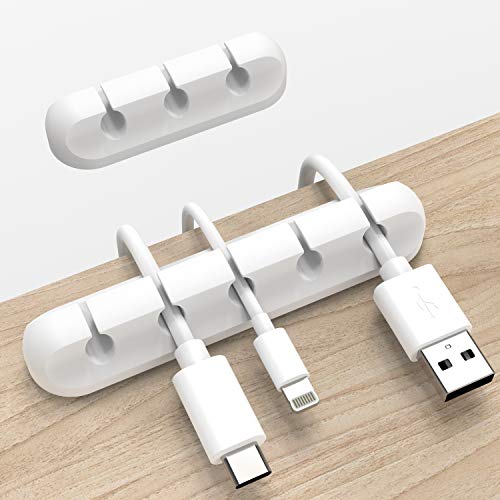
- Adhesive Cable Clips: Keep individual cables fixed to the desk edge or wall, preventing them from slipping down.
- Desk Grommets: If your desk has grommet holes, use them to route cables through the surface for a seamless look.
A pro tip: label your cables using colored ties or small tags. This makes it easy to identify which cable belongs to which device, especially when multiple chargers are plugged into a single station. Combined with proper under-desk cable management, your workspace will achieve a level of organization that feels both professional and calming.
4. Smart Power Strips & Surge Protectors
A charging setup is only as good as its power source. Smart power strips go beyond simple surge protection by offering features like energy monitoring, timers, and individual port control. Some even have USB-C ports built-in, reducing the need for separate wall adapters.
For desks with multiple high-power devices, a desk power management system that includes a robust surge protector is non-negotiable. Look for strips with flat plugs to maximize wall outlet space, and consider models with a long cord to accommodate varying desk distances. If you use smart plugs, you can further automate your charging schedule—for example, turning off power-hungry devices when not in use to save energy.
- Surge protection rating: Measured in joules, higher is better for sensitive electronics.
- USB ports: At least 4 USB-A or USB-C ports for versatile charging.
- Cord length: Minimum 6 feet for desk placement flexibility.
- Mounting: Flat or angled power strips can be mounted under the desk or on a cable tray.
5. Charger Organization Accessories
Beyond the core products, several accessories can elevate your charger organization game. These small additions make a big difference in daily usability and visual harmony.
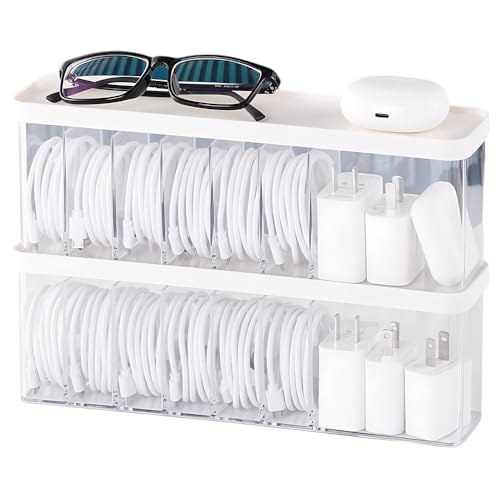
- Desk Organizers: Multi-compartment trays can separate chargers, cables, and small devices, keeping them contained.
- Phone Stands: Many charging stations double as stands, but standalone stands with integrated charging are also excellent.
- Tablet Mounts: Keep tablets charged and accessible at eye level, which is ideal for video calls or reference materials.
- Drawer Organizers: For desks with drawers, use dividers to store spare chargers, cables, and adapters neatly out of sight.
- Cable Ties & Velcro Straps: Reusable straps allow you to adjust cable lengths and bundle them without creating permanent kinks.
The goal is to create a system where every charger and cable has a designated home. When everything is in its place, you'll spend less time fussing with cables and more time being productive. A well-organized desk is also easier to reset weekly, maintaining that fresh feeling every Monday morning.
6. Charger Organization for Different Desk Setups
Charger organization isn't one-size-fits-all. Your approach depends on the desk type, room, and workflow.
🖥️ Desk-Specific Strategies
- Standing Desks: Use under-desk cable trays with flexible cable extenders to accommodate height changes.
- L-Shaped Desks: Distribute charging stations across both wings to reduce cable crossing.
- Compact Desks: Opt for vertical charging docks and wall-mounted power strips to save surface space.
- Gaming Desks: Look for charging stations with RGB lighting and extra USB ports for peripherals.
- Home Office Desks: Prioritize a mix of wired and wireless charging to accommodate personal and work devices.
Additionally, consider the room layout. In a bedroom desk setup, you might want quieter, dimmable charging indicators. For living room desks, a more decorative charging station that blends with home decor is preferable. The key is to adapt your charger organization strategy to your specific environment for maximum functionality and aesthetics.
7. Common Charger Organization Mistakes to Avoid
Even with the best intentions, some pitfalls can undermine your charger organization efforts. Here's what to watch out for:
- Overloading outlets: Plugging too many devices into a single strip can cause overheating or tripped breakers. Use power strips with built-in circuit breakers.
- Mixing high and low wattage: Charging a laptop with a low-wattage phone charger damages the battery over time. Always match wattage requirements.
- Using cheap cables: Flimsy cables break easily and may not support fast charging. Invest in durable, certified cables (e.g., MFi, USB-IF).
- Ignoring heat dissipation: Charging stations need airflow. Avoid stacking devices or covering vents.
- Forgetting cable length: Too short and you'll strain the connection; too long and you'll have excess loops. Measure your desk distance before buying.
By being mindful of these common errors, you can build a charging setup that is safe, reliable, and long-lasting.
Ready to transform your desk with premium charger organization? Explore our curated selection of top-rated charging stations, cable management tools, and power solutions below. Each product has been carefully chosen to help you build a clutter-free, efficient workspace.


![Lamicall 8 Pack Cord Organizer, [1s Lock] Cable Management Clips for Desk | Spring-Powered Cord Holder for Nightstand, Adhesive Phone Charger Keeper, Office Home Dorm Car RV Organizer Decor Accessories](https://m.media-amazon.com/images/I/41MHdY3ncDL._SL500_.jpg)