Master Desk Paper Management
Your complete guide to conquering paper clutter. Transform your desk from chaos to clarity with expert filing systems, smart organization, and paperless workflows. All about desks and paper—simplified.
DISCOVER PAPER SOLUTIONSWhy Paper Management Matters: A cluttered desk is a cluttered mind. Studies show that physical disorganization increases stress, reduces focus, and lowers productivity. Desk organization is the foundation of a calm, efficient workspace. Mastering paper management is your first step toward reclaiming your desk and your time.
Paper Management Systems That Work
Effective desk paper management isn't about going completely paperless—it's about creating a system that works for you. Whether you're a student, a professional, or a home office worker, the right approach can transform your workspace surface into a productivity powerhouse. A well-organized desk setup starts with controlling the paper flow. Let's explore the essential components of a robust paper management system, from filing cabinets to digital integration, ensuring your desk remains a place of focus, not frustration.
Essential Components of Desk Paper Management
1. In-Tray: Your Paper Landing Zone
Every piece of paper that enters your workspace needs a home. An in-tray is your designated landing zone for incoming documents. It's the first stop in your paper management workflow. Choose a sturdy desk organizer that complements your desk's style and size. The goal is to have a single, visible location for all new papers—this prevents them from scattering across your desk surface and creates an automatic sorting habit. For a compact desk, consider a wall-mounted file holder or a slim tiered tray to save valuable surface space.
2. Action File: Your To-Do Documents
Not all papers are created equal. Separate your in-tray into categories: "Action," "Archive," and "Recycle." The action file holds documents that require immediate attention, such as bills to pay, forms to complete, or contracts to sign. Place this file within arm's reach to keep pending tasks visible and pressing. This system prevents important papers from getting buried under other clutter and ensures you're always on top of your desk productivity habits.
3. Reference Files: Your Knowledge Base
Reference files are for documents you need to keep but don't need daily access to. This includes project notes, research papers, or past tax returns. A well-organized filing system is crucial here. Use a dedicated desk drawer with labeled folders, or a separate filing cabinet. For those with limited space, a vertical file holder or a set of floating shelves for binders can keep your reference materials organized and accessible without consuming valuable workspace.
4. The Archival Box: Long-Term Storage
Archival boxes are for documents you are legally required to keep but rarely need to access. This could include financial records, legal contracts, or sentimental items. Label and date these boxes clearly, and store them away from your main workspace. Digital scanning is an excellent alternative to physical archival storage, which we'll explore in the next section. A comprehensive digital declutter can complement your physical filing system beautifully.
Digital Integration for Paperless Workflows
Going digital doesn't mean eliminating paper entirely; it means reducing it. The goal is to minimize the volume of paper that enters your desk ecosystem. A reliable document scanner is your best investment for this. Scan receipts, contracts, and notes immediately, and store them in a well-organized cloud storage system. This reduces physical clutter and makes documents searchable by keyword, a massive time-saver. A wireless desk setup can significantly enhance your digital workflow by reducing cable clutter and improving device connectivity. Consider using a USB hub to connect your scanner, external drives, and other peripherals without creating a tangle of wires on your desk surface.
Scan & Organize: The Daily Habit
Create a habit of scanning documents daily or weekly. Use a consistent naming convention for your digital files (e.g., "YYYY-MM-DD_Client_Name_Document_Type"). Store them in a folder structure that mirrors your physical filing system. This creates a seamless bridge between your analog and digital worlds, ensuring you never lose important information. This practice is a key element of a successful weekly desk reset—a routine that helps you maintain order and prepare for the week ahead.
Top Desk Accessories for Paper Management
The right accessories can make or break your paper management system. Here are our top recommendations to keep your home office desk or student desk organized and efficient.
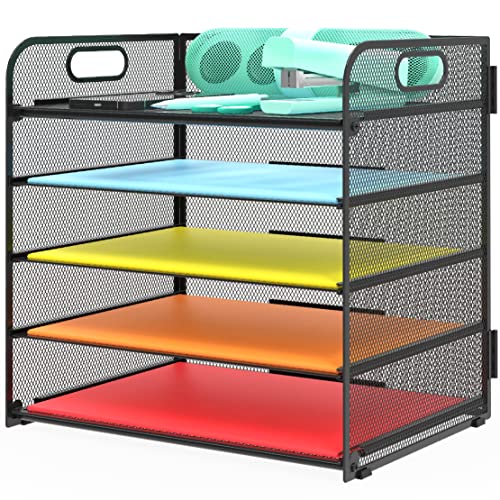
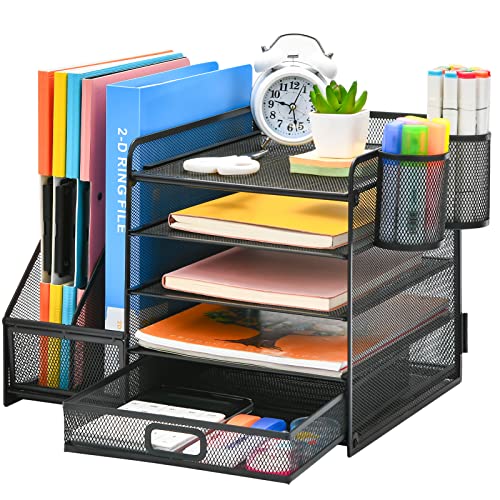
- Document Trays / Letter Trays: Stackable trays are a classic, space-saving solution. Use tiers for incoming, outgoing, and pending files. They keep papers visible and vertical, reducing the temptation to spread them out horizontally across the desk top. Look for models with handles or sloped fronts for easy access.
- Expanding File Folders / Accordion Folders: These are perfect for storing projects, client files, or class notes. They're portable, take up minimal space, and keep everything neatly categorized. They're an excellent choice for a small desk organization strategy.
- Desk Side Pockets / Hanging File Holders: A great option for a corner desk. These attach to the side of your desk, keeping files off the surface but within easy reach. They are a great way to utilize the vertical space beside your desk frame.
- Desktop Paper Shredder: A small, personal shredder is essential for handling sensitive documents. It creates an instant “recycle” action for papers you need to destroy, preventing them from piling up.
- Label Maker or Premium Pens for Labels: An organized system is only as good as its labels. Clear, consistent labeling ensures you and anyone else can quickly find what they need. Use a label maker or high-quality pens for a professional look.
- Monitor Stand with Storage: This is a genius two-in-one solution. A monitor stand with storage elevates your screen to an ergonomic height while providing a hidden compartment for your action files or small notebooks, clearing your immediate work surface.
Your Paperless Journey: A Step-by-Step Guide
Transitioning from a paper-heavy desk to a paper-light (or paperless) one is a process, not an event. Here's a simple roadmap:
- Audit Your Current Paper: Start by gathering all loose papers from your desk, drawers, and surrounding areas. Sort them into piles: Keep, Shred, Recycle, and Re-file. This initial purge instantly reduces clutter. For a truly fresh start, consider the minimalist desk challenge to rethink what you truly need on your surface.
- Scan & Store Digitally: For the "Keep" pile, scan documents and save them to your cloud. Use a consistent folder structure and naming convention. Once scanned, decide if you still need the physical copy. Most documents can be stored only digitally.
- Establish a "One-Touch" Policy: When new paper arrives, handle it once. Process it immediately: act on it, file it, scan it, or recycle it. Avoid the "processing pile" that leads to desk clutter. This approach dramatically reduces the mental load of paper management.
- Invest in the Right Tools: Based on your audit, you'll know exactly what paper organizers you need. Invest in high-quality, durable items that you'll actually enjoy using. For example, a stylish desk mat can also serve as a writing surface and help define your "active work zone" away from file trays.
Maintaining Your Paper Management System
The key to long-term success is maintenance. Schedule a weekly desk reset of 15-30 minutes to clear your in-tray, file new documents, and discard what's no longer needed. This routine prevents build-up and keeps your desk paper management system running smoothly.
Also, be mindful of how you bring paper into your workspace. Opt for digital bills and statements, use note-taking apps for quick ideas, and ask yourself, "Do I really need a physical copy of this?" before you print. This mindful approach is a core part of the KonMari method for your desk, which encourages you to keep only what sparks joy or is essential.
Finally, consider the role of lighting and ambiance. A well-lit desk can make sorting and reading documents less of a chore. A monitor light bar provides excellent task lighting without taking up precious desk real estate, further supporting your organized setup. A neat, well-lit space is a pleasure to work in, which motivates you to maintain it.