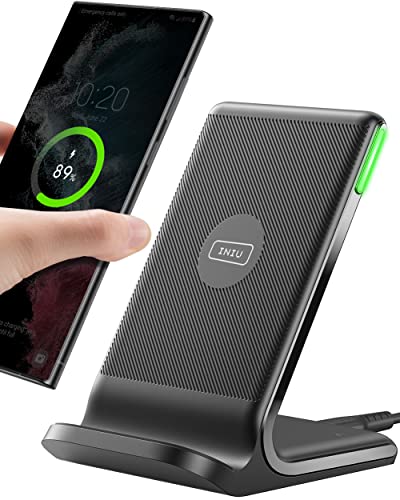
Wireless Charging Desk: The Complete Guide
Discover the best wireless charging desks for your home office, gaming setup, or workspace. From built-in charging pads to retrofit solutions and DIY hacks, we cover everything you need to know to keep your devices powered without cable clutter.
Shop Wireless Charging Desks ↓Why a wireless charging desk? Say goodbye to tangled cables and low-battery anxiety. A desk with integrated or retrofitted Qi charging lets you power your phone, earbuds, and even smartwatch effortlessly. Whether you're working, gaming, or studying, a wireless charging desk keeps your surface clean and your devices ready.
Built-in vs. Retrofit vs. DIY
🔌 Built-in Charging Desk
Desks with integrated wireless charging pads in the surface. Often include smart features like USB ports, power outlets, and app-controlled height adjustment.
- Clean, seamless design
- Multiple charging zones
- Often paired with standing desks or executive desks
🔧 Retrofit Charging Kit
Add wireless charging to your existing desk with a slim charging pad or under-desk mount. Great for upgrading your current wood desk or computer desk.
- Affordable and flexible
- Easy installation
- Works with most desk surfaces
🛠️ DIY Wireless Desk
For the handy user: embed a Qi charger into your desk surface using a router or drill. Pair with desk surfaces like wood, bamboo, or laminate.
- Custom placement
- Cost-effective
- Requires some woodworking skill
What to Look for in a Wireless Charging Desk
🔋 Charging Speed & Compatibility
Ensure the desk supports Qi standard (most modern phones). Look for 15W fast charging for Android or 7.5W for iPhone. Some desks offer dual charging zones for phone and earbuds.
📏 Placement & Ergonomics
The charging area should be easily accessible without reaching too far. Consider a desk with a proper depth and monitor placement to keep the charging zone within arm's reach.
🔌 Additional Power Options
Many wireless charging desks also include built-in USB-A, USB-C, and AC outlets. This is ideal for powering desk speakers, monitor stands, and other power accessories.
🪵 Surface Material
Wood, bamboo, and glass are common. Glass desks allow charging through the surface, while wood may require a thin pad. Check desk surface guides for compatibility with wireless charging.
Top Wireless Charging Desks for Every Need
Based on performance, design, and user reviews, here are our top picks across different categories.
🏆 Best Overall: SmartDesk Pro with Qi
A premium height-adjustable desk with dual 15W fast-charging zones, memory presets, and a sleek bamboo top. Price: $1,299
💼 Best for Home Office: Oak Executive Desk
A classic solid wooden desk with a hidden wireless charger and cable management tray. Price: $1,899
🎮 Best Gaming Desk: RGB Charging Desk
A gaming desk with integrated RGB lighting, dual wireless chargers, and a full-surface mouse pad. Price: $650
📱 Best Retrofit: Anker Wireless Charging Pad
Not a desk, but the best add-on for any computer desk. Slim, 15W fast charge, and works with wood, glass, or laminate. Price: $59
How to Retrofit Your Desk with Wireless Charging
- Choose a charger: Pick a Qi pad (e.g., Anker, Belkin, or Spigen) that matches your device's speed.
- Select a location: Mark where you want the charger – near your monitor or keyboard.
- For wood desks: Use a router to create a shallow recess, then place the charger flush with the surface. Alternatively, use a thin adhesive pad.
- For glass desks: Simply stick the charger under the glass using a clear adhesive mount – charging works through glass up to 8mm thick.
- Cable management: Route the cable under the desk using cable management clips or trays.
- Test and adjust: Place your phone on the charger and ensure it connects properly.
For a more advanced setup, consider integrating with a sit-stand desk or standing desk converter.
Frequently Asked Questions
Is wireless charging slower than wired?
Yes, but modern Qi chargers (15W) are almost as fast as standard wired charging. For overnight or all-day desk use, it's more than sufficient.
Can I charge through a desk pad or mousepad?
Yes, as long as the material is thin (under 5mm) and not metal. Many desk mats are compatible.
Do I need a special phone case?
Most standard cases under 5mm thick work fine. Metal cases or pop-sockets may block the charge.
Ready for a Wireless Charging Desk?
Browse our top picks and find the perfect desk to keep your devices powered and your workspace clutter-free.
Shop Now ↓Recommended Wireless Charging Desks & Accessories
⚠️ AFFILIATE DISCLOSURE: This website contains affiliate links. As an Amazon Associate, we earn from qualifying purchases. If you make a purchase through these links, we may receive a small commission at no additional cost to you. Read our full affiliate policy.

YDN Wireless Charging Glass Standing Desk with Drawer 48 Inches Super White

Wireless Charging Mouse Pad with Magnetic Phone Stand, 31.5"x15.8" Large | Waterproof Mousepad Desk Mat, Smooth Glide, Stitched Edge, Non-Slip Rubber Base, Computer Keyboard Mat, with Adapter

INNOVAR Wireless Charging Glass Standing Desk with Drawers 48×24 Inch

3 in 1 Mag-Safe Wireless Charger Stand for iPhone Apple Watch AirPods | Adjustable Blue Ambient Light,15W Magnetic Charging Station for iPhone 17 16 15 14 13 12 Series wireless charging station

Wireless Charging Mouse Pad with Foldable Phone Holder, 31.5"x15.8", Black | Large Desk Mat for Laptop/Keyboard, Waterproof Ultra-Smooth Surface, Non-Slip Base

TopMade Mouse Pad with 15W Fast Wireless Charging, 31.5"x15.75" XXL Large Gaming Waterproof Desk Pad with Ultra-Smooth Surface, Non-Slip Base, Computer Desk Mat for MacBook, PC, Laptop, Black