
Corner Standing Desks: Maximize Space & Health
Discover the perfect L-shaped sit-stand desk for your home office. Compare top models, materials, and ergonomic features to make the best choice.
SHOP TOP CORNER STANDING DESKSWhy a corner standing desk? If you're short on floor space but need a spacious work surface, a corner standing desk (also known as an L-shaped sit-stand desk) is the ultimate solution. It fits snugly into any corner, offers ample room for dual monitors, and lets you switch between sitting and standing throughout the day. In this guide, we'll walk you through the best corner standing desks, key features to look for, and how to choose the right one for your workflow.
Top 5 Benefits of a Corner Standing Desk
1. Space Efficiency
Corner standing desks use dead corner space, freeing up the center of your room. Perfect for small home offices, apartments, and multi-purpose rooms.
2. Ergonomic Flexibility
With an electric or manual height adjustment, you can easily alternate between sitting and standing. This reduces back pain, boosts energy, and improves posture.
3. Large Work Surface
An L-shaped design provides more surface area than a straight desk. You can arrange multiple monitors, a laptop, documents, and accessories without clutter.
4. Enhanced Productivity
Having everything within arm's reach minimizes distractions. The spacious corner layout helps you stay organized and focused on your tasks.
5. Healthier Workday
Alternating between sitting and standing reduces sedentary time, lowers the risk of metabolic syndrome, and keeps your mind sharp.
What to Look for in a Corner Standing Desk
When shopping for the best corner standing desk, consider these essential factors:
- Height Range – Look for 22"–48" or more to accommodate both sitting and standing positions.
- Weight Capacity – Ensure it can support your monitors, PC, and accessories (typically 200–350 lbs).
- Motor Type – Single motor (budget) vs. dual motor (smoother, quieter, higher capacity).
- Surface Material – Desk materials like solid wood, bamboo, laminate, or glass each have pros and cons.
- Stability – A sturdy steel frame with crossbars reduces wobble at standing height.
- Assembly – Look for desks with clear instructions and pre-drilled holes.
- Warranty – 5+ years on the frame and motor is a good sign of quality.
For more insights, check our electric standing desks and manual standing desks guides.
Corner Standing Desk Comparison
| Model | Height Range | Weight Capacity | Surface Material | Motor | Price |
|---|---|---|---|---|---|
| FlexiSpot E7Q | 23.6" – 49.2" | 355 lbs | Laminate / Bamboo | Dual | $1,200+ |
| Uplift V2 Commercial | 22.6" – 48.7" | 355 lbs | Solid Wood / Laminate | Dual | $1,400+ |
| Fully Jarvis L-Shaped | 24.5" – 50.0" | 350 lbs | Bamboo / Laminate | Dual | $1,250+ |
| VariDesk Corner Pro | 25.0" – 48.0" | 330 lbs | Laminate | Single | $900+ |
Prices are approximate and may vary. For the latest deals, check the product listings below.
Which Corner Standing Desk Is Right for You?
🏠 For Small Spaces
If your room is tight, a small corner standing desk with a 48"x48" footprint is ideal. Look for a compact L-shape with a single motor to save cost and space. Pair it with wall-mounted organizers to keep the surface clear.
💼 For Heavy Workloads
Dual monitors, a heavy PC, and peripherals demand a sturdy desk with a high weight capacity. Choose a dual-motor corner standing desk with a solid wood or bamboo top for durability.
⚡ For Frequent Height Changes
If you alternate between sitting and standing multiple times a day, invest in a desk with a programmable memory keypad. This allows you to save your preferred heights and switch with one touch.
🌿 For Eco-Conscious Buyers
Choose a bamboo desk or a desk made from reclaimed wood. Many corner standing desks now offer sustainable materials without compromising on strength.
Assembly & Setup Tips for Corner Standing Desks
- Measure twice, order once – Ensure the desk fits your corner with at least 2–3 inches of clearance on each side.
- Use a cable management tray – Keep cords off the floor with cable trays and raceways for a clean look.
- Position your monitors at eye level – Use a monitor stand with storage to achieve ergonomic height.
- Add an anti-fatigue mat – If you stand for long periods, a mat reduces foot fatigue.
- Secure the desk to the wall – For added stability, especially if you have thick carpet, anchor the desk to the wall.
Explore More Desk Guides
Top Corner Standing Desks – Best Picks for Your Home Office
⚠️ AFFILIATE DISCLOSURE: This website contains affiliate links. As an Amazon Associate, we earn from qualifying purchases. If you make a purchase through these links, we may receive a small commission at no additional cost to you. Read our full affiliate policy.
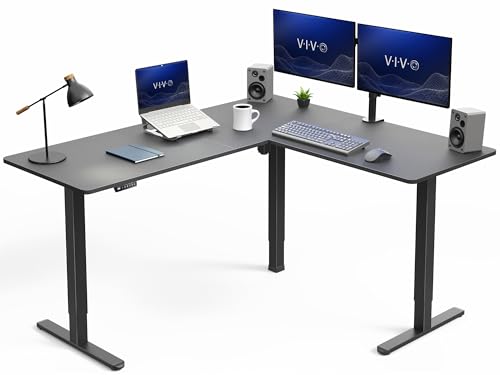
VIVO Electric Corner Standing Desk, L-Shaped, 63" x 55" Black Top | Holds 225 lbs, 3 Leg, Single Motor, 4 Memory Presets, Reversible, Height Adjustable, Black Frame, DESK-E3CTB

VIVO Dual Tier Corner Standing Desk Converter, 43" Black Top | Height Adjustable, Stand Up Desk Riser, Small Front Device Slot, Wide Keyboard Tray, Black Frame, DESK-V000VC

SEDETA Corner Electric Standing Desk with Drawer for Gaming, Small Space | 32'' Small Height Adjustable Computer Desk, Stand up Home Office Writing Desk, Rustic Brown

Casaottima 63 Inch L Shaped Electric Standing Desk, Home Office, White | Reversible Corner Desk with Height Adjustment, Ergonomic Sit Stand Table for Home Office, Computer Workstation
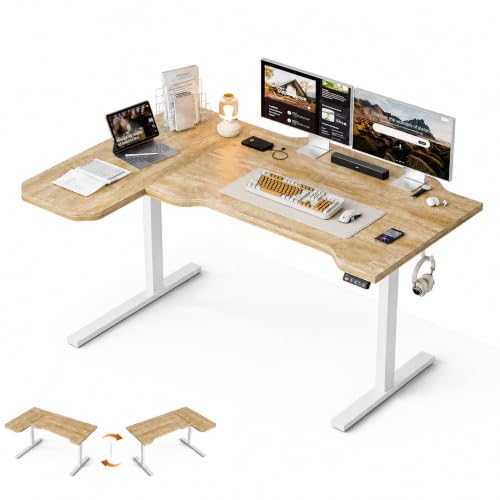
Grandder 47" L Shaped Standing Desk, Electric Height Adjustable Corner Stand Up Desk with Ergonomic Curved Round Corner for Small Apartment Home Office, Oak Desktop White Frame

VIVO Electric Dual Tier Corner Standing Desk Converter, 43" Black Top | Height Adjustable, Stand Up Desk Riser, Small Front Device Slot, Wide Keyboard Tray, Black Frame, DESK-V000VCE

Acrolix L Shaped Electric Standing Desk,59x40 Reversible,Rustic Brown | 176 lbs Capacity,28.3-46.4" Height,3 Memory Presets,Quiet <45dB Motor,Cup Holder&Hook,Home Office Gaming Corner Desk

Rocelco 46" Height Adjustable Corner Standing Desk Converter - Quick Sit Stand Up Dual Monitor Riser - Gas Spring Assist Tabletop Computer Workstation - Large Keyboard Tray - Black (R CADRB-46)
Ready to Upgrade Your Workspace?
Choose a corner standing desk that fits your space, style, and budget. Browse our top recommendations above and take the first step toward a healthier, more productive workday.
SHOP CORNER STANDING DESKS