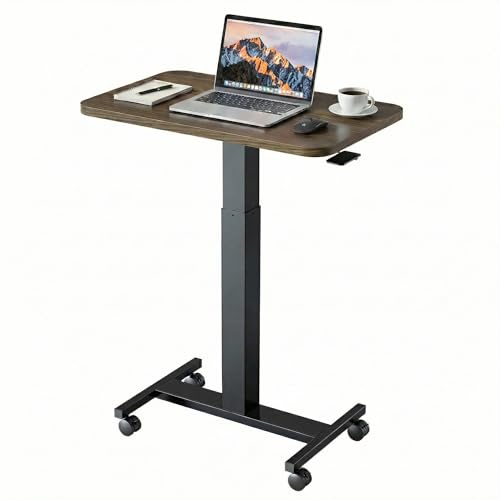
Adjustable Laptop Desk: The Ultimate Guide to Flexible Productivity
Transform your laptop into a dynamic, health-conscious workstation. Discover why an adjustable laptop desk is the smartest investment for your well-being and efficiency.
Shop Top Adjustable Laptop Desks💡 Why settle for a fixed setup? An adjustable laptop desk adapts to your needs—whether you're sitting, standing, or switching positions throughout the day. It's the key to reducing neck and back pain, boosting energy, and creating a workspace that truly works for you.
If you spend hours on a laptop, you know the struggle: hunching over a low screen, craning your neck, and feeling the strain by midday. An adjustable laptop desk (also called a laptop riser, stand, or sit-stand desk) elevates your screen to eye level, allowing you to maintain proper posture. Many models are portable, making them perfect for home, office, or co-working spaces.
Whether you're a digital nomad, a student, or a remote worker, the right adjustable laptop desk can transform your daily routine. Let's explore the key features, types, and how to choose the best one for your needs.
What Makes a Great Adjustable Laptop Desk?
🔧 Height Adjustability
Wide range from sitting to standing (often 4″–20″+). Smooth gas spring or spring-assisted mechanisms for effortless changes.
📐 Tilt & Angle
Adjustable tilt (0°–30°) for optimal viewing and typing angles, reducing glare and wrist strain.
🖥️ Weight Capacity
Holds laptops up to 10–15 lbs (some support up to 33 lbs for multiple monitors). Check your laptop weight.
🧳 Portability
Foldable, lightweight designs (under 5 lbs) for easy transport between home, office, or travel.
💨 Cooling & Ventilation
Open design or built-in fans to prevent laptop overheating during extended use.
📦 Built-in Extras
Cable management, device slots, phone holders, or USB hubs for added convenience.
How to Choose the Right Adjustable Laptop Desk
With so many options, it's essential to match the desk to your specific needs. Consider these factors:
- Stability: Look for a wide base and non-slip grips to prevent wobbling, especially when typing vigorously.
- Ease of Adjustment: Gas spring or spring-assisted mechanisms are smoother and easier to adjust than screw-based or friction-lock systems.
- Size & Compatibility: Ensure the platform fits your laptop size (up to 15″, 17″, or even 18″). Check the depth and width.
- Build Quality: Aluminum and steel frames offer durability and a premium feel, while plastic models are lighter and more budget-friendly.
- Maximum Height: If you're tall, verify that the desk can reach your standing eye level (typically 15″–20″ of lift).
For a more permanent home solution, an adjustable desk with drawers offers extra storage alongside ergonomic adjustability. If you prefer a minimalist approach, a adjustable laptop stand for desk focuses purely on elevating your screen while keeping your desk surface clear.
Many users pair their adjustable laptop desk with a chair for desk that also offers height and lumbar support. This combo ensures your entire workstation—from head to toe—is ergonomically aligned. For those who switch between sitting and standing, a adjustable sit-stand desk with a larger surface might be a better fit if you also use external monitors.
Types of Adjustable Laptop Desks
| Type | Best For | Price Range |
|---|---|---|
| Portable Stand | Travelers, students, hot-desking | $30–$80 |
| Gas Spring Arm | Dynamic height changes, multiple users | $80–$200 |
| Desktop Riser | Fixed elevation, simple setup | $20–$60 |
| Full Sit-Stand Desk | Full desktop replacement, dual monitors | $300+ |
Portable stands are lightweight and fold flat—ideal for commuters. Gas spring arms offer buttery-smooth height transitions and are excellent for shared desks. Desktop risers are the most budget-friendly and provide a simple, fixed lift. Full sit-stand desks are the ultimate solution if you want to transform your entire workspace.
Tips for Maximizing Your Adjustable Laptop Desk
- Eye-Level Rule: Adjust the desk so the top of your screen is at or slightly below eye level. This keeps your neck neutral.
- Arm Position: When typing, your elbows should be at a 90-degree angle, and your wrists should be straight.
- Alternate Postures: Switch between sitting and standing every 30–45 minutes to reduce fatigue and improve circulation.
- Clean Regularly: Wipe down the surface and gas springs to prevent dust buildup and maintain smooth operation.
✅ Ready to upgrade your workspace? Browse our curated selection of the best adjustable laptop desks below. Each product is carefully chosen for quality, ergonomics, and value. Click through to find your perfect match.
If you're looking for a more permanent solution, consider pairing your adjustable laptop desk with a black computer desk or a cheap computer desk for a complete home office makeover. For those who prefer a natural aesthetic, a bamboo desk is both sustainable and stylish. And don't forget the chair: an affordable desk chair can complete your ergonomic setup without breaking the bank.