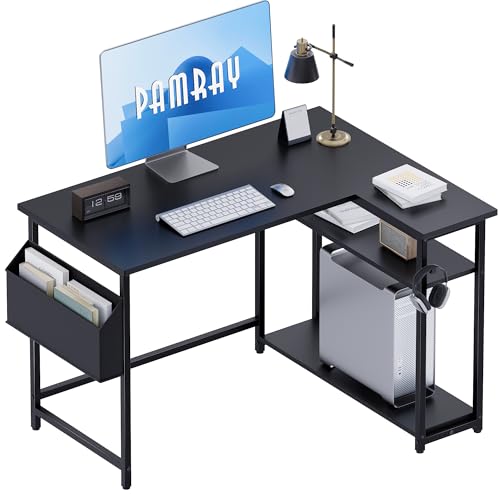
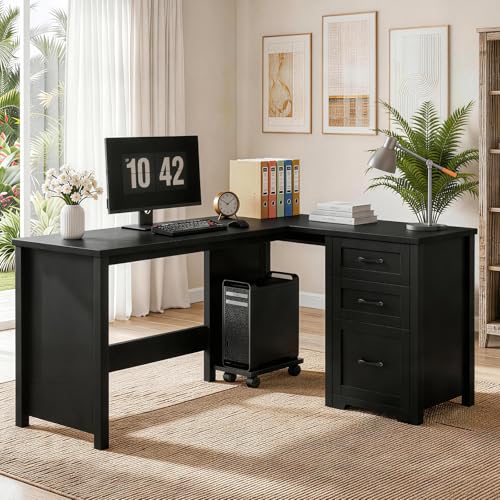
Black Corner Desk: Maximize Space & Style
Transform that unused corner into a powerful workspace. Discover the best black corner desks for gaming, home office, and creative work — with expert guidance on size, material, and setup.
Shop Top Black Corner Desks →Why a black corner desk? It's the perfect solution for maximizing floor space while adding a sleek, modern aesthetic to any room. Whether you're setting up a home office, a gaming station, or a creative workspace, a black corner desk offers the surface area you need with a professional, timeless look.
Why Choose a Black Corner Desk?
Space Optimization
Utilizes awkward corner space that would otherwise go unused. Perfect for small rooms and compact apartments.
Modern Aesthetic
The black finish offers a timeless, professional look that complements any decor style — from minimalist to industrial.
Ample Surface Area
Two connected surfaces provide generous workspace for multiple monitors, laptops, and accessories without cluttering.
How to Choose the Perfect Black Corner Desk
Selecting the right black corner desk involves more than just finding one that looks good. Consider these essential factors to ensure your desk meets your needs and fits your space perfectly.
1. Measure Your Corner Space
Before you start shopping, measure the available wall lengths and the depth of the corner. Standard corner desks typically require at least 48 inches of wall space on each side. For a compact setup, a small standing desk or a compact desk might be a better fit.
Don't forget to measure the height of the desk if you're considering an adjustable sit-stand desk. This feature allows you to switch between sitting and standing, promoting better health and productivity.
2. Choose Your Material
The material affects durability, maintenance, and aesthetics. Here are common options:
- Solid Wood: Offers durability and a premium feel. Black stains or paints on wood like oak or walnut create a rich, sophisticated look. If you love natural wood, explore our guides on walnut desks or oak desks.
- Engineered Wood with Laminate: Affordable, scratch-resistant, and easy to clean. Ideal for everyday use and families.
- Metal Frames: Provide stability and a modern industrial feel. Often combined with wood or glass tops.
- Glass: Creates an airy, contemporary look. Glass desks are stylish but require regular cleaning.
If you're looking for something truly unique, consider a custom desk idea that fits your exact specifications and style preferences.
3. Consider Desk Configuration
Corner desks come in several configurations:
- L-Shaped: The most popular design, offering two work surfaces at a right angle. You can also explore L-shaped desks for more options.
- U-Shaped: Provides even more space, wrapping around you for a command-center feel.
- Reversible: Can be configured for either left or right-facing setups.
For gaming setups, consider a big gaming desk or a gaming desk that can accommodate multiple monitors and peripherals.
4. Storage and Organization
Think about your storage needs. Some black corner desks come with built-in drawers, shelves, or hutches. For additional storage, you can add desk drawers or desk hutches separately. Efficient desk organization is key to maintaining a productive workspace.
Cable management is also crucial. Use cable trays and under-desk cable management to keep wires hidden and your workspace tidy.
Black Corner Desk Comparison
| Feature | Entry Level | Mid-Range | Premium |
|---|---|---|---|
| Price Range | $150–$350 | $400–$900 | $1,000–$2,500+ |
| Material | Laminate / Particle Board | Engineered Wood / Veneer | Solid Wood / Metal |
| Durability | Moderate | Good | Excellent |
| Weight Capacity | 150–250 lbs | 250–400 lbs | 400+ lbs |
| Best For | Students / Light Use | Home Office / Moderate Use | Heavy Use / Professional Setup |
Black Corner Desk Setup Ideas
Once you've chosen your desk, it's time to set it up for maximum productivity and comfort. Consider these layout and organization strategies:
Monitor Placement
Position your primary monitor directly in front of you at eye level. For dual monitor setups, place the main monitor centered and the secondary monitor to the side. Use monitor arms to free up desk space and achieve the perfect ergonomic angle.
If you have a dual monitor setup, consider an ultrawide option or a triple monitor setup for more screen real estate.
Ergonomic Accessories
Invest in ergonomic accessories to protect your health and comfort during long work sessions:
- Chair: Pair your desk with a comfortable black office desk chair or a chair for desk that supports good posture.
- Monitor Height: Use monitor calibration tools to ensure your screen is at the correct height.
- Lighting: Add a desk lamp or monitor light bar to reduce eye strain.
- Footrest: A footrest can help maintain proper posture.
- Anti-Fatigue Mat: If you have a standing desk converter or an adjustable standing desk, an anti-fatigue mat is essential.
Decor and Personalization
Make the space your own. Add desk plants for a touch of nature, or use desk mats to protect the surface and add texture. Incorporate desk decor elements that inspire you, such as photos, art, or mood boards.
For gaming setups, consider RGB gaming aesthetic accessories to create an immersive environment.
Cable Management
A clean desk is a productive desk. Use cable raceways, cable sleeves, and desk grommets to hide wires and keep your workspace looking professional.
Color Coordination
Black is a versatile color that pairs well with many other shades. For a cohesive look, consider a brown desk chair for a warm contrast, or a blue desk chair for a pop of color. A black desk with drawers can help keep essentials organized while maintaining the sleek aesthetic.
If you're setting up a bedroom desk setup or a living room desk setup, a black corner desk can blend seamlessly with existing furniture.
How to Maintain Your Black Corner Desk
Proper care will keep your black corner desk looking brand new for years. Here are some maintenance tips:
- Regular Dusting: Use a soft, dry microfiber cloth to remove dust. This prevents scratches and keeps the finish looking fresh.
- Clean Spills Immediately: Use a slightly damp cloth with mild soap. Avoid harsh chemicals that can damage the finish.
- Protect the Surface: Use coasters, desk mats, or desk mats to prevent scratches and stains. If you have a glass desk, use a dedicated glass cleaner.
- Repair Scratches: For minor scratches on wood, use a furniture touch-up marker or polish. For deeper scratches, consult a professional or use a repair desk scratch guide.
- Check Hardware: Periodically tighten any screws or bolts to ensure stability and prevent wobbling.
For more detailed maintenance advice, check out our guides on how to clean wood desk surfaces, protect desk surface, and refinish desk materials.
Frequently Asked Questions
What is the standard height of a black corner desk?
Most standard corner desks have a height of 29 to 30 inches (74 to 76 cm). This height works well for most users. If you're taller or shorter, consider an adjustable desk that allows you to customize the height.
Can a black corner desk fit in a small room?
Yes! Compact corner desks are designed for small spaces. Look for options with a smaller footprint or consider a floating desk setup that doesn't require legs. You can also pair it with a small desk organization system to maximize efficiency.
Is a black corner desk suitable for gaming?
Absolutely. Black corner desks are popular for gaming setups because they offer plenty of space for multiple monitors, a gaming PC, and peripherals. Consider a black gaming desk or a big gaming desk for extra surface area.
How do I clean a black laminate corner desk?
Use a soft cloth dampened with water and a mild soap solution. Avoid abrasive cleaners and scrubbers. Dry the surface immediately to prevent water spots. For more detailed information, see our desk polish guide.
What accessories do I need for a black corner desk?
Consider a comfortable chair for desk, a monitor arm for ergonomics, desk lamps for lighting, and desk organizers to keep everything tidy. If you're using a standing desk converter, don't forget an anti-fatigue mat.