Computer Desk That Can Hold 2 Monitors: The Ultimate Guide
Find the perfect desk for your dual-monitor setup. Expert advice on size, ergonomics, materials, and the best features to support two screens for maximum productivity.
SEE TOP RECOMMENDATIONS ↓Why You Need a Dedicated Desk for 2 Monitors
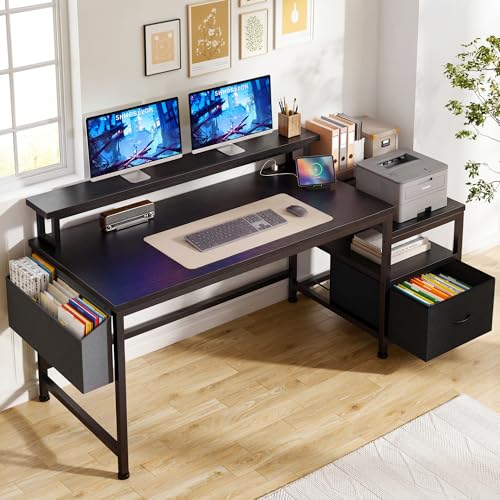
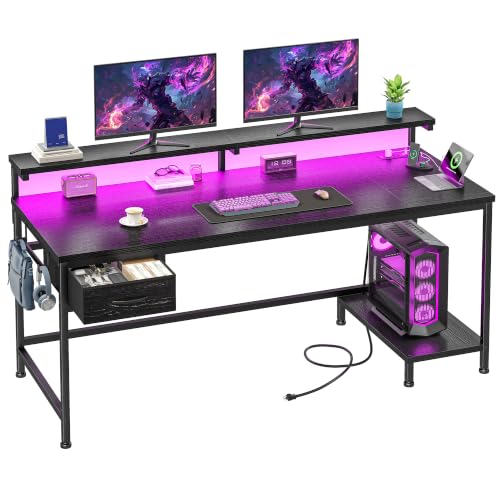
A dual-monitor setup is a game-changer for productivity, multitasking, and even gaming. But to truly benefit, you need a computer desk that can hold 2 monitors comfortably and safely. This isn't just about having enough surface space; it's about ergonomics, stability, and creating a workspace that works for you.
Using two monitors on an undersized or flimsy desk can lead to a cluttered surface, poor posture, and even the risk of your expensive screens toppling over. A proper desk for two monitors provides the necessary real estate and structural integrity for a stable and efficient setup.
Key Insight: The right desk for two monitors is an investment in your health and productivity. It allows you to position your screens correctly, reducing neck strain and eye fatigue, while keeping your workspace organized and functional.
How to Choose a Desk for Dual Monitors: 5 Critical Factors
Selecting the right desk for two monitors involves more than just measuring your screens. Here are the five most important factors to consider.
1. Desk Size and Surface Area
The most obvious requirement is adequate surface area. For a comfortable dual-monitor setup, you'll want a desk that is at least 55 inches wide and 28 inches deep. A 60-inch desk offers even more breathing room. The depth is crucial to allow for proper monitor distance, which should be an arm's length away. For larger monitors (27 inches or more) or if you also use a laptop, consider a 72-inch computer desk with keyboard tray.
If you have a smaller space, look for a 55-inch computer desk with keyboard tray or a 48-inch computer desk with keyboard tray that can still accommodate two 24-inch monitors side-by-side.
2. Weight Capacity and Build Quality
Two monitors, especially if they are large or heavy, put significant weight on a desk. You need a desk made of durable materials like solid wood, high-quality MDF, or sturdy metal frames. Check the manufacturer's weight capacity; a good desk for two monitors should support at least 150 lbs of evenly distributed weight.
For a stable and adjustable solution, consider an adjustable standing desk for 2 monitors. These desks are built with heavy-duty steel frames and powerful motors to handle the load.
3. Ergonomic Features
Ergonomics is paramount. To achieve the correct eye-level height for your monitors, you'll likely need a monitor stand for desk with drawer or a monitor arm. A desk that is too high or too low can cause neck and shoulder pain. The ideal setup allows your monitors to be at eye level and your keyboard and mouse to be at elbow height.
This is where a computer desk for 2 monitors and laptop with a pullout keyboard tray can be incredibly beneficial, as it allows you to adjust the keyboard height independently from the monitors.
4. Desk Shape and Layout
The shape of your desk can significantly impact your workflow. An L-shaped desk with 2 file drawers or a reversible L-shaped desk with hutch provides a larger surface area and can be ideal for corner spaces. A traditional rectangular desk works best in a straight-wall setup. Consider a corner computer desk with keyboard tray if you want to maximize a corner space while still having room for two monitors.
5. Cable Management
A dual-monitor setup comes with a tangle of cables: two power cords, two video cables (HDMI/DisplayPort), plus peripherals. A desk with integrated cable management, like the l-shaped desks with cable management, will keep your workspace clean and organized. Look for features like cable trays, grommet holes, or raceways.
Desk Types for 2 Monitors: A Comparison
Not all desks are created equal. Here’s how different types of desks stack up for a dual-monitor setup.
| Desk Type | Best For | Pros | Cons |
|---|---|---|---|
| Electric Standing Desk | Health-conscious users, flexible workspaces | Height adjustable, improves posture, reduces sedentary time | More expensive, requires power outlet |
| Gaming Desk | Gamers, heavy PC users | Often wide and deep, sturdy, includes cable management | Can be more expensive, sometimes gaudy design |
| L-Shaped Desk | Corner spaces, multi-monitor setups (3+ screens) | Maximizes space, provides ample area, can separate work/play zones | Can be large, more complex to set up |
| Executive Desk | Professional home offices, traditional styles | Stylish, often includes drawers, spacious | Can be very heavy, less adjustable |
For most users, an adjustable standing desk for 2 monitors or a dedicated gaming desk for 2 monitors and PC offers the best combination of space, features, and ergonomics.
Optimizing Your Monitor Setup on a Desk
Having the right desk is only half the battle. Here's how to set up your monitors for maximum comfort and efficiency.
Monitor Placement
Place both monitors directly in front of you, with the bezels meeting in the middle. Your primary monitor should be centered on your keyboard. The top of your monitors should be at or slightly below eye level. This is where a dual monitor mount for 6-inch thick desk can be a lifesaver, as it allows for precise positioning.
Monitor Size and Distance
The size of your monitors should influence your desk depth. For a 27-inch monitor, a desk depth of 28–30 inches is recommended. For larger 32-inch screens, consider a 30-inch or deeper desk. An adjustable computer monitor riser desk stand can help you achieve the correct height on a fixed-height desk.
Keyboard and Mouse Position
Your keyboard and mouse should be positioned so your elbows are at a 90-degree angle. If your desk is too high, use an adjustable keyboard tray under desk to lower the typing surface.
Top Features to Look For in a Dual-Monitor Desk
When shopping for your desk, keep an eye out for these highly-useful features.
Built-in Power Outlets
Desks like the l-shaped gaming desk with power outlet include integrated power strips, reducing cable clutter and making it easy to plug in your monitors and devices.
Integrated Cable Management
Look for desks with built-in cable management trays or channels. This is a feature often found in l-shaped desks with cable management and high-end standing desks.
Drawers and Storage
A desk with file drawer and hutch or a desk with 3 drawers on one side provides valuable storage for documents and office supplies, keeping your workspace tidy.
Heavy-Duty Frame
Ensure the desk has a solid steel frame to prevent wobbling. This is critical for standing desks and larger desks, especially when supporting two heavy monitors.
A great option that combines many of these features is a 60-inch l-shaped desk with drawers or a 60 x 30 office desk with drawers, which provides a large surface, storage, and a stable build.
Alternatives: What if You Don't Have Space for a Large Desk?
If you're tight on space, you have a few alternatives to a full-sized desk.
- A Standing Desk Converter: A stand-up desk converter for 2 monitors sits on top of an existing desk or table, elevating your monitors and keyboard. This is a great, space-saving solution.
- Monitor Arms: A good dual monitor arm desk mount can free up a lot of surface space by mounting your monitors to the edge of the desk. For a thicker desk, you'll need a dual monitor mount for 6-inch thick desk.
- A Larger Desk with a Keyboard Tray: A home office desk with pullout keyboard tray can make a smaller 48-inch desk feel more spacious by providing a separate surface for your keyboard and mouse.
For a complete setup, consider a work-from-home desk for 2 monitors which is specifically designed with the dimensions and features needed for a productive dual-monitor workspace.
Price Ranges for Dual-Monitor Desks
The price of a suitable desk for two monitors can vary widely based on material, size, and features.
- Budget ($150–$300): Basic MDF or particle board desks. Often 48–55 inches wide. Look for a 48-inch computer desk with keyboard tray or a 55-inch computer desk with keyboard tray.
- Mid-Range ($300–$700): Sturdier desks with solid wood or high-quality laminate. Many L-shaped desks with drawers and electric standing desks fall into this range.
- Premium ($700+): High-end hardwood desks, heavy-duty standing desks, and executive desks. Expect top-tier build quality, features, and warranties, like a 72-inch computer desk with keyboard tray or a 60 x 30 office desk with drawers.
Pro Tip: If you're on a budget but need a high-quality desk, consider looking for a used reversible l-shaped desk with hutch or a 60-inch l-shaped desk with hutch from office liquidation sales. You can often find premium desks at a fraction of the retail price.