
Cord Organizer for Desk: The Ultimate Guide to a Tidy Workspace
Stop messy cables from ruining your focus. Discover the best desk cord organizers, cable management solutions, and expert tips to create a clean, productive, and visually appealing workspace.
SHOP TOP CORD ORGANIZERSAll About Desks — We know that a cluttered desk with tangled cords can drain your productivity and peace of mind. That's why we've created this comprehensive guide to cord organizers for desks. Whether you're setting up a home office, gaming station, or creative workspace, we'll help you choose the perfect cable management solution. Say goodbye to cable chaos and hello to a clean, organized desk surface.
Why You Need a Cord Organizer for Your Desk
A cord organizer for desk is more than just a gadget—it's an investment in your workspace clarity and efficiency. Tangled cables not only look unprofessional but also make cleaning difficult, increase wear on your devices, and can even be a tripping hazard. By using a desk cable organizer, you create a streamlined environment that enhances focus and reduces stress. Whether you're managing power cords, USB cables, or audio wires, the right solution transforms your desk into a productivity powerhouse.
✅ Enhanced Productivity
A clean desk reduces visual clutter, helping you focus on tasks without distraction.
✅ Prolongs Cable Life
Organized cables are less likely to be bent, pulled, or damaged, extending their lifespan.
✅ Easier Cleaning
Dust and wipe your desk surface quickly without wrestling with a nest of wires.
✅ Professional Aesthetic
Impress clients, colleagues, or just enjoy a workspace that looks as good as it functions.
Types of Desk Cord Organizers
Choosing the right cord organizer for desk depends on your setup, cable volume, and personal preference. Here are the most popular types to consider:
🔌 Cable Trays
Mount under the desk to hold power strips and excess cables. Keeps cords off the floor and out of sight. Ideal for computer desks for home and office setups.
📦 Cable Sleeves & Raceways
Wrap multiple cables into a single, neat bundle. Perfect for managing monitor, keyboard, and mouse wires along the desk edge.
🧲 Magnetic Cable Holders
Attach to the desk surface or side to keep charging cables within easy reach. Great for phones, tablets, and other devices.
🪝 Cable Clips & Adhesive Organizers
Stick onto the desk or wall to route individual cables. Simple and affordable, perfect for minimal setups like a compact desk.
📎 Desk Grommets & Ports
Built-in or add-on holes that let you route cables through the desk surface, keeping them hidden and organized.
🔋 Charging Stations & Docks
Combine cable management with device charging. Keep your phone, tablet, and headphones organized in one place.
Compare Popular Cord Organizer Solutions
| Type | Best For | Installation | Price Range |
|---|---|---|---|
| Under-Desk Cable Tray | Home offices, corner desks for home office | Mounting screws or clamps | $25–$50 |
| Cable Sleeve (Neoprene) | Gaming desks, L-shaped computer desks | Wrap around cables | $10–$30 |
| Adhesive Cable Clips | Small desks, compact computer desks | Peel and stick | $5–$15 |
| Magnetic Cable Manager | Desks with metal surfaces, standing desk converters | Magnetic attachment | $15–$25 |
| Desk Grommet Kit | Permanent desk setups, corner desk with storage | Drill hole required | $10–$20 |
How to Choose the Best Cord Organizer for Your Desk
Selecting the right cord organizer for desk depends on several factors. Consider these points to make the best choice for your workspace:
- Number of Cables: If you have many devices (monitor, PC, laptop, phone, tablet), a cable tray or sleeve is ideal. For fewer cables, clips or magnetic holders may suffice.
- Desk Type: For glass or glass desks, adhesive clips or magnetic solutions work best. For wooden desks, trays and grommets are excellent.
- Desk Accessibility: If you frequently adjust your setup, consider portable organizers like cable sleeves or magnetic clips that allow easy access.
- Aesthetics: Choose colors and materials that match your desk style—black, white, wood-tone, or transparent options are available.
- Budget: From affordable clips to premium trays, there's a solution for every budget. Remember, a small investment can greatly enhance your daily work experience.
💡 Pro Tip: Combine multiple organizers for the best results. Use a cable tray under the desk for power bricks, a sleeve for monitor cables, and clips for charging cables on the surface. This layered approach keeps every wire in its place and makes your computer desk with storage both functional and visually appealing.
Installation & Maintenance Tips
Once you've chosen your cord organizer for desk, proper installation and maintenance will ensure long-lasting performance:
- Plan Before You Stick: Lay out all cables and decide the routing path before attaching any organizer. This prevents rework and wasted adhesives.
- Use Zip Ties for Bundling: Group cables together with reusable zip ties before placing them into sleeves or trays. This adds extra stability.
- Label Your Cables: Use small labels or colored tape to identify each cable. This saves time when you need to unplug or rearrange.
- Regularly Dust: Cable trays and sleeves can accumulate dust. Wipe them down every few weeks to keep your desk area clean.
- Check Adhesive Strength: For clip-on organizers, ensure the adhesive is firmly pressed for 30 seconds. For heavy cables, consider screw-mounted options.
If you're also looking to upgrade other aspects of your workspace, check out our guides on desk accessories for office, cute desk mats, and custom desk mats to complete your setup. For those with smaller spaces, our articles on compact desks and corner desks for small spaces offer additional inspiration.
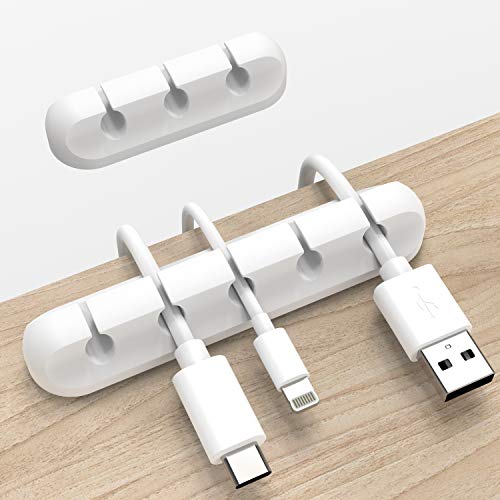




![Lamicall 8 Pack Cord Organizer, [1s Lock] Cable Management Clips for Desk](https://m.media-amazon.com/images/I/41MHdY3ncDL._SL500_.jpg)

