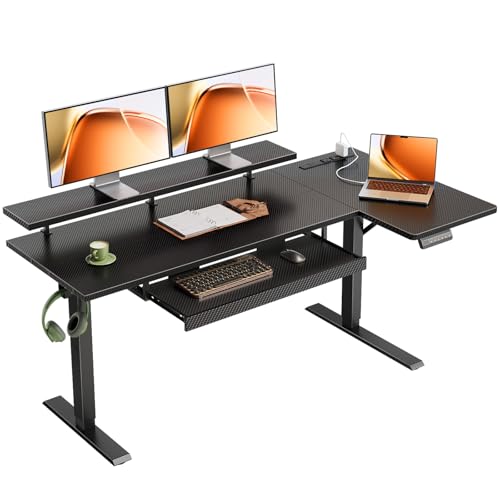
A corner desk with keyboard tray and monitor stand is the ultimate space-saving solution for modern home offices and small workspaces. By utilizing an L-shaped or corner configuration, you transform an often-underused area into a highly functional workstation. The integrated keyboard tray promotes neutral wrist posture, while a dedicated monitor stand elevates your screen to eye level — reducing neck strain and boosting daily productivity.
Whether you're a remote professional, a gamer, or a student, a corner desk with these ergonomic features helps you stay organized, comfortable, and focused. In this guide, we'll explore the benefits, key features to look for, and the best models available today.
What to Look For in a Corner Desk with Keyboard Tray and Monitor Stand
When shopping for a corner desk with these integrated features, consider the following factors to ensure you get the best fit for your needs and budget.
1. Keyboard Tray Quality & Adjustability
The keyboard tray should be wide enough to accommodate your keyboard and mouse, with a smooth sliding mechanism. Look for trays that tilt and adjust in height, allowing you to position your wrists in a neutral, straight line. Some trays also include a built-in wrist rest for added comfort.
2. Monitor Stand Stability & Height Range
A sturdy monitor stand or mount is essential for keeping your screen at eye level. For a corner desk, consider a freestanding monitor riser or a clamp-on mount that attaches to the desk surface. The stand should support the weight of your monitor(s) and offer sufficient height adjustment (typically 4–8 inches) to align with your seated eye level.
3. Desk Material & Build Quality
Corner desks are available in wood, engineered wood, metal, and glass. Solid wood and high-quality MDF with laminate finishes offer durability and a premium feel. Check the weight capacity, especially if you plan to mount multiple monitors or heavy equipment. A steel frame with crossbars ensures stability, particularly for larger L-shaped designs.
4. Surface Area & Layout
Measure your available corner space carefully. Most corner desks have depths of 24–30 inches on each wing and total widths ranging from 48 to 72 inches. Consider whether you need extra space for documents, a laptop, or other peripherals. A desk with a reversible configuration (left- or right-facing) offers flexibility for your room layout.
5. Cable Management
Integrated cable management channels, grommets, or under-desk trays keep wires organized and out of sight. This is especially important for a corner desk where multiple devices (monitor, keyboard, mouse, speakers, chargers) are used.
6. Assembly & Warranty
Most corner desks require assembly. Look for clear instructions, pre-drilled holes, and included tools. A warranty of at least 1–2 years indicates manufacturer confidence in the product.
✅ Corner Desk with Keyboard Tray & Monitor Stand
Best for: Small to medium rooms, maximizing corner space, ergonomic focus, multiple monitor setups.
Pros: Space-saving, promotes better posture, built-in organization, clean cable management.
Cons: May have slightly less depth than some standard desks, assembly can be more involved.
✅ Standard Rectangular Desk
Best for: Larger rooms, traditional layouts, those who prefer a simple design.
Pros: More surface depth (often 30 inches), simpler assembly, wide variety of styles.
Cons: Takes up more floor space, may not offer integrated ergonomic accessories, often lacks dedicated keyboard tray.
Price Range for Quality Corner Desks
Prices for a corner desk with keyboard tray and monitor stand typically range from $250–$800, depending on materials, brand, and features. Entry-level models (MDF/laminate) start around $250–$400, while premium solid wood or height-adjustable electric versions can reach $700–$800+. For most home office users, a mid-range option ($400–$600) offers the best balance of durability, ergonomics, and aesthetics.
Below, we've curated a selection of highly-rated corner desks that combine a comfortable keyboard tray and a reliable monitor stand, suitable for various budgets and workspace needs.
Setting Up Your Corner Desk for Maximum Comfort
Once you've chosen your corner desk, follow these tips to optimize your ergonomic setup:
- Monitor height: The top of your monitor screen should be at or slightly below eye level. Use the monitor stand to achieve this.
- Keyboard position: The keyboard tray should be at a height where your elbows are at a 90-degree angle and your wrists are straight. Adjust the tray's tilt to keep your hands in a neutral position.
- Chair alignment: Use an ergonomic office chair with adjustable height and lumbar support. Your feet should rest flat on the floor.
- Lighting: Position your desk to avoid glare on the monitor. Use a desk lamp with adjustable brightness for task lighting.
- Cable management: Use cable management boxes and clips to keep wires tidy and prevent tangling.
For more ideas on optimizing your workspace, explore our home office desk setup ideas and office ergonomics guide.
Frequently Asked Questions
Can I add a keyboard tray to my existing corner desk?
Yes, you can purchase an under-desk keyboard tray mount that clamps onto the desk surface. Just ensure there is enough clearance for your legs and that the tray is compatible with your desk thickness.
Do corner desks support dual monitors?
Absolutely. Many corner desks provide enough surface depth (24 inches or more) for two monitors. For the best stability, use a dual monitor stand that clamps to the desk, freeing up surface space and allowing independent height adjustment.
What's the ideal corner desk size for a small room?
For a compact space, look for a corner desk with each wing measuring 36–48 inches wide and a depth of 24 inches. This provides ample workspace without overwhelming the room. Check our corner desk for small space guide for more options.