
Desktop Gaming PC: The Ultimate Powerhouse for Your Battlestation
Your desk deserves a machine that matches its potential. Whether you're building from scratch or buying pre-built, we break down everything you need to know about the best desktop gaming PCs in 2026.
Explore Top Gaming Desktops →What Is a Desktop Gaming PC?
A desktop gaming PC is a high-performance computer specifically designed to handle demanding video games, streaming, and intensive multitasking. Unlike standard office desktops, gaming PCs pack powerful graphics cards (GPUs), fast processors (CPUs), ample RAM, and high-speed storage to deliver smooth frame rates and stunning visuals. If you're serious about gaming, content creation, or VR, a dedicated gaming desktop is non-negotiable.
🔍 Why trust this guide? We've analyzed hundreds of gaming desktops, benchmarked components, and monitored real-world performance to bring you unbiased, actionable advice. Whether you're a first-time buyer or a seasoned enthusiast, we'll help you find the perfect match for your desk.
Key Components That Define Performance
Understanding what's inside a gaming PC is crucial. Here's a breakdown of the core parts that influence speed, graphics, and overall experience.
Graphics Card (GPU)
The heart of any gaming rig. For 1440p and 4K gaming, look for NVIDIA RTX 4070 or higher, or AMD RX 7800 XT. Entry-level: RTX 4060 / RX 7600. $300–$1,800
Processor (CPU)
Handles physics, AI, and background tasks. Intel Core i7 / i9 or AMD Ryzen 7 / 9 are top-tier. For budget builds, i5 / Ryzen 5 still deliver great performance. $200–$700
Memory (RAM)
16GB is the sweet spot for gaming. 32GB recommended for streaming or heavy multitasking. Speed matters: DDR5-6000 is ideal for modern platforms. $50–$200
Storage (SSD)
NVMe SSDs load games in seconds. Aim for at least 1TB; 2TB is better for large game libraries. Gen4 drives offer blazing read/write speeds. $80–$300
Power Supply (PSU)
Stable power is essential. 750W–850W Gold-rated for mid-range builds; 1000W+ for top-tier GPUs. Always choose reputable brands. $100–$250
Motherboard & Cooling
Compatibility matters: choose a board with PCIe 5.0 and DDR5 support. Cooling – air or liquid – keeps your CPU and GPU running at peak performance. $150–$500
Pre-Built vs Custom: Which Is Right for You?
One of the biggest decisions is whether to buy a pre-built gaming desktop or build your own. Both have pros and cons.
- Pre-Built: Convenient, plug-and-play, with warranty and support. Ideal if you don't want to deal with assembly or troubleshooting. Prices range from $800–$2,500 for mid-to-high-end systems.
- Custom Build: Total control over components, often better value for money, and the satisfaction of building it yourself. Requires research and patience. Budget: $900+ for a solid 1440p machine.
Whichever path you choose, ensure your gaming desk can accommodate the case size and airflow. A spacious large computer desk with good cable management will keep your battlestation clean and cool.
Best Desktop Gaming PCs for Every Budget
Based on our research and user reviews, these are the top performers across different price tiers. We've included a mix of pre-built and custom-ready options.
🔥 Top Pick (Premium)
Custom RTX 4080 Super + Ryzen 7 7800X3D – 4K gaming beast, 32GB DDR5, 2TB NVMe. $2,500+
Pre-built: Alienware Aurora R16 – Sleek design, liquid cooling, excellent support. $2,200
⭐ Mid-Range (Best Value)
Custom RTX 4070 Super + i5-14600K – 1440p gaming at high settings, 16GB DDR5, 1TB SSD. $1,400
Pre-built: CyberPowerPC Gamer Xtreme – Great price-to-performance ratio. $1,350
🎮 Entry-Level (1080p Gaming)
Custom RTX 4060 + Ryzen 5 7600 – Solid 1080p performance, upgradeable. $900
Pre-built: HP Victus 15L – Compact, budget-friendly, ready to play. $850
Setting Up Your Gaming Desktop for Peak Comfort
A powerful PC deserves a comfortable and organized space. Here are some tips to maximize your gaming experience.
- Monitor placement: Position your primary monitor at eye level, about an arm's length away. Pair with a adjustable monitor stand for ergonomic flexibility.
- Desk size: Ensure your computer desk for bedroom or gaming area has enough depth for your keyboard, mouse, and monitor stand.
- Cable management: Use desk that hides cords or cable trays to keep wires out of sight – a clean desk reduces clutter and improves focus.
- Chair & posture: A gamer desk and chair combo with proper lumbar support prevents fatigue during long sessions.
- Lighting: A desk lamp mid-century or adjustable LED bar reduces eye strain and adds style to your setup.
🔥 Top Desktop Gaming PCs on the Market
⚠️ AFFILIATE DISCLOSURE: This website contains affiliate links. As an Amazon Associate, we earn from qualifying purchases. If you make a purchase through these links, we may receive a small commission at no additional cost to you. Read our full affiliate policy.

msi Codex Z2 Gaming Desktop, AMD R7-8700F, RTX 5070, 32GB DDR5, 2TB SSD | NVIDIA GeForce RTX 5070, USB Type-C, VR-Ready, Windows 11 Home. Model A8NVP-436US

Skytech Gaming PC Desktop, Ryzen 7 9850X3D, RX 9070 XT, 32GB RAM, 2TB SSD | Windows 11, Gen4 NVMe SSD, DDR5 5600, 850W GOLD ATX 3 PSU, 360 ARGB AIO , Wi-Fi 5, Azure 3 Series

Alienware Aurora Gaming Desktop, RTX 5070, Intel Core Ultra 7 265F | 1TB SSD, 32GB DDR5, Wi‑Fi 7, Bluetooth, Killer 2.5Gb Ethernet, Windows 11 Home, Wired Keyboard, ACT1250

iBUYPOWER Element Gaming PC Desktop Computer AMD Ryzen 9 7900X CPU, NVIDIA GeForce RTX 5070 12GB GPU, 32GB DDR5 RAM, 1TB NVMe SSD, Windows 11 Home, Gamer Keyboard and Mouse - EWA9N5702

YAWYORE Gaming PC, AMD Ryzen 7 5700X, GeForce RTX 5060 Desktop Computer | 32GB DDR4 RAM, 1TB M.2 NVMe SSD,, ARGB Fans, WiFi+BT

KOTIN Gaming PC Desktop, Ryzen 7 8700F, RTX 5060 Ti 8GB, 16GB DDR5, 1TB SSD | Prebuilt Gaming Tower with WiFi 7, Windows 11 Home, DLSS 4, ARGB Cooling, 650W Gold PSU for 1080p/1440p PC Gaming & Streaming

msi Codex Z2 Gaming Desktop, AMD R7-8700F, RTX 5060Ti, 16GB DDR5, 1TB SSD | NVIDIA GeForce RTX 5060 Ti, USB Type-C, VR-Ready, Windows 11 Home. Model A8NVM-671US
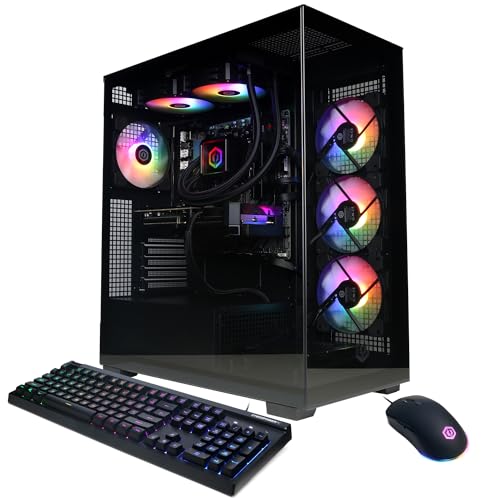
CyberPowerPC Gaming PC, AMD Ryzen 9 9900X, GeForce RTX 5070 12GB | Gamer Xtreme, 32GB DDR5, 1TB PCIe 4.0 SSD, WiFi Ready & Windows 11 Home (GXiVR8080A41)
Accessories to Elevate Your Gaming Desk
Beyond the tower, accessories can make or break your experience. Consider these additions to complete your desk setup idea.
- Mechanical keyboard: Tactile feedback and durability. Look for hot-swappable switches.
- High-DPI gaming mouse: Essential for precision in FPS and MOBA games.
- Headset: Immersive audio is key. A wireless or wired headset with a good mic is a must for multiplayer.
- Surge protector & UPS: Protect your investment from power surges and outages.
- Desk pad: A full desk mouse pad provides a smooth, consistent surface for both keyboard and mouse.
Final Verdict: Which Desktop Gaming PC Should You Buy?
Choosing a desktop gaming PC comes down to your budget, performance goals, and willingness to build. If you want the absolute best and have the budget, a custom RTX 4090 / Ryzen 9 build will dominate for years. For most gamers, a $1,200–$1,500 pre-built or custom with an RTX 4070 Super and 32GB RAM delivers exceptional 1440p gaming and future-proofing.
Remember, the desktop gaming pc you choose should integrate seamlessly with your existing adjustable computer desk or standing desk setup. Prioritize airflow, cable management, and comfort, and you'll enjoy countless hours of immersive gameplay.
Ready to upgrade? Check out the recommended products above and find the perfect gaming desktop for your desk.