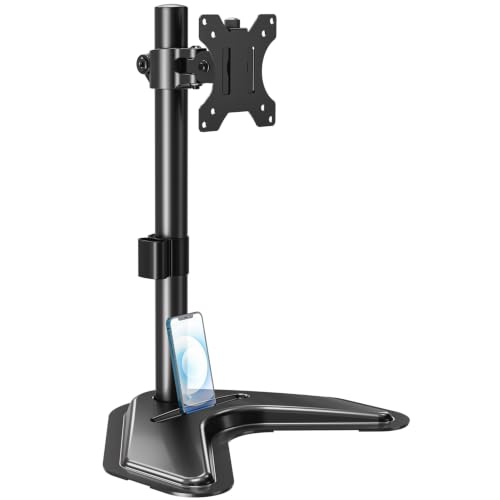
Desktop VESA Monitor Stand: The Ultimate Guide
Unlock better ergonomics, reclaim desk space, and elevate your viewing experience. Our expert guide covers everything from VESA compatibility to the best gas-spring arms for your workspace.
A desktop VESA monitor stand is more than just a metal bracket—it's the cornerstone of an ergonomic, organized, and productive workspace. Whether you're a gamer, a programmer, or a remote worker, the right monitor mount transforms your desk by freeing up valuable surface area and positioning your screen at the perfect height and angle.
VESA (Video Electronics Standards Association) is the universal standard for mounting flat-panel displays. Most modern monitors have VESA mounting holes on the back. A desk with monitor mounts or a standalone desktop VESA stand lets you attach your monitor to a clamp, grommet, or freestanding base, giving you unparalleled flexibility.
Why Choose a Desktop VESA Monitor Stand?
✔ Ergonomic Bliss
Position your monitor at eye level to reduce neck and back strain. Adjust height, tilt, and swivel to create a truly ergonomic desk setup that keeps you comfortable all day.
✔ Reclaim Desk Space
Lift your monitor off the desktop. Instantly gain up to 80% more usable surface for your keyboard, documents, or a desktop organizer.
✔ Dual & Multi-Monitor Ready
Easily mount two or more screens side-by-side. A dual monitor mount creates a seamless, panoramic workspace perfect for multitasking.
✔ Cable Management
Many stands feature built-in cable channels, helping you maintain a clean desk. Pair it with a desk with shelves or cable trays for a pristine look.
VESA Compatibility: What You Need to Know
Before buying, check your monitor's VESA pattern. Common sizes are 75x75mm and 100x100mm. Some heavy or large monitors (over 32 inches) use 200x200mm. Most desktop VESA monitor stands come with adapter plates and hardware to fit multiple patterns.
Pro Tip: Always verify the maximum weight capacity of the stand against your monitor's weight (including any attached accessories). A quality gas-spring arm can handle 4.4–17.6 lbs per arm, while heavy-duty stands support up to 30 lbs.
Desktop VESA Stand Types: Which One is Right for You?
| Type | Best For | Price Range | Key Feature |
|---|
| Gas Spring Arm | Dynamic positioning, multiple monitors | $70–$250 | Effortless height & angle adjustment |
| Fixed Height Stand | Budget setups, single monitor | $25–$60 | Simple, sturdy, space-saving |
| Pole Mount (2 or 3 arms) | Multi-monitor (stacked or side-by-side) | $100–$300 | Clean vertical alignment |
| Freestanding Base | Glass desks or no-clamp surfaces | $60–$180 | No edge clamping needed |
How to Choose & Set Up Your Desktop VESA Stand
- Check desk thickness: Clamp mounts need a desk edge of 0.4–3.5 inches. For thicker desks, consider a grommet mount.
- Monitor weight & size: Ensure the stand's capacity exceeds your monitor's weight. For ultrawide or heavy monitors, choose a heavy-duty arm.
- Cable management: Look for integrated cable clips or channels to keep things tidy. Combine with a desk cable management solution for a professional finish.
- Installation: Most stands come with tools and instructions. Mount the VESA plate to your monitor, attach the arm to the desk, and adjust the gas spring tension for smooth movement.
Ergonomics: Elevate Your Workflow
A properly positioned monitor reduces eye strain and neck pain. The top of your screen should be at or slightly below eye level, about 20–28 inches from your face. A desktop VESA monitor stand lets you achieve this perfectly. For a complete ergonomic overhaul, consider pairing it with an ergonomic office desk and an ergonomic desk chair.
If you use multiple monitors, align them so that your primary screen is directly in front of you, with secondary screens angled toward you. Many VESA arms allow for independent adjustment of each monitor, making it easy to create a customized, dual monitor setup that boosts productivity.
Ready to Upgrade Your Workspace?
Whether you're building a new desk setup or refining your current one, a desktop VESA monitor stand is a game-changer. Browse our curated selection of top-rated stands below—each one tested for quality, durability, and ease of installation.
Disclaimer
All About Desks provides educational content only. Not a substitute for professional ergonomist or interior designer services. Always consult a qualified professional for major structural or electrical work involving your desk. Some content may use AI. We are not responsible for product defects, injuries, or outcomes related to desk use. By using this site, you accept these terms. If you do not agree, please leave this website and discontinue its use. Read full disclaimer.