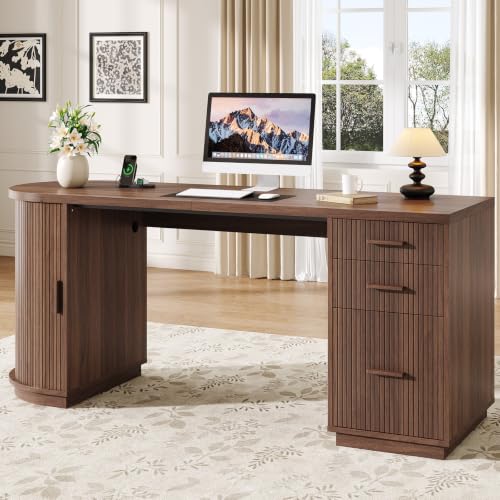
Executive Desk with Cable Management
Master your executive workspace with integrated cable management. Keep your surface pristine, your devices charged, and your focus uninterrupted.
Shop Top Executive Desks →Why Cable Management Matters for Executive Desks
An executive desk with built-in cable management isn't just about aesthetics — it's about productivity, safety, and professionalism. A clutter-free surface reduces distractions, protects your devices from accidental pulls, and makes your workspace look as polished as your work. Whether you're setting up a home office or a corner office, the right cable management system transforms your desk into a command center.
Key Features of the Best Executive Desks with Cable Management
Built-in Cable Trays
Under-desk trays route and hide power strips, adapters, and excess cable length, keeping your floor and surface clear. Look for trays with adjustable width and removable covers for easy access.
Grommet Holes & Routing
Pre-drilled grommets allow cables to pass through the desk surface discreetly. High-end models feature wide, brushed-metal grommets that accommodate multiple cables and maintain a sleek profile.
Integrated Power & USB
Many executive desks now include built-in power outlets and USB ports right on the surface or in the grommet area, reducing the need for bulky adapters and power strips on the floor.
Modular & Expandable
Top-tier desks offer modular cable management that adapts to your evolving tech setup. Additional clips, channels, and sleeves let you customize routing for monitors, laptops, and peripherals.
How to Choose the Right Executive Desk with Cable Management
When selecting an executive desk, consider not just the material and finish, but also the cable management system that will keep your workspace tidy for years. Here's what to look for:
- Assess your tech load: Count your devices — monitors, laptop, docking station, phone charger, desk lamp, speakers. Choose a desk with enough grommets and tray space to handle all cables without overcrowding.
- Think about accessibility: You'll need to plug and unplug devices occasionally. Ensure the cable tray or routing channel is easy to reach, preferably with a quick-release or hinged design.
- Material compatibility: Solid wood and veneer desks often come with factory-drilled grommets, while glass desks may use adhesive cable clips. Choose a system that complements the desk material.
- Future-proofing: Opt for a desk with at least 3-4 grommets and a spacious tray. As you add new gadgets, you'll appreciate the extra real estate for cable routing.
- Integrated power solutions: Desks with built-in outlets and USB ports save you from crawling under the desk to plug in. Look for UL-listed components for safety.
Explore more: Desk with Built-in Cable Management · Computer Desk with Cable Management · Desk with Power Outlet and USB · Desk with Drawers on Both Sides
Expert Tips for Setting Up Your Executive Desk
1. Plan Before You Plug
Map out where each device will sit. Group cables by type (power, data, audio) and measure the length needed to reach the grommet or tray. This prevents unnecessary slack.
2. Use Velcro Ties & Sleeves
Bundle cables together with reusable Velcro ties and place them inside a cable sleeve for a clean, unified look. This also makes future changes much easier.
3. Label Everything
Use small labels or colored tape on each cable near the plug. When you need to unplug one device, you won't have to trace every cord.
4. Secure Under-Desk Power Strips
Mount your power strip inside the cable tray using heavy-duty double-sided tape or screw-mounted brackets. This keeps it off the floor and reduces cable strain.
Ready to Upgrade Your Executive Desk?
Browse our top picks for executive desks with superior cable management. Each model is hand-selected for quality, design, and functionality.
View Executive Desks BelowRecommended Executive Desks with Cable Management
⚠️ AFFILIATE DISCLOSURE: This website contains affiliate links. As an Amazon Associate, we earn from qualifying purchases. If you make a purchase through these links, we may receive a small commission at no additional cost to you. Read our full affiliate policy.

SEDETA 78.7" L Shaped Executive Desk with Charging Station, Large Home Office Computer Desk with File Drawers & Adjustable Storage Cabinet, CPU Stand, Modern L Desk for Business, Black + Brown

SEDETA 77.1" Executive Large Electric Standing Desk, Brown

Sauder Palladia Office Desk with Drawers, Executive Desk with File Cabinet Storage, Cable Management, Keyboard Tray, in Wind Oak Finish

63 Inch L-Shaped Executive Desk, Industrial Modern Wood Office Desk with Locking Drawers, Built-in Cable Management & Power Outlet, Real Wood Finish, Reversible Left/Right Return Home Workstation

OffiGo 71" Executive Electric Standing Desk Height Adjustable, Rustic Brown

Bestier 59" Executive Desk, File Drawer, Keyboard Tray & 2 Drawers, Gray