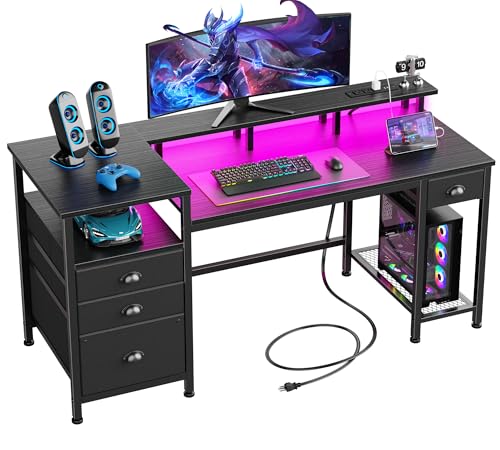
Gaming Computer Desk Guide
Find the perfect gaming desk that combines performance, comfort, and style for your ultimate battle station. Expert advice for every gamer.
Explore Gaming DesksYour gaming desk is the foundation of your setup. The right gaming computer desk enhances your performance, supports your gear, and defines your gaming space. Whether you're a competitive esports player, a casual streamer, or a content creator, your desk choice impacts every gaming session. This guide covers everything you need to know about choosing, setting up, and optimizing your gaming desk.
Why Your Gaming Desk Matters
A gaming computer desk is more than just a place to put your monitor and keyboard. It's the command center for your digital adventures. A well-chosen desk:
- Supports your gear: From heavy monitors to full tower PCs, your desk must handle the weight and size of your equipment.
- Enhances ergonomics: Proper height and layout prevent strain during long gaming sessions, keeping you comfortable and focused.
- Organizes cables: Built-in cable management keeps your setup clean and reduces clutter for a professional look.
- Reflects your style: Whether RGB-lit or minimalist, your desk should match your gaming aesthetic.
- Improves performance: A stable, spacious surface lets you move freely and react faster in competitive games.
Key Features of a Great Gaming Computer Desk
Not all desks are created equal. When shopping for a gaming computer desk, pay attention to these essential features:
🔹 Size & Surface Area
Consider your monitor setup. A gaming desk should comfortably fit your monitors, keyboard, mouse, and other peripherals. For dual monitor setups, look for desks at least 55 inches wide. Triple monitors may require 70+ inches.
🔹 Height Adjustability
Ergonomics are crucial. Consider a height-adjustable gaming desk that allows you to switch between sitting and standing positions. This promotes better posture and reduces fatigue.
🔹 Weight Capacity
Ensure your desk can support your setup. Most gaming computer desks support 100-300 lbs. Check the specs if you have a heavy PC, multiple monitors, or a large sound system.
🔹 Cable Management
Built-in cable trays, grommets, and routing channels keep wires organized. A clean setup not only looks better but also makes maintenance easier.
🔹 Material & Build Quality
Steel frames provide stability. Desktops come in various materials including laminate, solid wood, and tempered glass. Choose based on durability and aesthetic preference.
🔹 Shape & Layout
Choose from rectangular, L-shaped, or corner desks. L-shaped and corner desks maximize space and provide additional surface area for multi-monitor setups.
Types of Gaming Computer Desks
Different gaming styles require different desk configurations. Here's a comparison of the most popular types:
| Desk Type | Best For | Key Features | Price Range |
|---|---|---|---|
| Rectangular Gaming Desk | Single or dual monitors, limited space | Simple, sturdy, easy to place | $150–$500 |
| L-Shaped Gaming Desk | Multi-monitor setups, corner spaces | Extra surface, corner placement, great for streaming | $250–$800 |
| Corner Gaming Desk | Maximizing corner space, immersive setups | Space-efficient, deep surface, ergonomic | $200–$600 |
| Height-Adjustable Gaming Desk | Sit-stand flexibility, health-conscious gamers | Electric or manual adjustment, ergonomic | $300–$1,200 |
| RGB Gaming Desk | Aesthetic-focused builds, streamers | Built-in RGB lighting, modern design | $200–$700 |
How to Choose the Right Size
The perfect gaming computer desk size depends on your equipment and available space. Follow this guide:
Measure Your Space
Measure your room dimensions and consider the desk's footprint. Allow at least 3 feet of clearance behind your chair and enough room for comfortable movement.
Consider Your Monitor Setup
For one monitor, 48" width is sufficient. For dual monitors, aim for 55"–60". Triple monitors or ultrawide screens need 70" or more. Depth should be at least 24" for comfortable viewing distance.
Account for Peripherals
Consider your keyboard, mouse, speakers, and other accessories. Ensure there's enough space for mouse movement and comfortable arm placement.
Think About Future Upgrades
Buy a desk that can accommodate future equipment additions, such as additional monitors, streaming gear, or a larger PC case.
Materials and Durability
The material of your gaming computer desk affects durability, aesthetics, and maintenance. Here's what you need to know:
- Steel Frames: Most durable and stable. Look for a heavy-duty steel frame with powder coating to prevent rust and scratches.
- Laminate Tops: Affordable and resistant to scratches and spills. Ideal for gamers on a budget. However, laminate can chip over time and may not handle heavy weights as well as solid wood.
- Solid Wood Tops: Premium choice with excellent durability and timeless aesthetics. Can be refinished if damaged. More expensive and requires regular maintenance.
- Tempered Glass Tops: Modern look and easy to clean. Suitable for lightweight setups but can be fragile and show fingerprints easily. Not recommended for heavy equipment.
- MDF (Medium Density Fiberboard): Common in budget desks. Provides a smooth surface and can be laminated or painted. Less durable than solid wood.
Gaming Desk Setup Tips
Once you've chosen your gaming computer desk, optimize it for performance and comfort:
Monitor Placement
Position your monitor at arm's length with the top bezel at or slightly below eye level. This reduces neck strain and improves focus during long gaming sessions.
Keyboard and Mouse
Place your keyboard directly in front of you with your elbows at 90 degrees. Your mouse should be within comfortable reach without stretching.
Cable Management
Use cable ties, adhesive clips, and under-desk trays to organize your wires. This not only looks better but also prevents tangles and improves airflow around your PC.
Lighting
Consider LED strips or a green desk light for ambient lighting. Proper lighting reduces eye strain and creates an immersive gaming atmosphere.
Budget Considerations
Gaming computer desks range from budget-friendly to premium. Here's what to expect at different price points:
- Under $200: Basic rectangular desks with MDF or laminate tops. Good for casual gamers or those on a tight budget. May lack cable management and have lower weight capacity.
- $200–$500: Mid-range desks with better build quality, steel frames, and improved features like cable grommets and ergonomic designs. Great value for most gamers.
- $500–$1,000: High-quality options including L-shaped, corner, and height-adjustable desks. Solid wood options and advanced features for serious gamers and streamers.
- $1,000+: Premium gaming desks with electric height adjustment, RGB lighting, solid hardwood tops, and extensive customization options. Perfect for professional streamers and high-end setups.
Ready to Build Your Ultimate Gaming Setup?
Choose from our top-rated gaming computer desks and transform your gaming experience. Find the perfect desk for your style and budget.
Shop Gaming Desks