
L-Shaped Computer Desk with Drawers and Shelves: The Complete Guide
Everything you need to know before choosing a corner workstation with built-in storage — layouts, drawer types, shelf configurations, materials, and setup strategies for a productive home office.
Explore Recommended ModelsWhy this desk style deserves your attention: An L-shaped computer desk with drawers and shelves solves two problems at once — it turns an unused corner into a generous work surface, and it keeps documents, peripherals, and office supplies off the desktop. For anyone researching a corner workstation, understanding how the return arm, storage columns, and shelf heights interact is the key to choosing a model that fits both your room and your daily workflow.
What Makes an L-Shaped Desk with Drawers and Shelves Different?
An L-shaped computer desk combines two working surfaces that meet at a 90-degree angle. One arm — usually the longer one — serves as the primary computer station, while the return arm provides secondary workspace or storage. When drawers and shelves are integrated into this design, the desk becomes a self-contained workstation rather than a flat surface that needs separate furniture around it.
The storage elements typically appear in three places. First, a drawer pedestal or column sits under one arm, offering filing drawers, shallow utility drawers, or both. Second, open shelves or a small hutch rise above the corner or along one return. Third, some models include a raised monitor shelf that doubles as a storage ledge. Together, these features reduce desktop clutter and let you keep reference materials, chargers, and stationery within reach.
Compared with a plain corner desk, the storage-equipped version is a more complete solution for home offices where floor space is limited and a separate filing cabinet or bookcase would feel cramped. If you are still comparing broader categories, our desk types overview explains how L-shaped models fit alongside standing desks, executive desks, and compact workstations.
Key Benefits of a Corner Desk with Integrated Storage
Efficient Corner Use
An L-shaped footprint uses the dead corner of a room that a straight desk cannot reach, often delivering more usable surface than two separate tables.
Dedicated Work Zones
The long arm handles monitor and keyboard work while the return arm becomes a writing, planning, or laptop zone — no need to clear the desk between tasks.
Built-In Organization
Drawers and shelves keep documents, cables, and accessories off the desktop, which makes daily tidying faster and keeps focus on the screen.
Multi-Monitor Friendly
The wide angle between arms supports dual or triple monitor arrangements, with the corner naturally accommodating a primary display and side screens.
Fewer Extra Pieces
Integrated shelves and drawers reduce the need for separate bookcases, filing cabinets, or under-desk organizers in a small home office.
Strong Visual Anchor
A single coordinated desk with storage looks more deliberate than mismatched furniture, which matters in living rooms and open-plan apartments.
Anatomy of the Desk: Drawers, Shelves, and Returns
Before comparing individual models, it helps to understand the components that define this category. The same terms appear across listings, but the quality and configuration vary widely.
The Main Arm and the Return Arm
The main arm is the longer working surface and normally hosts the monitor, keyboard, and primary task area. The return arm is the shorter leg of the L, and it may be used for a laptop, printer, writing space, or storage. Some models allow you to assemble the desk in a left-handed or right-handed orientation, which is valuable if your room's window or door position dictates the layout. If you prefer an even larger footprint, a U-shaped desk with hutch and drawers adds a third arm but requires more floor space.
Drawer Pedestals and Columns
Drawers on an L-shaped desk usually come in one of three configurations. A full pedestal offers two or three deep drawers, often including a file drawer for letter or legal folders. A column of shallow drawers works well for stationery, chargers, and small devices. A single utility drawer beneath the desktop is the most basic option and is common on entry-level models. Check the drawer glides: metal ball-bearing slides last longer than nylon rollers, and full-extension slides let you reach the back of each drawer.
Open Shelves and Hutches
Shelves may sit below the return arm, above the corner, or as a small hutch on the main arm. Open shelving is flexible but collects dust, while enclosed cabinets hide clutter more effectively. If you plan to store heavy reference books, confirm the shelf's weight rating and whether it is adjustable. A shelf that sits on top of the desk is a useful add-on for models that do not include overhead storage.
Monitor Shelves and Risers
A raised monitor shelf at the back of the main arm lifts the screen to a comfortable viewing height and creates a shallow storage ledge beneath it. This is especially useful on L-shaped desks because the corner geometry already pushes the screen slightly away from the user.
Layout Ideas for an L-Shaped Workstation
The way you arrange the two arms determines how comfortable the desk feels day to day. Three layouts cover most home office situations.
1. The Dual-Zone Office
Place the monitor and keyboard on the long arm and reserve the return for a laptop, notebook, or printer. Drawers sit beneath the return so the main arm stays open for your legs and chair. This layout suits people who switch between screen work and paper work throughout the day.
2. The Corner Command Center
Push the monitor into the corner itself and angle it toward the chair, using both arms as extended side surfaces. Shelves above the corner hold reference material, and drawers on one side keep cables and accessories out of sight. This arrangement maximizes surface area but requires careful cable routing around the inner corner.
3. The Writing and Computing Split
Keep the computer on one arm and set up the other arm as a clean writing or sketching surface. Choose a model where the drawer pedestal is on the computing side, leaving the writing arm free of storage underneath for legroom. For a dedicated writing focus, compare the proportions with a classic secretary desk, which offers a different ergonomic approach.
Whichever layout you choose, keep at least 75 to 90 centimeters of clearance in front of each working arm so the chair can move freely. If the room is tight, a small corner desk for home office use may be a better starting point than a full-size L-shaped model.
Materials and Build Quality
An L-shaped desk with drawers and shelves carries more structural load than a flat table, so material choice matters more than it first appears. The desktop must resist sagging across two spans, and the drawer columns must stay rigid when opened.
Engineered Wood and Laminate
Particle board and MDF with a laminate or melamine finish are the most common materials in the mid-range and entry-level tiers. They offer consistent surfaces, resist minor spills, and keep the overall weight manageable. The trade-off is that screw holes can strip over time, so reinforced hardware and thicker panels are worth prioritizing. Our guide to laminate desks explains finish options in more detail.
Solid Wood and Butcher Block
Solid wood and butcher block tops provide a more durable surface that can be sanded and refinished. They pair well with metal frames and give the desk a warmer appearance. A solid wood computer desk with drawers is a long-term investment, but the added weight means the frame and leg joints must be correspondingly robust.
Metal Frames and Steel Legs
Steel legs and cross-bracing determine how much the desk wobbles during typing. Look for a frame with a rear stretcher or a corner gusset, especially on larger models. High-grade steel with a rust-proof finish is the most reliable choice for a desk that will hold monitors, a printer, and filled drawers.
Drawer Hardware
Drawer glides are the most common failure point on storage desks. Metal ball-bearing slides with a stated load rating are preferable to simple roller slides. Soft-close mechanisms are a nice refinement, but smooth travel and solid mounting matter more than the closing feature itself.
Comparing Desk Tiers at a Glance
The table below uses universal quality tiers rather than specific figures, so it stays useful regardless of when you read it or where you shop.
| Tier | Typical Build | Storage Configuration | Best For |
|---|---|---|---|
| Entry-level | Laminate over particle board, simple steel legs | One utility drawer, open lower shelf | Students, light daily use, first home office |
| Mid-range | Thicker engineered panels, reinforced frame | Two-to-three drawer pedestal, adjustable shelf | Full-time remote work, dual monitors |
| Premium | Solid wood or high-grade engineered top, heavy-duty steel | File drawer, soft-close glides, hutch shelving | Professionals needing long-term durability |
| Commercial-grade | Reinforced steel frame, scratch-resistant surface | Locking drawers, modular shelving, cable channels | Shared offices, high-traffic workspaces |
Choosing the Right Drawer Configuration
Drawers are where most buyers either feel satisfied or frustrated months after assembly. Think about what you actually store before deciding on a configuration.
- File drawers: Essential if you keep paper records. Confirm the internal dimensions accept letter or legal hanging folders, and check that the drawer extends fully.
- Shallow utility drawers: Ideal for pens, chargers, adapters, and small tools. A column of three shallow drawers is often more useful than one deep drawer.
- Deep storage drawers: Useful for binders, camera gear, or larger accessories, but they consume legroom if placed where you sit.
- Locking drawers: Worth considering in shared spaces or if you handle confidential documents. A locking drawer model adds security without a separate cabinet.
Also check drawer alignment and whether the pedestal is reversible. A reversible pedestal lets you position storage on the side that suits your dominant hand and your room layout.
Shelf Planning: Open, Enclosed, or Overhead
Shelves on an L-shaped desk serve two purposes: they add vertical storage and they can visually frame the workspace. The right choice depends on how much you want to display versus conceal.
Open Shelving
Open shelves keep reference books, plants, and decor visible, which makes a home office feel more personal. They also collect dust and require regular tidying. If your storage needs are modest, open shelves above the return arm are usually sufficient.
Enclosed Cabinets
Cabinet doors hide clutter and protect contents from dust, but they add visual weight. In a small room, a single enclosed cabinet combined with open shelving is often the best balance. Models described as an office desk with hutch and file cabinet typically combine both approaches.
Overhead Hutches
A hutch adds a second tier of storage above the main arm. It is useful for printers, reference binders, and display items, but it can make the desk feel enclosed. Measure your ceiling height and the hutch depth before committing, and make sure it does not block light from a nearby window.
Ergonomics and Comfort on an L-Shaped Desk
The angled geometry of an L-shaped desk changes how you sit, so ergonomic adjustments matter. Start with desk height: the primary work surface should allow your forearms to rest roughly parallel to the floor with your shoulders relaxed. If the desk is fixed-height, a footrest can help shorter users, and a keyboard tray can lower the typing surface without changing the desk itself. A pull-out keyboard tray is especially useful on L-shaped desks because it keeps the main surface clear for documents.
Position the primary monitor at the corner or along the main arm, roughly an arm's length away, with the top of the screen at or slightly below eye level. If you use a second monitor, place it on the return arm at a slight angle so you can turn your head rather than twist your torso. Keep frequently used items within the inner corner arc, and reserve the far ends of each arm for occasional-use items.
Chair choice also matters. An L-shaped desk invites more swiveling and repositioning than a straight desk, so a chair with smooth casters and adjustable armrests is a worthwhile pairing. If you work standing for part of the day, a height-adjustable frame or a standing desk converter can be added later.
Cable Management for Corner Workstations
Cables on an L-shaped desk tend to gather at the inner corner, where the two arms meet and where power outlets are often furthest away. A simple routine keeps the setup clean.
- Mount a surge protector or power strip under the main arm, near the corner, so cables have a short path to power.
- Use adhesive cable clips or raceways along the underside of each arm to route monitor and peripheral cables toward the corner.
- Keep a small cable tray or basket in one drawer for spare adapters and charging cables.
- Label power bricks and charger cables so future changes are quick.
- If you add a monitor arm, route its cable through the arm's integrated channel rather than letting it hang.
For a deeper treatment, see our guide to cable management, which applies equally to fixed and adjustable corner desks.
Who Should Choose This Desk Style?
Remote and Hybrid Workers
If you spend most of the day at a computer and also handle paperwork, the two-arm layout separates screen work from document work without clearing the desk. A mid-range model with a file drawer covers most needs.
Multi-Monitor Users
The corner angle naturally accommodates a primary display plus one or two side screens. Choose a model with a wide main arm and a reinforced frame to support monitor arms and heavy displays.
Small Home Offices
A corner desk with integrated shelves replaces a separate bookcase and filing cabinet, which frees floor space. Measure the room carefully and favor compact returns over full-size pedestals.
Students and Creators
One arm can host a computer while the other stays open for sketching, editing, or study materials. Entry-level and mid-range models in this category are well specified for these workflows.
Pre-Purchase Checklist
Use this checklist to evaluate any L-shaped computer desk with drawers and shelves before you commit.
- Dimensions per arm: Measure both the long arm and the return arm, not just the overall width. Confirm the return depth leaves room for your chair and legs.
- Reversible assembly: Check whether the desk can be built left-handed or right-handed to suit your room and dominant hand.
- Drawer glide quality: Look for metal ball-bearing slides and full-extension travel. Soft-close is a bonus, not a substitute for solid hardware.
- Frame rigidity: A rear stretcher, corner gusset, or central support leg reduces wobble on larger models.
- Shelf adjustability: Adjustable shelves accommodate binders, printers, and plants of different heights.
- Cable provisions: Grommets, cable channels, or an under-desk tray make cable routing much easier.
- Weight capacity: Total capacity should account for monitors, a printer, and filled drawers — not just the desktop load.
- Assembly requirements: Confirm the tools included, the number of people recommended, and whether the desk ships in one box or several.
If you are weighing this style against a simpler option, our modern computer desk guide covers straight-desk alternatives with a different visual language.
Ready to Compare Specific Models?
Browse the recommended L-shaped computer desks with drawers and shelves below. Each listing focuses on storage layout, frame quality, and assembly details so you can match a model to your room and workflow.
View Product RecommendationsFrequently Asked Questions
What are the main benefits of an L-shaped computer desk with drawers and shelves?
An L-shaped computer desk with drawers and shelves maximizes corner space, provides separate zones for work and storage, keeps essentials within arm's reach, and supports multi-monitor or dual-task workflows without crowding the main surface.
How much floor space does an L-shaped desk need?
Most L-shaped desks fit comfortably in a corner footprint of roughly 150 to 180 centimeters per side. Measure your room and account for chair clearance of at least 75 to 90 centimeters in front of each working section before choosing a model.
Which side should the drawers and shelves be on?
Place drawers and shelves on the side opposite your dominant writing hand if possible, so your working arm moves freely. For right-handed users, storage on the left return is usually more comfortable, though workflow and monitor placement should guide the final decision.
Are L-shaped desks suitable for small home offices?
Yes. Corner L-shaped desks often use awkward corner space more efficiently than two separate straight desks. Compact versions with a shallow return arm fit small home offices well, especially when shelves replace a separate bookcase.
How do I keep cables organized on an L-shaped desk?
Route cables along the inner corner using cable trays, adhesive raceways, and a grommet near the main work zone. Label power bricks, mount a surge protector under the desk, and keep storage drawers reserved for small accessories rather than loose cables.
Related Guides for Your Corner Workstation
If you are refining your setup, these related guides may help:
- L-shaped gaming desk with drawers — for RGB-focused setups and controller storage.
- L-shaped standing desk with keyboard tray — if you want the option to alternate between sitting and standing.
- White and gold L-shaped desk with drawers — a style-focused comparison for brighter rooms.
- Modern desk with drawers — if a straight desk with storage suits your layout better.
- Office desk with storage — a broader look at storage configurations for home offices.
- Under-desk storage — add-on storage that works with corner desks.
- Desk mat with wrist rest — comfort accessories for long sessions.
- Modern desk chair — pairing advice for an L-shaped workstation.
- Desk height calculator — confirm the right working height for your body.
Recommended L-Shaped Computer Desks with Drawers and Shelves
⚠️ AFFILIATE DISCLOSURE: This website contains affiliate links. As an Amazon Associate, we earn from qualifying purchases. If you make a purchase through these links, we may receive a small commission at no additional cost to you. Read our full affiliate policy.

L-Shaped Computer Desk with Drawers & Shelves - LED Lights & Power Outlets | Metal Frame & Wood Top, 6 Drawers, 5-Tier Open Shelves, Reversible L-Shape for Left or Right Setup
Check price on Amazon
SEDETA 58'' L Shaped Computer Office Desk with 3 Drawers and Bookshelf | L Shaped Corner Desk with Storage Shelves and LED Light for Home Office, Gaming, Small Space, White
Check price on Amazon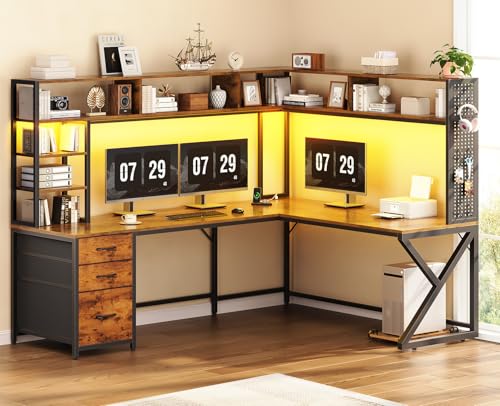
SEDETA L Shaped Computer Desk with Hutch, 3 Drawers, Shelves | Convertible 94.5" Home Office Desk with File Drawer, Power Outlet, LED Lights, Storage and Pegboard, Brown
Check price on Amazon
Huuger L Shaped Office Desk with Power Outlets & 3 Drawers | 47 Inch Computer Desk with Shelves, for Gaming, Corner Work, Home Office, Study, Rustic Brown
Check price on Amazon
AODK 79 inch L Shaped Desk with 5 Drawers, LED Light & 2 Power Outlets | Reversible Black L Shaped Gaming Desk, Computer Desk with Storage Shelves for Home Office
Check price on Amazon
SEDETA L Shaped Gaming Corner Desk with Drawers, Hutch and Storage Shelves | Reversible Computer Desk, Gaming Desk with Pegboard, Led Lights, and Power Outlet for Home Office, Small Space, Black
Check price on Amazon