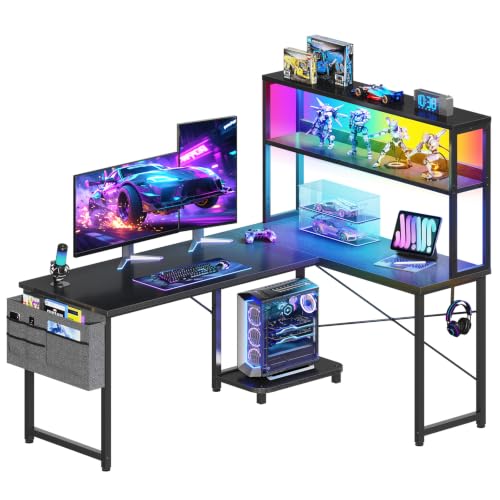
L Shaped Gaming Desk with LED Lights: The Ultimate Buying Guide
Transform your gaming setup with a corner workstation that combines immersive lighting, generous surface area, and ergonomic design. Everything you need to know before choosing your next battlestation centerpiece.
Explore Top PicksWhy an L shaped gaming desk with LED lights? A corner desk maximizes room usage while giving you separate zones for dual monitors, peripherals, and collectibles. Integrated LED lighting adds atmosphere, reduces eye strain in dim rooms, and turns your setup into a visual statement. This guide walks you through the essential features, tier classifications, and practical considerations so you can make a confident decision.
Key Features to Evaluate
Not all corner gaming desks are created equal. The following attributes separate a well-engineered model from a basic one. Use these criteria to compare options across different tiers.
Surface Dimensions
An L shaped desk typically offers between 50 and 60 inches per wing. Verify the depth (at least 23 inches) to accommodate a large mouse pad, keyboard, and monitor arms without crowding.
LED Lighting System
Look for integrated LED strips with multiple color modes, remote control, and memory function. Premium tiers often include app-based control and music-sync capability.
Build Material & Stability
High-grade steel frames with reinforced legs prevent wobble during intense sessions. Desktop surfaces range from engineered wood to carbon fiber textures; heavier materials generally indicate better durability.
Cable Management
Pre-drilled grommets, under-desk cable trays, and velcro straps keep wiring organized. This is especially important for LED strips that require power routing along the desk frame.
Reversible Configuration
Many L shaped models allow you to mount the longer wing on either the left or right side. This flexibility is valuable for adapting to different room layouts.
Additional Storage & Accessories
Monitor shelves, cup holders, headphone hooks, and controller stands add functionality. Check whether these are included or sold separately.
Tier Classification: Finding Your Fit
To simplify comparison, we classify L shaped gaming desks with LED lights into three market tiers. Each tier reflects a different balance of materials, lighting sophistication, and structural refinement.
| Tier | Best For | Typical Characteristics |
|---|---|---|
| Entry-Level | First-time gaming setups, casual players | Basic LED strips with single-color or limited RGB modes; engineered wood surface; steel frame with standard legs; minimal cable management features. |
| Mid-Range | Dedicated gamers, dual-monitor users | Multi-zone RGB lighting with remote; thicker desktop with scratch-resistant coating; reinforced frame; included cable tray and monitor shelf; reversible design. |
| High-End Tier | Enthusiasts, streamers, multi-device setups | App-controlled lighting with music sync; premium materials such as carbon fiber or solid wood veneer; heavy-duty frame rated for multiple monitors; integrated power outlets and USB hubs. |
Setup Considerations for LED-Lit Corner Desks
Proper placement and configuration maximize both the aesthetic and functional benefits of your new desk. Keep these points in mind during assembly and daily use.
- Room placement: Position the desk so the longer wing faces away from direct sunlight to reduce glare on monitors. Corner placement naturally defines the gaming zone.
- Power routing: Use a surge protector mounted under the desk. LED strips and monitor power bricks should be secured with cable ties to avoid dangling wires.
- Lighting angle: Aim LED strips downward or backward against the wall for indirect ambient light. Direct-facing LEDs can cause reflections on glossy monitor screens.
- Monitor positioning: Place your primary monitor at the corner intersection for a natural viewing angle. Secondary screens go on the wings.
- Ergonomic height: Standard gaming desks sit at 28–30 inches. If you are taller or shorter, consider an adjustable-height model or add a footrest to maintain proper posture.
- Cable management plan: Route all cables along the desk frame using adhesive clips before adding LED strips. This prevents interference and keeps the lighting clean.
LED Lighting: What to Look For
The lighting system is a defining feature of this desk category. Here is a breakdown of what different LED configurations offer:
Basic RGB Strips
Usually include a remote with 16 color options and several brightness levels. Adequate for ambient accent lighting and easy to install along the desk's rear edge.
Multi-Zone Lighting
Separate LED segments on each wing and the corner can be controlled independently. This creates depth and allows color coordination with your peripherals.
Smart / App-Controlled
Wi-Fi or Bluetooth-enabled systems that sync with music, respond to voice commands, or integrate with smart home routines. Found primarily in the high-end tier.
Music Sync Mode
A built-in microphone or audio input makes the LEDs pulse with game audio or music. Popular among streamers and content creators.
Compatibility with Gaming Accessories
An L shaped desk with LED lights pairs well with a wide range of peripherals. Consider these pairings to complete your setup:
- Monitor arms: A dual monitor arm clamped to the corner section frees up desk space and allows precise alignment. Check that the desk surface is thick enough for the clamp.
- Keyboard tray: If the desk does not include one, an under-desk keyboard tray improves ergonomics and keeps the main surface clear for mouse movement.
- Headphone stand and controller mount: Attach these to the side of the desk to keep accessories within reach without cluttering the surface.
- Desk mat: A large extended mouse pad protects the surface and provides a consistent glide area. Choose a dark color to complement RGB lighting.
- Under-desk PC mount: Keep your tower off the floor and away from dust while freeing up legroom.
Frequently Asked Questions
Is an L shaped desk better than a straight desk for gaming?
For most gamers, yes. The corner configuration provides more usable surface area, allows separate zones for dual monitors and peripherals, and fits more naturally into room corners. Straight desks are preferable only in very narrow rooms.
Can I install LED lights on an existing desk?
Absolutely. Aftermarket LED strips with adhesive backing are widely available. Look for USB-powered or plug-in kits with a remote control. The guides above on cable management apply equally to DIY installations.
What is the ideal height for a gaming desk?
Most standard gaming desks are 28–30 inches high, which suits users between 5'6" and 6'0". If you fall outside this range, consider an adjustable-height model or use a footrest to compensate.
Do LED lights cause eye strain?
Indirect LED lighting actually reduces eye strain by lowering the contrast between a bright monitor and a dark room. Avoid placing LEDs directly in your line of sight or reflecting off the screen.
How much weight can an L shaped gaming desk hold?
Weight capacity varies by tier. Entry-level models typically support 100–150 lbs, mid-range models 150–250 lbs, and high-end models 250–400 lbs. Always check the manufacturer's specification before mounting heavy equipment.