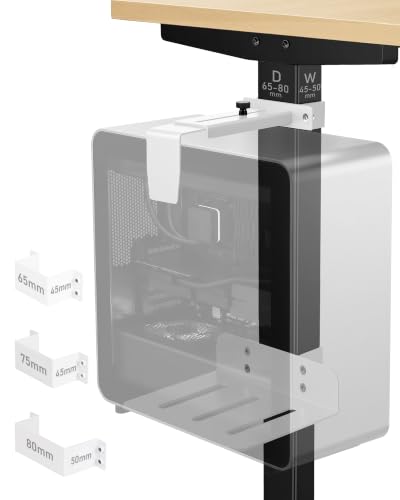
PC Bracket Under Desk: Mount Your Computer Securely
Mount your PC under the desk to free up floor space, improve airflow, and create a cleaner, more organized workspace. Discover the best under-desk PC brackets for your setup.
Why Mount Your PC Under the Desk? A PC bracket under desk is one of the smartest upgrades for any workspace. It securely holds your computer tower beneath the desk surface, keeping it off the floor, away from dust, and out of the way. This not only saves valuable floor space but also improves cable management and gives your desk a clean, professional look. Whether you have a PC desk, a PC under-desk mount, or a custom setup, the right bracket makes all the difference.
What is a PC Bracket Under Desk?
A PC bracket under desk is a mounting accessory designed to hold your computer tower securely beneath your desk. It typically consists of a metal frame or adjustable arms that attach to the underside of the desk, cradling the PC case. These brackets are available in various sizes to accommodate different tower sizes, from compact mini-ITX builds to full-tower gaming rigs. They often feature adjustable width, padded grips, and sturdy construction to ensure your PC stays safe and stable.
Key Benefits of Using an Under-Desk PC Mount
✅ Saves Floor Space
By mounting your PC under the desk, you free up valuable floor area. This is especially useful for small offices, home studios, or any workspace where every square foot counts. Your room looks tidier and more spacious.
✅ Improves Airflow & Cooling
Elevating your PC off the carpet or floor allows for better airflow. Dust and pet hair are less likely to clog your intake fans, leading to cooler operating temperatures and longer component life.
✅ Enhanced Cable Management
With the PC mounted under the desk, cables can be routed neatly along the desk frame. This reduces clutter and makes your workspace look professional and organized. Pair it with PC desk with shelves for even more organization.
✅ Cleaner Aesthetic
An under-desk PC mount gives your workspace a minimalist, modern look. No more bulky tower taking up space on or beside your desk. It’s a simple upgrade that transforms the entire feel of your setup.
How to Choose the Right PC Bracket Under Desk
🔧 Weight Capacity
- Check the bracket's weight limit. Most support 30–80 lbs.
- Ensure it can handle your PC's weight (including components).
- Heavier towers need heavy-duty brackets with reinforced steel.
📏 Adjustability
- Look for adjustable width and depth to fit various case sizes.
- Some brackets have sliding arms or removable pads for a custom fit.
- Ensure the bracket can accommodate your PC's dimensions.
🛠️ Desk Compatibility
- Consider desk thickness and material (wood, metal, glass).
- Most brackets use screws or clamps; ensure your desk can support them.
- For normal height of desk, check clearance for your legs.
🧰 Build Quality
- Opt for steel or aluminum construction for durability.
- Padded grips prevent scratches and reduce vibration.
- Powder-coated finishes resist rust and wear.
Installation Tips for a Secure Mount
Pro Tip: Before installing your PC bracket under desk, measure the clearance needed for your tower and ensure there is enough legroom. Use a stud finder if attaching to a wooden desk to avoid splitting the wood. For metal desks, use rubber grommets to prevent scratches. Always double-check that the bracket is level and tightened securely before placing your PC. If you're using a PC in a desk setup, ensure proper ventilation.
Comparison of Popular Under-Desk PC Mounts
| Model | Weight Capacity | Adjustable Width | Price Range |
|---|---|---|---|
| Heavy-Duty Steel Bracket | 80 lbs | Yes (up to 10") | $45–$65 |
| Universal Adjustable Mount | 55 lbs | Yes (up to 9") | $30–$50 |
| Compact Mini-ITX Bracket | 35 lbs | Limited | $25–$40 |
| Premium Aluminum Mount | 65 lbs | Yes (up to 11") | $60–$85 |
Frequently Asked Questions
Will an under-desk PC mount fit any desk?
Most brackets are designed to fit desks with a thickness of 0.75" to 2.5". Check the clamp or screw specifications. For glass or delicate surfaces, use a clamp-style mount with rubber padding to prevent damage.
Can I mount a full-tower gaming PC under my desk?
Yes, as long as the bracket supports the weight and dimensions. Full-tower cases typically weigh 30–50 lbs and are around 8–10 inches wide. Look for heavy-duty brackets with a 60+ lb capacity and adjustable width.
Will mounting my PC under the desk affect airflow?
Actually, it often improves airflow! The PC is elevated, allowing air to circulate from all sides. Ensure the bracket doesn't block any intake or exhaust vents. Leave at least 2–3 inches of clearance around the case for optimal ventilation.
Final Thoughts: Elevate Your Workspace with an Under-Desk PC Bracket
A PC bracket under desk is a small investment that delivers big returns in terms of space, cleanliness, and aesthetics. Whether you're a gamer, a professional, or a student, mounting your PC under the desk can transform your workspace. Combine it with a perfect desk height and ergonomic accessories for the ultimate setup. Ready to upgrade? Browse our selection of top-rated under-desk PC mounts below.