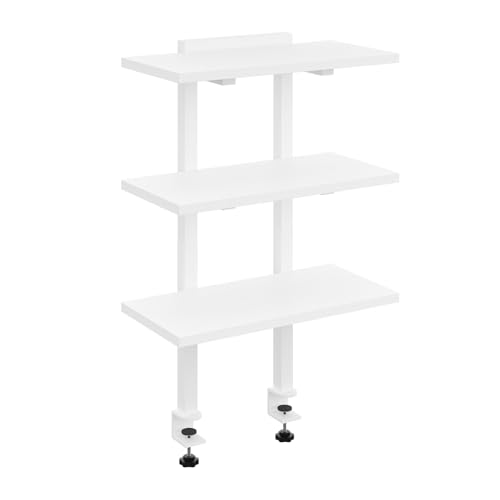
Shelves That Sit On Top of Desk: The Ultimate Guide to Desk Toppers
Transform your workspace with a shelf that sits on top of your desk. Discover how desk topper shelves can add vertical storage, improve ergonomics, and organize your surface.
SHOP TOP DESK SHELVESWhat is a shelf that sits on top of a desk? A desk shelf topper is a freestanding or clamp-on shelf unit placed directly on your desk surface. It raises monitors, organizes accessories, and creates valuable extra storage without taking up additional floor space.
Why You Need a Shelf That Sits On Top of Your Desk
If you're struggling with a cluttered workspace or want to improve your posture, a shelf to sit on top of desk is a game-changer. These versatile accessories help you maximize vertical space, keep your desk surface clean, and create a more organized, productive environment.
📐 Enhanced Ergonomics
Raising your monitor to eye level reduces neck strain and improves posture. A desk topper shelf is one of the most effective ways to achieve proper monitor height.
🗄️ Extra Storage Space
Desk shelves provide additional surface area for speakers, plants, books, and office supplies. Use the space underneath for your keyboard or paperwork.
🧹 Clutter-Free Surface
By lifting items off your desk, you instantly create a cleaner, more focused workspace. This is essential for both productivity and mental clarity.
🎯 Flexible & Portable
Unlike permanent shelving, desk toppers are easy to move, reposition, or take with you when you change workspaces.
Choosing the right shelf that sits on your desk depends on your specific needs. Whether you need a simple monitor riser or a multi-tiered organizer, the options are vast and affordable.
Types of Desk Shelf Toppers
There are several styles of shelves that sit on top of desks, each designed for different purposes. Understanding these types will help you make the best choice for your workspace.
| Type | Best For | Key Features | Typical Price |
|---|---|---|---|
| Monitor Riser | Raising monitors, laptops | Single-level, sturdy, often with storage underneath | $25–$80 |
| Two-Tier Shelf | Dual monitor setups, organizing multiple items | Two levels, extra storage and display area | $40–$120 |
| Corner Desk Shelf | Utilizing corner space, L-shaped desks | Compact, angled design | $30–$90 |
| Clamp-On Shelf | Securing to desk edge, minimal footprint | Attaches to desk, adjustable height | $35–$110 |
| Modular Shelf System | Customizable layouts | Interchangeable components, expandable | $60–$200+ |
If you're looking for a more permanent solution, consider shelves that go on top of desks with a larger footprint or multiple tiers.
How to Choose the Best Shelf for Your Desk
Selecting the right shelf that sits on top of a desk involves more than just picking the cheapest option. Consider these key factors to ensure you get the best value and functionality.
- Weight Capacity: Ensure the shelf can support your monitor, speakers, or other equipment. Most desk shelves hold 20–50 lbs, but heavier-duty options exist.
- Size and Dimensions: Measure your desk depth and width. The shelf should fit comfortably without overcrowding your workspace.
- Material Quality: Solid wood, bamboo, and high-grade MDF are durable choices. Metal frames add stability.
- Height Adjustability: Some shelves have adjustable legs, allowing you to fine-tune monitor height for ergonomic comfort.
- Open vs. Closed Design: Open shelves offer easy access, while closed shelves with drawers add hidden storage.
For a balanced solution that combines storage and ergonomics, many users pair their desk shelf with a stand-up desk to put on desk for versatile sit-stand options.
Ready to Elevate Your Workspace?
Browse our curated selection of the best shelves that sit on top of desks. Find the perfect balance of style, function, and value.
VIEW TOP-RATED DESK SHELVESInstallation Tips for Desk Shelf Toppers
Once you've chosen your shelf, proper installation ensures safety and stability. Here are some pro tips for setting up your shelf to sit on top of desk.
- Center the load: Place heavier items like monitors in the center of the shelf to prevent tipping.
- Use anti-slip pads: Silicone pads or rubber mats under the shelf and on top prevent scratches and slipping.
- Secure cords: Use cable ties or clips to keep wires organized and out of the way, creating a clean look.
- Check stability: Gently shake the shelf to ensure it doesn't wobble. Adjust legs or add stabilizers if needed.
For users with existing standing desks, a stand-up desk converter can also be used in conjunction with a desk shelf for maximum flexibility.
Maximizing Productivity with a Desk Shelf
A shelf that sits on top of your desk isn't just about storage—it's a strategic tool for boosting productivity. Here's how to make the most of it.
- Create zones: Use the shelf for your monitor and accessories, leaving the main desk surface for writing and paperwork.
- Add personal touches: Place a small plant, framed photo, or motivational item on the shelf to personalize your space.
- Improve lighting: Position a desk lamp on the shelf to direct light onto your work area and reduce eye strain.
- Keep frequently used items within reach: Store pens, sticky notes, or your phone on the shelf's lower tier for easy access.
For those who work with multiple monitors, a small computer desk with a monitor shelf can be an excellent space-saving alternative.