Standing Desk Converter: The Ultimate Guide
Transform your existing desk into a healthy sit-stand workstation. Everything you need to know – from benefits & features to maintenance & top picks.
Explore Top Converters ↓Why a standing desk converter? It’s the most affordable way to enjoy the health benefits of standing without replacing your entire desk. Perfect for home offices, corporate cubicles, and shared workspaces. All about desks helps you choose the best converter for your setup.
What Is a Standing Desk Converter?
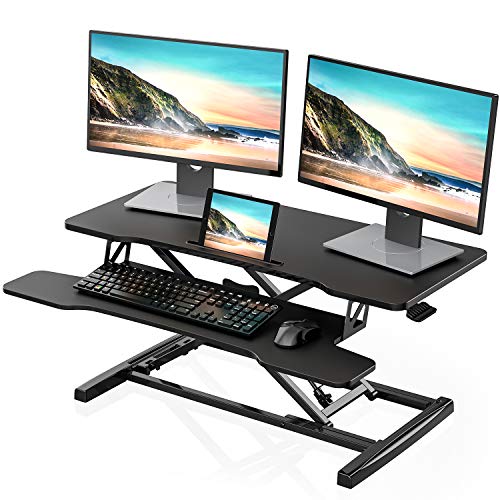
A standing desk converter (also called a sit-stand converter or desktop riser) is a height‑adjustable platform that sits on top of your existing desk. It raises your monitor(s) and keyboard to a comfortable standing height, allowing you to alternate between sitting and standing throughout the day. Most models use gas springs, manual cranks, or electric motors for smooth height adjustment.
Unlike a full adjustable height desk, a converter is portable, affordable, and doesn’t require you to replace your current desk. It’s an ideal solution for renters, budget‑conscious professionals, and those who want to test the standing desk lifestyle before committing to a permanent setup.
Key Benefits of Using a Standing Desk Converter
💪 Health & Wellness
- Reduces back and neck pain by promoting better posture.
- Lowers risk of cardiovascular disease and metabolic syndrome.
- Boosts energy and focus – many users report higher productivity.
- Supports a more active workday, even in a traditional office.
Pair your converter with an anti-fatigue mat for maximum comfort.
💰 Cost & Space Savings
- Significantly cheaper than a new standing desk.
- No need to discard your existing desk.
- Compact footprint – fits most desks (including corner and L-shaped).
- Easily move it between workstations or take it home.
If you have a small workspace, check our guide on home office desks for small spaces.
Types of Standing Desk Converters
Not all converters are created equal. Here are the most common types to help you decide:
🔧 Manual (Spring / Gas Assist)
Uses gas springs or counterbalance mechanisms. You lift or press a lever to adjust height. Quick, affordable, and widely available. Ideal for personal use.
Best for: Budget buyers, home offices, and occasional standing.
⚙️ Crank (Mechanical)
Adjust height by turning a handle. Very durable and reliable, but slower to adjust. Often found in heavy‑duty models that support multiple monitors.
Best for: Shared workstations or heavy equipment (dual 27" monitors).
🔌 Electric (Motorized)
Push a button to raise or lower the platform. Fastest and most convenient, but more expensive and requires a power outlet.
Best for: Frequent position changers, luxury setups, and those with mobility issues.
📦 Full‑Width vs. Compact
Full‑width converters span the length of your desk and can hold dual monitors plus a laptop. Compact models are smaller, lighter, and better for single‑monitor setups or small desks.
For large desks, consider a 72‑inch desk with a full‑width converter.
How to Choose the Right Standing Desk Converter
- Weight capacity: Ensure it can hold your monitor(s), laptop, keyboard, and any accessories. Most support 15–35 lbs.
- Height range: Check the minimum and maximum height. Make sure it matches your seated and standing elbow height.
- Width & depth: Measure your existing desk and available space. Full‑width converters need at least 30" of depth.
- Keyboard tray: Some models include a sliding tray for the keyboard, which improves ergonomics.
- Ease of adjustment: If you switch positions frequently, choose gas‑spring or electric models.
- Stability: Look for sturdy steel frames and non‑slip feet to prevent wobbling while typing.
- Assembly: Most converters require minimal assembly – check reviews for ease of setup.
For a complete ergonomic setup, also consider a monitor arm and a keyboard tray to fine‑tune your workspace.
Pros & Cons of Standing Desk Converters
✅ Advantages
- Affordable (under $300 for most models)
- Portable – move it between desks
- No need to replace existing furniture
- Quick installation – setup in minutes
- Encourages movement & better posture
❌ Disadvantages
- Less stable than a full standing desk
- Limited weight capacity (vs. freestanding desks)
- Can be cumbersome to adjust with multiple monitors
- Some models take up valuable desk surface space
- May not look as sleek as a dedicated standing desk
Maintenance & Care Tips
To keep your standing desk converter in top condition:
- Clean regularly: Wipe with a soft, damp cloth. Avoid harsh chemicals that may damage the surface.
- Lubricate moving parts: Gas springs and crank mechanisms benefit from occasional silicone spray.
- Check screws & bolts: Tighten any loose hardware every few months to maintain stability.
- Avoid overloading: Stay within the weight limit to prevent wear on the lifting mechanism.
- Store properly: If not in use, lower the converter to its lowest position to reduce strain on the springs.
For more desk care, visit our desk tips section.
Frequently Asked Questions
Ready to improve your workspace?
Browse our top‑rated standing desk converters below and find the perfect match for your desk.
View Recommendations ↓