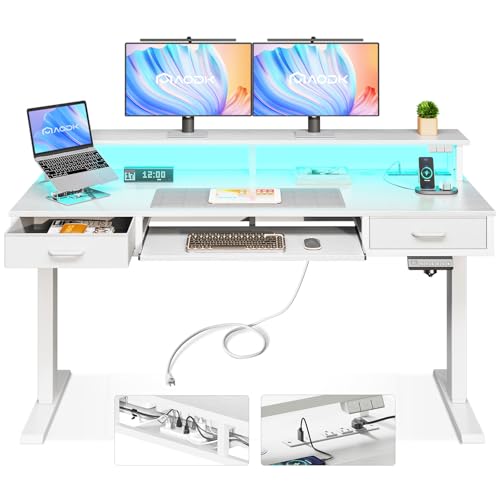
Standing Desk with Keyboard Tray and Drawers
Discover how a height-adjustable desk with an integrated keyboard tray and built-in drawers can transform your posture, protect your wrists, and keep your workspace organized from morning to evening.
EXPLORE RECOMMENDED MODELSWhy this combination matters: A standing desk alone improves circulation and reduces prolonged sitting, but without a keyboard tray your wrists and shoulders may still sit at awkward angles. Add drawers, and you suddenly have a complete workstation that keeps essentials within reach while the desktop stays clear. This guide explains how to evaluate each component so you can choose a model that genuinely fits your body, your equipment, and your room.
What Makes a Standing Desk with Keyboard Tray and Drawers Different?
Most height-adjustable desks focus on one thing: raising and lowering the work surface. A model that also includes a keyboard tray and drawers is designed as a complete ergonomic system. The tray brings the keyboard and mouse closer to your lap, which reduces reach and keeps your elbows near a 90-degree angle whether you are seated or standing. The drawers, meanwhile, convert unused space beneath the desktop into storage for pens, cables, notebooks, and small devices.
This combination is particularly useful in compact rooms where a separate filing cabinet or side table would crowd the floor. Instead of adding furniture, you consolidate storage into the desk itself. The result is a cleaner visual line and a workspace that adapts to both focused tasks and quick transitions between sitting and standing.
Core Components to Evaluate
Height Adjustment Mechanism
Dual-motor electric frames offer smoother, quieter movement and better stability at full height. Single-motor systems are common in entry-level models and can handle lighter loads.
Keyboard Tray Design
Look for adjustable tilt, swivel, and a width that fits your keyboard plus a mouse. Clamp-on trays are flexible; integrated trays feel more seamless.
Drawer Configuration
Side-mounted pedestals, center drawers, or slim under-desk units each suit different storage needs. Soft-close runners and locking options add day-to-day convenience.
Frame Stability
A reinforced steel frame with a wide foot base minimizes wobble. Stability matters more when drawers add weight and when the desk is raised.
Ergonomic Benefits of a Keyboard Tray on a Standing Desk
When you raise a desk to standing height, the keyboard often ends up too high unless you also raise your chair or lower the tray. A dedicated keyboard tray solves this by decoupling the input surface from the main desktop. You can set the desktop at the height that suits your monitor and still bring the keyboard to a comfortable position for your arms.
For standing use, the tray should sit slightly below elbow height so your shoulders stay relaxed. For seated use, the tray should allow your forearms to rest parallel to the floor. Many trays offer negative tilt, which gently slopes the keyboard away from you and encourages a neutral wrist position. Pairing a tray with a supportive wrist rest can further reduce strain during long typing sessions.
If you already own a fixed-height desk and are considering an upgrade, compare the flexibility of a full sit-stand frame against a simpler adjustable computer desk with keyboard tray. The full-frame option typically provides a wider height range and smoother transitions.
Storage That Works With Your Workflow
Drawers are not just about hiding clutter; they shape how you move through your day. A shallow top drawer is ideal for pens, sticky notes, and a charging cable. A deeper drawer can hold a tablet, a compact keyboard, or a notebook. If you work with documents, a file-ready drawer keeps important papers accessible without stacking them on the desktop.
Consider how the drawer unit interacts with the desk frame. Side-mounted pedestals give generous storage but can reduce legroom. Center-mounted slim drawers preserve knee space and suit smaller rooms. For a broader look at how storage changes the character of a workspace, see our guide to a wooden desk with drawers, which covers material and finish considerations that also apply to standing models.
- Measure the drawer depth against your legroom needs.
- Confirm the drawer unit does not block the frame at the lowest height.
- Check whether drawers lock if you store sensitive items.
- Look for soft-close runners to avoid noise in shared spaces.
Comparing Tiers: What to Expect at Each Level
Standing desks with keyboard trays and drawers span a wide range of build quality. The table below groups models by market tier so you can set expectations without relying on numeric figures. Each tier reflects relative positioning rather than an absolute benchmark.
| Tier | Typical Frame & Motors | Keyboard Tray | Drawer Build | Best For |
|---|---|---|---|---|
| Entry-level | Single motor, basic steel frame, narrower height range | Simple clamp-on or fixed tray with limited tilt | One or two slim drawers, basic runners | Light daily use, first sit-stand setup, smaller rooms |
| Mid-range | Dual motor, reinforced frame, memory presets | Adjustable tilt and swivel, wider tray surface | Side pedestal or multi-drawer unit, soft-close runners | Full-time home office, mixed seated and standing work |
| Premium | Dual motor with anti-collision, high-grade steel, extended range | Integrated or heavy-duty tray with ergonomic tilt | Solid wood or high-grade laminate drawers, locking options | Demanding workloads, multi-monitor setups, long-term investment |
| Luxury / commercial-grade | Dual or quad motor, commercial certification, exceptional stability | Custom-integrated tray with precision adjustment | Premium joinery, full-extension drawers, refined finishes | Executive offices, design-focused spaces, heavy daily use |
As you move up the tiers, the differences show up in smoothness of height changes, stability at full extension, and the refinement of drawer hardware. A mid-range model often hits the sweet spot for a home office, while premium and commercial-grade options make sense when the desk is used for many hours every day.
Stability, Weight Capacity, and Drawer Placement
Adding drawers changes the weight distribution of a standing desk. A pedestal on one side can create an imbalance, especially when the desk is raised and the drawer is open. Frames with a wide foot base and a crossbar tend to handle this better. If you plan to store heavy items such as books or a printer, check the desk's rated load capacity and keep heavier items in lower drawers.
Anti-collision sensors, found on many mid-range and premium frames, are a useful safety feature in rooms with nearby shelving or walls. They stop the desk when resistance is detected, which protects both the desk and anything stored around it.
Keyboard Tray Types and How They Attach
There are three common approaches to adding a keyboard tray to a standing desk:
- Integrated tray: Built into the desk design, often sliding out from beneath the desktop. This offers the cleanest look but limits flexibility if you change keyboards.
- Clamp-on mount: Attaches to the front edge of the desktop with a clamp. Easy to install and remove, and usually offers tilt and swivel adjustment. A dedicated under-desk keyboard tray mount can retrofit most desks with a solid top.
- Screw-mounted tray: Fixed directly to the underside of the desktop. More secure than a clamp, but requires drilling and is harder to reposition.
Whichever type you choose, confirm that the tray does not collide with the desk frame or drawer unit when the desk moves through its full height range. Test the range before finalizing your setup.
Pairing Your Desk with the Right Accessories
A standing desk with a keyboard tray and drawers is a strong foundation, but a few accessories complete the ergonomic picture. A footrest can relieve pressure when you are seated, and an anti-fatigue mat makes standing periods more comfortable. Cable management keeps the area beneath the desk tidy, especially when drawers and a motorized frame share the same space.
If you work with a laptop as your primary machine, a standing desk converter with keyboard tray is a lighter alternative, though it does not offer the same drawer storage. For a full-frame solution with a laptop, pair the desk with an external keyboard and mouse so the tray can be used properly.
Monitor height deserves equal attention. A monitor stand for desk with drawer can raise your screen while adding a small storage compartment, which is useful if your desk's drawers are already full. Just ensure the stand does not push the monitor too far back, especially on deeper desktops.
Materials and Finish Considerations
The desktop material affects both durability and the feel of the workspace. Solid wood, bamboo, and high-grade laminate are common choices. Solid wood offers a premium look and can be refinished over time, while laminate resists scratches and moisture with less maintenance. Drawer fronts that match the desktop create a cohesive appearance; contrasting finishes can add visual interest but require more deliberate styling.
For a closer look at how wood surfaces behave in daily use, our guide to a wooden desk top covers grain, sealing, and care. If your design leans toward a more traditional aesthetic, the principles in our wooden stand-up desk overview also apply to height-adjustable frames with drawer units.
Set Up Your Desk for Better Posture
Once the desk arrives, take time to calibrate it to your body. Sit with your feet flat on the floor, elbows near 90 degrees, and the keyboard tray at a height that lets your wrists stay neutral. Save that position as a preset if your desk has memory controls. Then raise the desk to standing height and adjust the tray so your elbows remain relaxed and your monitor sits at eye level.
Alternate between sitting and standing every 30 to 45 minutes. The keyboard tray makes these transitions smoother because your input surface moves with the desk, so you do not need to rearrange your keyboard and mouse each time. If you experience wrist discomfort, review your tray angle and consider a wrist rest to support the natural curve of your hands.
Common Mistakes to Avoid
- Ignoring legroom: A deep drawer pedestal can crowd your knees. Measure before you commit.
- Overloading one side: Distribute weight evenly to keep the frame stable at standing height.
- Skipping the height check: Confirm the drawer unit clears the frame at the lowest setting.
- Setting the tray too high: The tray should support a neutral wrist position, not force your shoulders up.
- Neglecting cable management: Moving desks need slack in cables; route them so they do not catch on drawers or the frame.
Frequently Asked Questions
What are the benefits of a standing desk with a keyboard tray and drawers?
A standing desk with a keyboard tray and drawers combines ergonomic height adjustment with organized storage. The keyboard tray keeps your wrists at a neutral angle, while built-in drawers keep your workspace clutter-free. Together, these features support better posture, reduced strain, and a more productive workflow throughout the day.
How do I choose the right height range for a standing desk with drawers?
Measure your seated elbow height and your standing elbow height, then choose a desk whose height range comfortably covers both. For most adults, a range from around 24 to 50 inches works well. Check that the drawer unit does not interfere with the frame at the lowest setting, since some designs reduce the minimum height when storage is attached.
Can a keyboard tray be added to an existing standing desk?
Yes, under-desk keyboard tray mounts are widely available and can be attached to most standing desks with a solid desktop. Look for a clamp-on or screw-mounted tray with adjustable tilt and swivel. Just confirm the tray does not collide with the desk frame when the desk is lowered or raised.
Do drawers affect the stability of a standing desk?
Drawers add weight and can shift the center of gravity, especially when open. Mid-range and premium standing desks with reinforced frames and dual motors handle drawer units well. Entry-level single-motor desks may wobble at full height if loaded unevenly. Distribute heavy items across drawers and avoid pulling multiple drawers open at once.
What materials are best for a standing desk with keyboard tray and drawers?
Solid wood and high-grade laminate offer durability and a premium feel. Bamboo is an eco-friendly choice with good strength. For drawer fronts, matching the desktop material creates a cohesive look. Metal frames with powder-coated finishes resist rust and wear, making them a solid long-term investment for daily sit-stand use.
Final Thoughts
A standing desk with a keyboard tray and drawers is more than a piece of furniture; it is a system for working comfortably and staying organized. Focus on the height range, frame stability, tray adjustability, and drawer layout that match your daily routine. When those elements align, the desk becomes a natural extension of your workflow rather than something you have to work around.
If you are still weighing options, revisit the tier comparison and the ergonomic checklist above. And when you are ready to explore specific models, the recommended products below are selected to match the needs discussed in this guide.