
Under Desk Printer Stand: The Smart Way to Reclaim Your Workspace
An under desk printer stand moves your printer off your work surface and into unused vertical space below the desk. This guide explains the benefits, the key features to evaluate, and how to choose the right stand for a cleaner, more organized office.
Explore Top PicksWhy an under desk printer stand matters: Most home office desks are designed for a monitor, keyboard, and a few accessories. A printer placed on top consumes a large portion of that surface, crowds the workspace, and forces cables and paper into awkward positions. An under desk printer stand solves this by converting the empty space beneath your desk into functional storage. The result is a clearer surface, a more ergonomic working area, and a printer that stays stable and accessible. Whether you run a compact inkjet for occasional printing or a larger laser unit for daily documents, the right stand keeps your equipment secure and your desk organized.
Key Benefits of Moving Your Printer Under the Desk
Reclaimed Surface Space
Freeing the top of your desk from a bulky printer gives you room for monitors, documents, and daily tools. Many users discover they no longer need a larger desk after relocating the printer underneath.
Cleaner Cable Routing
Under desk placement naturally shortens cable runs to wall outlets and hides power and USB cords. Pair a stand with a cable management tray to keep cords organized and out of sight.
Improved Stability
Dedicated stands are built to support the weight of printers, reducing vibration during printing. This protects the printer mechanism and keeps paper feeding smoothly compared to balancing a unit on a shelf or floor.
Easy Access & Mobility
Many stands include casters or wheels, letting you pull the printer out for paper refills, maintenance, or scanning without lifting. Mobile models also make it simple to reposition the printer when needed.
Types of Under Desk Printer Stands
Printer stands vary by structure, mobility, and storage capacity. Understanding the main categories helps you match the stand to your printer size and workspace layout. If you also need general storage beneath the desk, consider pairing your stand with dedicated under desk storage solutions.
| Type | Best For | Key Features |
|---|---|---|
| Mobile Printer Cart | Users who need to move the printer between rooms or pull it out for access | Casters or wheels, often with a lower shelf for paper, sturdy metal or composite frame |
| Fixed Under Desk Stand | Permanent setups where the printer stays in one position | Compact footprint, solid steel construction, fixed height, sometimes adjustable feet |
| Printer Stand with Storage | Users who want to store paper, toner, or accessories alongside the printer | Multiple tiers or drawers, reinforced shelving, holds heavier laser printers |
| Adjustable Height Stand | Desks with unusual clearance or users who may change printers later | Height-adjustable legs or shelves, flexible fit, supports a range of printer sizes |
What to Look For When Choosing a Stand
How an Under Desk Printer Stand Fits Into Your Workspace
An under desk printer stand works best as part of a broader organization strategy. When you move the printer off the desktop, you create room for a cleaner monitor arrangement, a dedicated writing area, or additional accessories. This is especially valuable in small home offices where every square inch of surface counts. For desks with limited top space, combining an under desk printer stand with other space-saving furniture helps maintain a professional, uncluttered look.
If your desk setup includes a rolling or adjustable workstation, a mobile printer cart can move with you. For fixed desks, a compact stand with a lower paper shelf keeps supplies within reach without adding clutter. Many users also find that relocating the printer reduces noise near their seating position and improves airflow around the device.
Consider how the stand interacts with your existing furniture. A modern computer desk with open legs offers generous under-desk clearance, while a desk with drawers may require a narrower stand. If you have a large office setup, a U-shaped desk provides multiple zones where a printer stand can sit out of the way but remain accessible.
Maintenance and Everyday Use
An under desk printer stand requires minimal maintenance, but a few habits keep it functioning well. Wipe down the stand periodically to prevent dust buildup, especially if it sits near the floor. Check the casters or feet for looseness every few months and tighten any hardware. Keep the area around the printer ventilated and free of paper scraps that could block airflow. When refilling paper, pull the stand out fully rather than reaching awkwardly beneath the desk. These small routines extend the life of both the stand and the printer.
Frequently Asked Questions
Can any printer be placed on an under desk stand?
Most inkjet and compact laser printers work well on under desk stands. Check the stand's weight capacity and dimensions against your printer's specifications. Large office-grade copiers usually require dedicated floor stands rather than under desk models.
How much clearance do I need beneath my desk?
Measure the combined height of the stand and the printer, then add a few centimeters for clearance. Ensure the stand can slide in and out without hitting desk legs, drawers, or the floor. A mobile cart with casters typically needs slightly more vertical clearance.
Are mobile printer stands stable during printing?
Yes, provided the stand has locking casters and a sturdy frame. Lock the wheels before printing to prevent movement. Fixed stands with rubber feet are also a stable option if mobility is not required.
Will an under desk stand reduce printer noise?
Moving the printer beneath the desk can reduce perceived noise near your seating position, especially if the desk surface acts as a barrier. Stands with non-slip pads also help dampen vibration.
How do I manage cables with an under desk printer stand?
Use cable clips or a cable management tray attached to the stand or desk underside. Route power and USB cables along the desk leg to the wall outlet. Keeping cables off the floor reduces trip hazards and keeps the setup tidy.
Recommended Under Desk Printer Stands
Top Under Desk Printer Stands for a Cleaner Workspace
⚠️ AFFILIATE DISCLOSURE: This website contains affiliate links. As an Amazon Associate, we earn from qualifying purchases. If you make a purchase through these links, we may receive a small commission at no additional cost to you. Read our full affiliate policy.

HOOBRO Printer Stand, 2-Tier Industrial Under Desk Printer Cart with Shelf, Mobile Heavy Duty Storage Rack on Wheels for Home, Office, Rustic Brown and Black BF02PS01G1
Check price on Amazon
HUANUO Printer Stand with Storage Drawer, Locking Wheels, Under Desk Cart | Cable management, 17.2 x 13.2 inch top shelf, adjustable height, 38.5 lbs capacity, office storage, optional casters
Check price on Amazon
HOOBRO 2-Tier Printer Stand with Charging Station, Under Desk Printer Table, Printer Cart with Storage Shelves, Shelf for Small Spaces, for Home Office, Rustic Brown and Black BF38UPS01
Check price on Amazon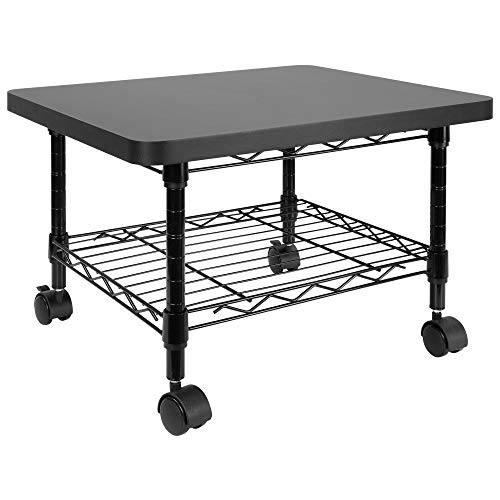
Mount-It! Under Desk Printer Stand with Wheels | Mobile Printer and Fax Cart with Storage Shelf for Office and Home Use, 2 Tiers (Black)
Check price on Amazon
Natwind 2 Tier Laser Printer Stand,20''x20'' Under Desk Printer Cart, White | Large Printer Table Copier Stand with Wheels, Stand for Heavy Printers,Thickened Steel Tube,Supports 200lbs,for Home Office
Check price on Amazon
SwaaVee Printer Stand, 2-Tier Under Desk Printer Stand, Printer Cart with Wheels for Home, Office, Heavy-Duty Storage Shelf, White
Check price on Amazon
HOOBRO Under Desk Printer Stand, Industrial Printer Cart with Storage Shelf, 2-Tier Mobile Printer Table on Wheels, Heavy Duty Machine Storage Rack for Office and Home Rustic Brown + Black BF12PS01
Check price on Amazon
Zonon 2 Tier Printer Stand Under Desk with Wheels, Open Shelf, Black | 19.7x15.7x7.9 Inch Rolling Printer Table Cart, Short Storage Shelf with Lockable Wheels, for Home Office Organization
Check price on AmazonDisclaimer
All About Desks provides educational content only. Not a substitute for professional ergonomist or interior designer services. Always consult a qualified professional for major structural or electrical work involving your desk. Some content may use AI. We are not responsible for product defects, injuries, or outcomes related to desk use. By using this site, you accept these terms. If you do not agree, please leave this website and discontinue its use. Read full disclaimer.