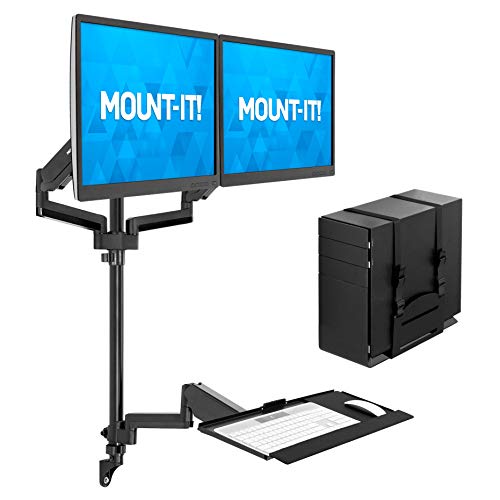
Wall Mounted Folding Desk Dual Monitor: The Ultimate Space-Saving Workstation
Transform any wall into a powerful dual-monitor workstation with a foldable desk. Learn how to choose, install, and optimize your wall mounted folding desk for maximum productivity and style.
Shop Top-Rated Wall Desks →Why a wall mounted folding desk? If you're working with limited square footage, a wall-mounted folding desk with dual monitors is a game-changer. It clears floor space, offers instant fold-away convenience, and supports a professional dual-screen setup without the bulk of traditional desks.
What Is a Wall Mounted Folding Desk?
A wall mounted folding desk is a space-saving workstation that attaches directly to your wall and folds down when not in use. Unlike a traditional desk, it occupies zero floor space, making it ideal for small apartments, home offices, and multi-purpose rooms. When paired with dual monitors, it creates a compact but highly functional command center.
Modern designs feature sturdy steel frames, smooth folding mechanisms, and weight capacities that can easily support two 24–27 inch monitors plus a laptop and accessories. Some models even include integrated cable management and adjustable height brackets.
For those who need flexibility, a stand-up desk attachment can complement your folding desk, allowing you to alternate between sitting and standing positions throughout the day.
Why Choose a Folding Desk for Dual Monitors?
Zero Floor Footprint
Wall-mounted design frees up valuable floor space. When folded, it's just a few inches deep, so you can reclaim your room for other activities.
Ergonomic Flexibility
Install at your ideal height. Many folding desks let you position monitors at eye level, reducing neck and back strain during long work sessions.
Clean, Clutter-Free Aesthetic
Hide cables behind the wall or use cable management accessories to maintain a pristine workspace. Fold it away after work to instantly declutter your room.
Quick Transition
Set up your workstation in seconds. Fold it down when you need dining space, a play area, or a guest room.
Key Specifications & Weight Capacity
When shopping for a wall mounted folding desk that supports dual monitors, focus on these critical specs:
- Weight Capacity: Look for at least 60–80 lbs (27–36 kg) to safely hold two monitors, a laptop, and accessories. Heavy-duty models can support up to 150 lbs.
- Desktop Depth: Minimum 20–24 inches to provide adequate viewing distance for dual monitors.
- Width: 36–48 inches is ideal for two 24-inch monitors side by side. For larger screens (27–32 inches), choose a desk 48 inches or wider.
- Mounting Hardware: Ensure the desk comes with heavy-duty wall anchors or toggle bolts suitable for your wall type (drywall, concrete, or brick).
- Folding Mechanism: Smooth gas-spring or spring-assisted folding makes opening and closing effortless.
Pro Tip: Always install the desk into wall studs for maximum stability. If studs don't align with your desired placement, use high-quality drywall anchors rated for at least 100 lbs per anchor.
Setting Up Dual Monitors on a Folding Desk
To get the most out of your wall mounted folding desk dual monitor setup, follow these ergonomic guidelines:
- Monitor Placement: Position the main monitor directly in front of you, with the secondary monitor angled 15–30 degrees to the side. The top of your screens should be at or slightly below eye level.
- Monitor Arms: Use a monitor arm desk mount to free up desktop space and achieve perfect positioning. This is especially useful on folding desks where surface area is limited.
- Keyboard & Mouse: Place them at a height where your elbows are at a 90-degree angle. Consider an under-desk keyboard tray mount for even better ergonomics.
- Lighting: Add a black desk lamp or monitor light bar to reduce eye strain and illuminate your work surface.
For additional workspace, you can pair your folding desk with a corner desk for small space or use a small writing desk with drawers nearby for extra storage.
Installation & Wall Preparation
Proper installation is crucial for safety and longevity. Follow these steps to mount your folding desk securely:
- Choose the Right Wall: Select a wall with ample space around it. Consider your seating position and the wall's load-bearing capacity.
- Locate Studs: Use a stud finder to locate wall studs. Mark the center of each stud with a pencil.
- Check Level: Use a level to ensure your mounting brackets are perfectly horizontal before drilling.
- Drill Pilot Holes: Drill pilot holes into the studs using a drill bit slightly smaller than your lag bolts or screws.
- Attach Brackets: Securely fasten the wall brackets using the provided hardware. Double-check tightness.
- Mount the Desk: Follow the manufacturer's instructions to attach the folding desktop to the brackets. Test the folding mechanism.
- Test Stability: Gently apply downward pressure to ensure the desk is secure before placing your monitors.
If you're renting or prefer a non-permanent solution, consider a stand desk converter as an alternative, though it won't offer the same space-saving benefits.
Maintenance & Care Tips
Keep your wall mounted folding desk in top condition with these simple practices:
- Regularly tighten screws: Vibration from folding and unfolding can loosen hardware. Check every few months.
- Clean the surface: Use a soft, damp cloth to wipe down the desktop. Avoid harsh chemicals that can damage the finish.
- Lubricate hinges: Apply a small amount of silicone spray or lubricant to the folding mechanism to ensure smooth operation.
- Inspect wall anchors: Periodically check for any signs of pull-out or wall damage, especially if you frequently fold and unfold the desk.
For long-lasting protection, consider using a desk mat with wrist rest to prevent scratches and improve comfort.
Frequently Asked Questions
Can I use a wall mounted folding desk with two 27-inch monitors?
Yes, provided the desk has a width of at least 48 inches and a weight capacity of 60+ lbs. Use adjustable dual monitor stand for optimal positioning.
How much weight can a folding wall desk hold?
Most quality models support 60–100 lbs. Heavy-duty options can hold up to 150 lbs. Always check the manufacturer's specifications.
Is it safe to mount monitors on a folding desk?
Absolutely. Just ensure the desk is securely anchored into wall studs and the monitor arms or stands are rated for the weight of your screens. A monitor arm desk mount is highly recommended.
Can I install a folding desk myself?
Yes, with basic tools (drill, level, stud finder) and careful attention to the instructions. If you're unsure, hire a handyman for peace of mind.
Final Thoughts: Is a Wall Mounted Folding Desk with Dual Monitors Right for You?
A wall mounted folding desk dual monitor setup is the ultimate solution for maximizing limited space without sacrificing productivity. It offers a clean, professional workstation that can be tucked away when not in use, making it perfect for small apartments, shared rooms, and minimalist home offices.
By carefully choosing a desk with the right weight capacity, width, and mounting hardware, you can enjoy the benefits of a dual-monitor setup without the bulky footprint. Pair it with ergonomic accessories like a office chair, monitor arm, and ergonomic keyboards to create a workspace that supports both your health and productivity.
Ready to transform your wall into a powerful workstation? Explore our top recommendations below and find the perfect wall mounted folding desk for your dual monitors.