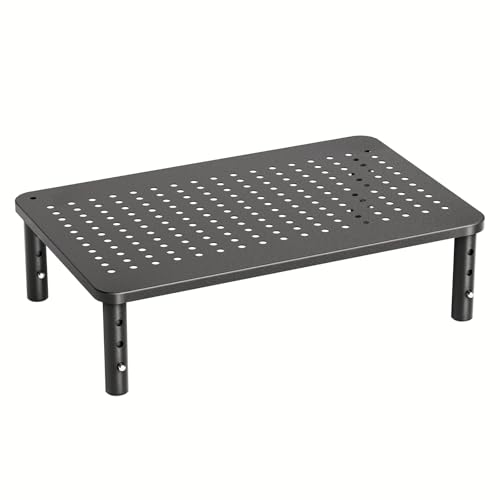
Adjustable Computer Monitor Riser Desk Stand
Elevate your screen to eye level, reduce neck strain, and reclaim valuable desk space. Discover the best adjustable monitor risers for every workspace and budget.
Shop Top Riser StandsWhy a Monitor Riser? An adjustable computer monitor riser desk stand is one of the most impactful ergonomic upgrades you can make. It raises your screen to the proper viewing height, encourages better posture, and frees up desk surface for a cleaner, more organized workspace. Whether you're a professional, gamer, or student, the right riser can transform your daily comfort and productivity.
Top Benefits of an Adjustable Monitor Riser
📐 Ergonomic Eye Level
Position your monitor so the top of the screen is at or slightly below eye level. This reduces forward head tilt, preventing neck and shoulder pain during long work sessions.
📏 Height & Angle Flexibility
Adjustable risers let you fine-tune height and tilt. Some models offer multi-level adjustments or gas-spring arms, so you can switch between sitting and standing positions seamlessly.
🧹 Declutter Your Desk
Elevating your monitor creates valuable space underneath for a keyboard, notepad, or other essentials. Many risers also include integrated storage drawers or cable management.
🖥️ Dual Monitor Support
Wide risers and dual-arm stands accommodate two monitors, keeping both screens at the same ergonomic height for a seamless multi-display setup.
How to Choose the Right Riser Stand
Selecting the best adjustable computer monitor riser desk stand depends on your monitor size, desk space, and workflow. Consider these key factors before making a decision:
- Weight Capacity: Ensure the riser supports your monitor’s weight. Most stands handle 10–30 lbs, but check for larger curved or ultrawide screens.
- Height Range: Look for a riser that offers at least 4–8 inches of adjustment. For standing desks, consider a riser that integrates with your existing setup.
- Stability: A sturdy base prevents wobbling. Metal construction and rubber feet provide better stability than lightweight plastic.
- Desk Compatibility: Measure your desk depth and width. A riser should fit comfortably without overcrowding your workspace.
- Extra Features: Some risers include USB ports, cable management clips, or built-in drawers for pens and accessories.
Monitor Riser Types Comparison
| Type | Best For | Height Adjustment | Price Range |
|---|---|---|---|
| Fixed Height Riser | Budget setups, single monitor | Fixed (2–4″) | $20–$50 |
| Multi-Level Riser | Users needing some flexibility | 3–4 preset levels | $40–$90 |
| Gas-Spring Arm Riser | Full motion, sit-stand desks | Infinite (5–18″) | $100–$250 |
| Dual Monitor Stand | Two-screen setups | Varies (arm or riser) | $70–$300 |
Tips for Setting Up Your Monitor Riser
Once you've chosen your adjustable monitor riser, proper placement is key to maximizing its ergonomic benefits. Follow these best practices:
- Eye Level: The top of the screen should be at or slightly below eye level when sitting upright. Adjust the riser accordingly.
- Arm's Reach: Place the monitor about an arm's length away (20–30 inches) from your eyes for comfortable viewing.
- Keyboard & Mouse: Ensure your keyboard and mouse are within easy reach, ideally on a adjustable keyboard tray under desk for optimal ergonomics.
- Cable Management: Use the riser's built-in cable clips or under-desk solutions to keep cords tidy and out of the way.
- Combine with a Standing Desk: For maximum flexibility, pair your riser with an adjustable standing desk for 2 monitors to easily switch between sitting and standing.
If you're working with a compact space, consider a wall-mounted desk for small spaces to free up floor area, then add a monitor riser for ergonomic screen height.
Complement Your Riser with These Add-Ons
⌨️ Keyboard Trays
An adjustable keyboard tray pairs perfectly with a monitor riser, allowing you to position your keyboard at the ideal height for your wrists.
🖥️ Monitor Arms
For even more flexibility, a dual monitor arm offers infinite adjustment and frees up desk surface entirely.
💡 Desk Lighting
Add a monitor light bar to reduce eye strain and illuminate your workspace without taking up extra desk space.