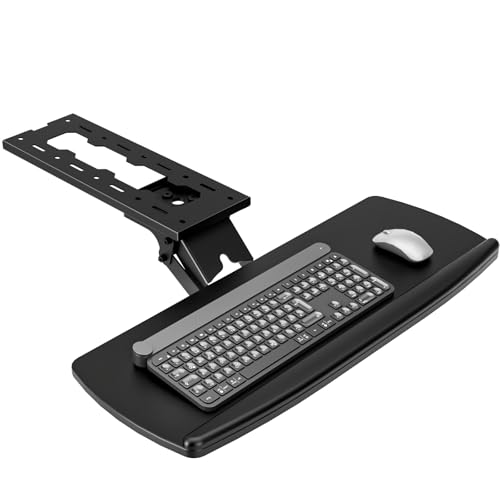
Adjustable Keyboard Tray Under Desk: The Ultimate Ergonomic Guide
Discover how the right under-desk keyboard tray can transform your workspace, boost comfort, and prevent strain. Expert reviews, buying advice, and top picks for 2026.
Why an adjustable keyboard tray? A properly mounted under-desk tray positions your keyboard at the ideal height and angle, reducing wrist strain and improving posture. Whether you're a programmer, writer, or gamer, this simple upgrade can make a world of difference.
What Is an Adjustable Keyboard Tray Under Desk?
An adjustable keyboard tray under desk is a mounting platform that attaches to the underside of your work surface, allowing you to position your keyboard and mouse at an ergonomically correct height and tilt. Unlike fixed trays, adjustable models offer height, tilt, and sometimes swivel adjustments so you can fine-tune the position to your body.
These trays are essential for adjustable height desks and standard desks alike, ensuring your wrists remain straight and your shoulders relaxed while typing. Many models also include a separate mouse platform and wrist rest for added comfort.
If you're looking for a complete ergonomic setup, consider pairing your tray with a standing desk for 2 monitors or a desk with drawers and shelves to keep your workspace organized.
Key Benefits of an Under-Desk Keyboard Tray
Beyond the basics, a high-quality adjustable keyboard tray under desk can also include features like:
- Height adjustment range: Typically 2–4 inches of vertical travel.
- Swivel and tilt: Allows for negative tilt (front edge lower) to keep wrists straight.
- Durable mounting: Clamp-on or screw-in options for solid wood, MDF, or metal desks.
- Wrist rest: Gel or memory foam padding for extra comfort.
For small spaces, a small computer desk with slide-out keyboard tray can be a great alternative, but dedicated under-desk mounts often offer better adjustability.
How to Choose the Best Adjustable Keyboard Tray for Your Desk
Selecting the right tray depends on your desk type, work habits, and budget. Here are the key factors to consider:
- Mounting type: Clamp-on (tool-free) vs. screw-in (more secure). Ensure compatibility with your desk edge thickness.
- Adjustability: Look for height, tilt, and swivel adjustments. More adjustments mean better ergonomics.
- Size & weight capacity: Make sure the tray can accommodate your keyboard and mouse (and possibly a numeric keypad).
- Mouse platform: Some trays include a side platform for your mouse; others have a wide single platform.
- Wrist rest: A padded wrist rest can significantly improve comfort during long typing sessions.
If you already have a standing desk with drawers, ensure the tray mounts without interfering with the drawer mechanism. For L-shaped desks with cable management, choose a tray that integrates neatly with your cable routing.
Installation Tips for Your Under-Desk Keyboard Tray
Installing an adjustable keyboard tray under desk is straightforward, but proper placement is critical for ergonomics. Follow these steps:
- Position: Mount the tray so that the home row of your keyboard is at or slightly below elbow height when your arms are relaxed.
- Tilt angle: Use a slight negative tilt (front edge lower) to keep your wrists straight.
- Clearance: Ensure your chair legs and thighs have enough clearance underneath the tray.
- Test & adjust: Spend a few days tweaking the height and angle until you find the perfect position.
For desks with limited depth, a corner computer desk with keyboard tray can be a smart solution, but standalone trays work on almost any flat surface.
Once installed, you'll also want to manage your cables. Pair your tray with a desk with file cabinet and hutch or a mobile printer stand to keep your entire workspace tidy.
Frequently Asked Questions About Keyboard Trays
-
Can I use a keyboard tray with a standing desk?
Yes! Many trays are designed for both sitting and standing desks. Just ensure the mounting clamp fits your desk thickness. -
Are keyboard trays compatible with gaming keyboards?
Absolutely, but check the tray dimensions to ensure it fits larger gaming keyboards with wrist rests. -
Do I need a special desk for an under-desk tray?
Not at all. Most trays work with standard desks, including wood home office desks with drawers and adjustable standing desks with storage. -
How much should I spend?
Prices range from $40 for basic models to $200+ for premium trays with full adjustability. Expect to pay around $80–$150 for a quality adjustable tray with good reviews.
Ready to Upgrade Your Workspace?
An adjustable keyboard tray under desk is one of the most cost-effective ergonomic investments you can make. Whether you're battling wrist pain, want more desk space, or simply want to improve your typing posture, the right tray makes a noticeable difference.
Browse our curated selection below—each product is chosen for its durability, adjustability, and user satisfaction. Pair your new tray with a comfortable desk chair and a monitor stand with drawer for a complete ergonomic setup.
👉 Check out the recommended products below to find the perfect tray for your desk.