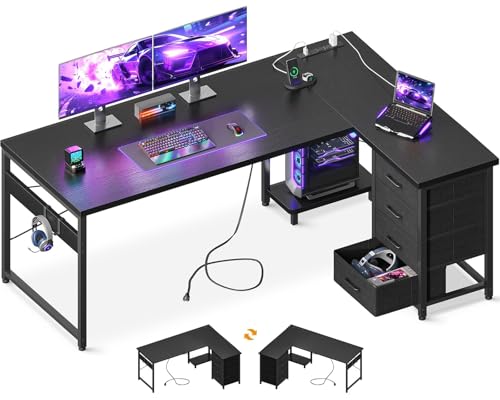
L-Shaped Desk with Cable Management
Maximize your corner workspace with built-in wire organization — clean, spacious, and productivity-focused.
Why an L-shaped desk with cable management? If you’re juggling multiple monitors, a desktop computer, and various peripherals, wires can quickly become a visual and functional mess. An L-shaped desk not only gives you ample surface area but also — when paired with a smart cable management system — keeps every cord tucked away. This guide covers the essential features, top recommendations, and practical tips to help you choose the perfect L-shaped desk with integrated cable management.
Key Features to Look For
Built-in Cable Tray
A dedicated cable tray underneath the desktop keeps power strips, adapters, and excess wire hidden. Look for a tray with multiple openings so you can route cables easily.
Grommet Holes
Strategically placed grommets let you pass monitor, keyboard, and charging cables from the desk surface to the underside, reducing visual clutter.
Durable Materials
Solid wood, high-grade MDF, or steel frames ensure stability. A sturdy desk is essential when you have multiple heavy monitors and equipment.
Adjustable Height
Some L-shaped desks offer height adjustability (electric or manual). This allows you to switch between sitting and standing, improving ergonomics.
Benefits of Integrated Cable Management
Beyond aesthetics, a well-organized desk with proper cable management offers several practical advantages:
- Improved focus: A clutter-free workspace reduces visual distractions and helps you concentrate.
- Easier cleaning: With cables hidden, dusting and wiping the desk surface becomes effortless.
- Protects equipment: Prevents accidental unplugging or damage from tangled wires.
- Better airflow: Keeps cables away from vents, reducing overheating risks for your devices.
If you’re also considering other L-shaped configurations, check out our guides on L-shaped desks with drawers and shelves, L-shaped desks with hutch and drawers, and gaming L-shaped desks with LED lights.
✅ Pros
- Maximizes corner space efficiently
- Integrated wire management keeps surface clean
- Spacious enough for multi-monitor setups
- Available in various materials and finishes
- Many models offer height-adjustable options
❌ Cons
- Larger footprint requires ample floor space
- May be heavier and harder to move
- Quality cable management systems add cost
How to Choose the Right L-Shaped Desk
When shopping for an L-shaped desk with cable management, consider these factors:
- Size & layout: Measure your available corner space. The “return” (shorter side) should be at least 48 inches for comfortable use.
- Material: Solid wood offers durability and a premium feel. Laminate or MDF is cost-effective and easy to maintain.
- Cable management system: Look for desks with a combination of grommet holes, under-desk trays, and channels. Some also include built-in power outlets — a huge plus.
- Weight capacity: If you use heavy equipment (like a desktop PC or large monitors), ensure the desk frame is rated for at least 150–200 lbs.
- Assembly: Check if assembly instructions are clear, and whether tools are provided. Some brands offer white-glove delivery.
For those who need even more storage, explore our review of L-shaped desks with drawers and a hutch.
Pro Tips for Cable Management
- Use Velcro cable ties to bundle wires together — they’re reusable and adjustable.
- Label cables so you know which cord goes to which device, especially useful when you have multiple peripherals.
- Mount power strips underneath the desk using double-sided tape or screw-on brackets to keep them out of sight.
- Plan your layout before drilling or sticking anything — decide where each device will sit to minimize cable length and crossing.
If you’re considering a standing L-shaped desk, our L-shaped standing desk with drawers guide offers additional insights. And for smaller spaces, see home office desks for small spaces.