Master Cable Management: Clean & Productive Desk Setup
Say goodbye to tangled wires and clutter. Learn proven cable management techniques, from under-desk trays to wireless solutions, and create a workspace that boosts focus and style.
Shop Top Cable OrganizersWhy cable management matters: A clean desk isn’t just about aesthetics — it improves productivity, reduces dust buildup, and makes cleaning easier. Whether you have a standing desk, a gaming desk, or a compact home office desk for small spaces, managing cables is the first step to a professional workspace.
1. Essential Cable Management Tools
🔌 Cable Trays & Raceways
- Under-desk cable trays – keep power strips and excess cables hidden.
- Desk grommets – route cables through the desk surface for a clean look.
- Adhesive cable raceways – stick to walls or desk edges to conceal wires.
Perfect for L-shaped desks and corner computer desks where cable paths are complex.
📦 Cable Sleeves & Spiral Wraps
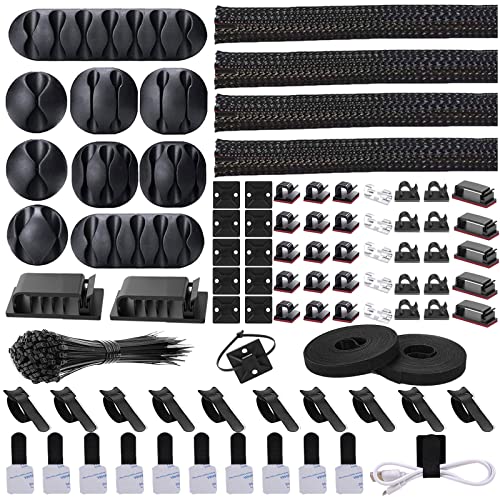
- Neoprene sleeves – bundle multiple cables into one neat tube.
- Spiral cable wraps – adjustable and reusable for frequent changes.
- Velcro cable ties – secure loose ends and prevent tangling.
Ideal for dual monitor setups and gaming desks with LED lights.
2. Step-by-Step Cable Organization Plan
- Unplug & categorize – separate power, data, and audio cables.
- Measure and plan routes – map where each cable should go, especially for adjustable standing desks that move up and down.
- Install under-desk trays or raceways – secure them firmly to support the weight of power strips.
- Bundle cables with sleeves or ties – leave enough slack for movement if you use a sit-stand desk.
- Use cable clips or adhesive mounts – keep cables flush against the desk edge or wall.
- Label cables – makes future changes and troubleshooting much easier.
For a complete desk refresh, combine cable management with desk organization tips and ergonomic accessories.
3. Wireless Desk Setup – The Ultimate Cable-Free Goal
Going wireless reduces cable clutter significantly. Consider these upgrades:
- Wireless keyboard & mouse – eliminates two of the most visible cables.
- Wireless charging pad – for phones and compatible devices.
- Bluetooth speakers or headphones – reduce audio cable mess.
- Monitor with integrated USB hub – connect peripherals with a single cable to your laptop.
Explore our wireless charging desk guide and desk speaker reviews for more inspiration.
4. Advanced Cable Management for Special Setups
⚡ Standing Desks
Use spiral cable chains or retractable cable reels to allow smooth height adjustments. Mount power strips directly under the desk top.
See electric standing desk options with built-in cable channels.
🖥️ Multiple Monitors
Combine monitor cables into a single cable sleeve and use a monitor arm with integrated cable management to keep everything tidy.
Check our vertical monitor setup and monitor stand guides.
🎮 Gaming Desks
RGB lighting and multiple peripherals create extra cable chaos. Use cable management boxes and under-desk netting to hide power bricks and excess wire.
Learn from gaming desk setups with drawers that hide cables effectively.
🏠 Small Spaces
Maximize every inch with wall-mounted cable clips and adhesive hooks to keep cables off the floor. Use a floating desk to route cables behind the wall or under the desk.
5. Maintenance & Safety Tips
- Dust regularly – cables attract dust; wipe them with a microfiber cloth.
- Avoid overloading power strips – use surge protectors and calculate wattage.
- Check for frayed wires – replace damaged cables immediately to prevent hazards.
- Re-evaluate every 6 months – as you add or remove devices, adjust your cable layout.
For a holistic approach, combine cable management with desk ergonomics and workspace feng shui to create a harmonious, productive environment.
Ready to Transform Your Desk?
Browse our top-rated cable management products below and start building the clean, professional workspace you deserve.
Shop Now →