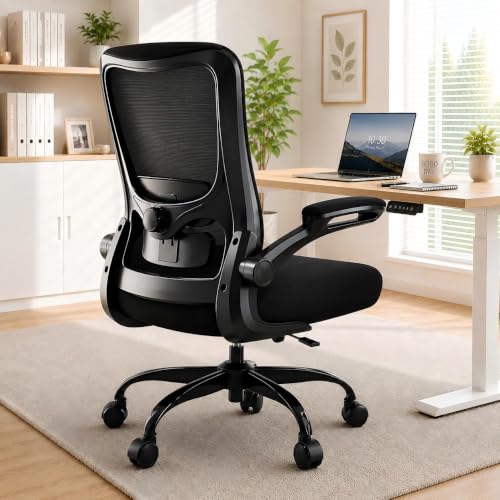
Desk Chair for Lower Back Pain
Discover the best ergonomic desk chairs designed to relieve lower back pain, improve posture, and keep you comfortable during long work hours.
SHOP TOP CHAIRSIf you suffer from lower back pain, your desk chair is the first place to look. The right ergonomic chair provides proper lumbar support, encourages healthy posture, and reduces pressure on your spine. In this guide, we’ll walk you through the key features to look for, the best chair types, and our top recommendations to help you work pain‑free.
Why Your Desk Chair Matters for Lower Back Pain
Sitting for extended periods puts immense pressure on your lower back (lumbar spine). A chair that lacks proper support forces your muscles to overcompensate, leading to fatigue, stiffness, and chronic pain. Investing in a desk chair with lumbar support is one of the most effective ways to prevent and alleviate discomfort.
Key benefits of an ergonomic chair include:
🦴 Lumbar Support
Adjustable lumbar support maintains the natural inward curve of your spine, reducing strain on your lower back.
🪑 Seat Depth & Tilt
Proper seat depth (2–3 inches between the edge and your knees) and tilt allow you to sit with your feet flat, distributing weight evenly.
🔄 Adjustable Armrests
Armrests that adjust in height and width keep your shoulders relaxed, preventing tension that travels to your lower back.
🧘♂️ Posture Correction
A good chair encourages your ears, shoulders, and hips to align in a straight line, reducing slouching and spinal stress.
What to Look For in a Chair for Lower Back Pain
Not all ergonomic chairs are created equal. When shopping for a desk chair for home office or professional use, prioritize these features:
✔️ Adjustable Lumbar Support: The best chairs allow you to move the lumbar pad up/down and in/out to fit your spine’s exact curve. Fixed support is often too high or low for most users.
Seat Height & Depth: Your feet should rest flat on the floor (or on a footrest) with your knees at a 90‑degree angle. Look for chairs with pneumatic height adjustment and a seat pan that slides forward or backward.
Recline Tension & Lock: A chair that reclines with variable tension allows you to lean back and shift your weight, giving your lower back a break. Many top-rated chairs offer a recline lock so you can set your preferred angle.
Seat Cushion Material: High-density foam or memory foam distributes pressure better than thin padding. If you sit for 6+ hours, consider a chair with a waterfall edge to reduce pressure on your thighs.
Breathable Backrest: Mesh backs allow airflow, keeping you cool, and they also conform to your spine’s movements. However, some users prefer padded backs for a softer feel.
For a deeper dive into chair ergonomics, check out our desk height ergonomics guide to ensure your entire setup supports your health.
Top Chair Types for Lower Back Pain
1. Ergonomic Task Chairs: The most popular choice for home offices. They offer full adjustability – lumbar, armrests, seat depth, and tilt – making them suitable for most body types. Prices typically range from $300 – $1,200 for quality models.
2. High‑Back Executive Chairs: These offer additional upper back and neck support. They often have plush padding and a more luxurious feel, but ensure the lumbar support is still adjustable. Expect to pay $400 – $1,500+.
3. Kneeling Chairs: These shift your weight forward, opening the angle between your torso and thighs, which reduces lower back strain. They take some getting used to and are best for short to medium sessions. Prices: $150 – $400.
4. Saddle Chairs: Designed to mimic horse‑riding posture, they promote a neutral spine and active sitting. Ideal for professionals who move around their desk frequently. Cost: $200 – $600.
If you prefer a more traditional look, consider a desk swivel chair that combines ergonomic features with classic styling.
Desk Setup Tips for Back Pain Relief
Even the best chair won’t help if your desk and monitor are misaligned. Follow these tips for a back‑friendly workspace:
- Monitor height: Top of the screen at or slightly below eye level. Use a monitor riser if needed.
- Desk height: Elbows should rest at a 90‑degree angle. If your desk is too high, consider a desk riser to adjust.
- Take breaks: Stand up and stretch every 30–45 minutes. A sit‑stand desk converter can help you alternate positions.
- Footrest: If your feet don’t reach the floor, use a chair with a footrest or a separate foot support.
💡 Pro Tip: Pair your ergonomic chair with a chair mat to protect your floor and allow smooth movement. On carpet, a thick carpet mat prevents sinking and keeps your chair level.
FAQs About Chairs for Lower Back Pain
Q: Can a new desk chair really fix my back pain?
Yes – a properly adjusted ergonomic chair reduces pressure on your lumbar spine and encourages neutral posture. Combined with regular movement, it’s one of the most effective solutions for chronic lower back pain.
Q: How much should I spend on a chair for back pain?
Quality ergonomic chairs typically start around $300. At this price point, you’ll find adjustable lumbar, seat depth, and armrests. Premium models ($800+) offer better materials, longer warranties, and additional adjustments like tilt tension and headrests.
Q: Can I use a chair with a backrest only for support?
A back support attachment can improve an existing chair, but for lasting relief, a chair designed with built‑in lumbar support is far more effective.
For more chair options, explore our guides on chairs with wheels, adjustable lumbar support chairs, and high‑back chairs.
Your Comfort is an Investment
Choosing the right desk chair for lower back pain is one of the smartest investments you can make for your health and productivity. Use the checklist above to evaluate your current chair, and don’t hesitate to upgrade to a model that truly supports your body. Browse our top picks below – all chairs are carefully selected for their ergonomic features and back‑pain relief benefits.