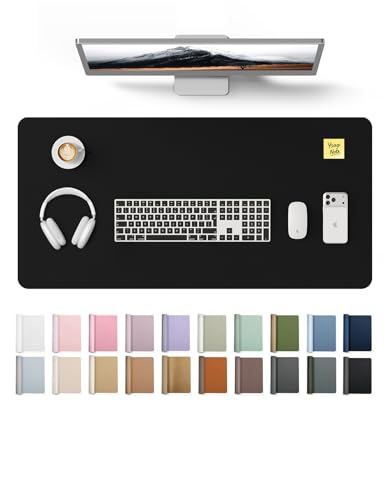
Desk Mat for Keyboard and Mouse – The Ultimate Worksurface Upgrade
Protect your desk, improve mouse precision, and add a touch of style with the perfect desk mat. Our expert guide covers materials, sizes, and top picks for every workspace.
Shop Top Desk MatsWhy a dedicated desk mat matters: A quality desk mat for keyboard and mouse does more than just look good. It provides a consistent surface for smooth mouse tracking, reduces wrist fatigue, protects your desk from scratches and spills, and ties your whole setup together. Whether you're a gamer, a remote worker, or a student, the right desk mat can transform your daily workflow.
Desk Mat Materials – Which One Is Right for You?
Choosing the right material for your desk mat is crucial for comfort, durability, and performance. Here’s a breakdown of the most common materials:
- Fabric / Cloth – Soft, affordable, and available in many colors. Great for everyday office use and gaming. Provides a comfortable wrist rest.
- Leather / PU Leather – Premium look and feel, water-resistant, and easy to clean. Ideal for executive desks and minimalist setups.
- Silicone / Rubber – Non-slip, waterproof, and heat-resistant. Perfect for messy workspaces or those who eat at their desk.
- Wool / Felt – Eco-friendly, naturally insulating, and gives a warm, textured aesthetic. Excellent for standing desks and cozy home offices.
- Bamboo / Wood – Hard, durable, and sustainable. Offers a unique, natural surface but may be less comfortable for long typing sessions.
- Gel-filled – Provides ergonomic wrist support with a cushioned feel. Best for users with wrist pain or carpal tunnel concerns.
📌 Expert Tip: For most users, a large fabric desk mat (90x40 cm or larger) offers the best balance of comfort, mouse control, and desk protection. If you frequently switch between sitting and standing, consider a height-adjustable desk paired with a non-slip silicone mat for stability.
Finding the Right Size and Thickness
Standard Sizes (Width x Depth)
- Small (60x30 cm) – Compact, fits in tight spaces, good for laptops or minimalists.
- Medium (80x40 cm) – Accommodates a full-size keyboard and mouse with room to move.
- Large (90x45 cm) – The most popular size; fits most setups and provides ample mouse space.
- Extra Large (120x60 cm) – Covers most of the desk surface, ideal for dual-monitor or multi-device setups.
Thickness matters too: 2–3 mm is standard for fabric mats; 4–5 mm offers more cushioning; 6 mm+ is best for ergonomic support.
💡 Pro tip: Measure your desk depth and the space you need for your keyboard, mouse, and other peripherals before ordering. A mat that’s too small will slide around; one that’s too large may overhang your desk edge.
Why a Desk Mat Boosts Ergonomics and Productivity
A high-quality desk mat isn't just an accessory—it's a productivity tool. Here’s how it helps:
- Consistent Mouse Tracking: Provides a uniform surface for optical and laser mice, eliminating tracking errors caused by textured wood or glass.
- Wrist Comfort: A padded mat reduces pressure on your wrists during long typing or gaming sessions, lowering the risk of repetitive strain injuries.
- Desk Protection: Shields your desk from scratches, spills, and heat marks from coffee mugs or laptops.
- Noise Dampening: Softens the sound of typing and mouse clicks, creating a quieter, more focused work environment.
- Visual Anchor: Defines your workspace, helping you stay organized and focused. A well-chosen mat can also elevate your desk’s aesthetic.
For the best ergonomic experience, pair your desk mat with a monitor riser and an ergonomic chair to create a complete, health-conscious setup.
How to Clean and Maintain Your Desk Mat
To keep your desk mat looking and performing its best, follow these simple care tips:
- Fabric / Cloth: Spot-clean with mild soap and a damp cloth. For deeper cleaning, hand-wash with cold water and air-dry (avoid direct sunlight).
- Leather / PU: Wipe with a soft, damp cloth. Use a leather conditioner occasionally to prevent cracking.
- Silicone / Rubber: Wash with soap and water; they are usually dishwasher-safe (top rack).
- Wool / Felt: Use a lint roller or vacuum with a brush attachment. Spot-clean with a wool-safe detergent.
- Bamboo / Wood: Wipe with a slightly damp cloth and dry immediately. Apply mineral oil occasionally to prevent drying.
Regular cleaning not only extends the life of your mat but also ensures a hygienic workspace—especially important if you eat at your desk.
Style Your Workspace with the Perfect Desk Mat
A desk mat is a key element of your desk’s visual identity. Here are some styling ideas:
- Minimalist: Choose a plain black, grey, or white mat. Pair with a wooden desk organizer for a clean, Scandinavian look.
- Natural: Opt for felt, cork, or bamboo mats. Complement with desk plants and warm lighting.
- Gaming: Go for large, RGB-illuminated mats or ones with vibrant patterns. Pair with a mechanical keyboard and RGB mouse.
- Professional: Leather or PU leather mats in brown or black. Combine with a desk blotter and elegant stationery.
Remember, your desk mat sets the tone for your entire workspace. Choose one that reflects your personality and work style.
Your Desk Mat Buying Checklist
Before you make a purchase, run through this quick checklist:
- Measure your desk: Ensure the mat fits without overhanging the edges (unless you want a full-desk cover).
- Check your mouse type: Optical and laser mice work well on most mats, but some high-DPI gaming mice perform better on cloth surfaces.
- Consider your activities: If you eat or drink at your desk, choose a water-resistant material like silicone or PU leather.
- Think about comfort: If you type for hours, a thicker, padded mat or gel wrist rest is a smart investment.
- Coordinate with your setup: Choose a color and texture that complements your desk, chair, and other accessories.
By following this guide, you’ll be able to choose a desk mat that enhances your comfort, protects your furniture, and elevates your entire workspace.
📎 Explore more: Desk Mat for Keyboard and Mouse · Desk Mats for Office · Desk Matt · Desk Mouse Pad · Desk Blotter · Desk Monitor Riser · Wooden Desk Organizer