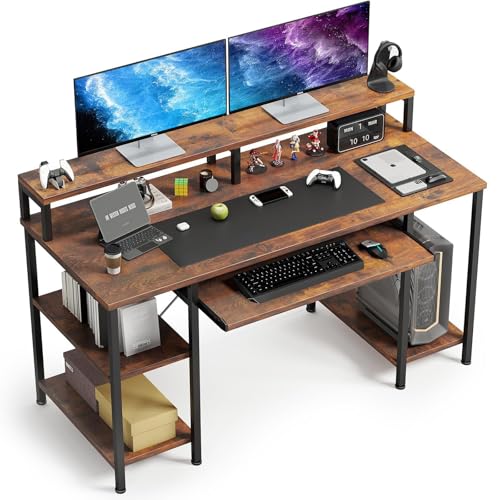
Desk with Pull Out Keyboard Tray
Ergonomic comfort meets smart design. Discover how a pull-out keyboard tray can transform your posture, free up desk space, and boost productivity.
Shop Top Models →Why a keyboard tray? A pull-out keyboard tray positions your hands at the correct height, reducing wrist strain and shoulder tension. It also keeps your desk surface clear for notes, documents, or a second monitor. This guide covers everything you need to choose the perfect desk with pull-out keyboard tray.
What Is a Desk with Pull Out Keyboard Tray?
A desk with pull out keyboard tray features a sliding platform beneath the main work surface. This tray holds your keyboard and mouse, allowing you to adjust their height and angle independently. It’s an essential feature for ergonomic comfort and is widely used in home offices, corporate settings, and gaming stations.
Key Benefits of a Pull-Out Keyboard Tray
🪑 Ergonomic Posture
Placing the keyboard at elbow height keeps your wrists straight and shoulders relaxed. This reduces the risk of repetitive strain injuries (RSI) and carpal tunnel syndrome. Pair it with an ergonomic chair for complete support.
📐 Extra Desk Space
By moving the keyboard under the desk, you free up the main surface for writing, drawing, or placing a monitor. It’s a smart solution for small workspaces where every inch counts.
⚙️ Adjustable Positioning
Many trays tilt (negative or positive) and slide in/out, so you can find the perfect angle for typing. Some models even swivel to accommodate different working postures.
🧹 Cleaner Desk Aesthetic
A hidden keyboard gives your desk a minimalist, organized look. It's easier to keep the surface tidy and focus on your work without visual clutter.
What to Look For in a Desk with Pull Out Keyboard Tray
1. Tray Size & Weight Capacity
Measure your keyboard and mouse. The tray should be at least 28" wide and 10" deep. Weight capacity should handle your keyboard (most are 5–10 lbs). If you use a large gaming keyboard, check dimensions carefully.
2. Slide Mechanism & Stability
Look for smooth ball-bearing slides that lock in place. A sturdy mechanism prevents wobbling when typing. Avoid cheap plastic rails that can break under regular use.
3. Height Adjustment & Tilt
The tray should adjust vertically (at least 2–3 inches) and tilt up to 15° negative tilt for optimal wrist angle. This is crucial for preventing wrist pain.
4. Material & Build Quality
Steel or aluminum frames with a durable laminate or wood finish. High-quality trays feel solid and don't sag under weight. Avoid thin particle board.
Popular Styles of Keyboard Tray Desks
🖥️ Built-in Tray Desks
These desks come with a tray as a fixed part of the design. They offer the most integrated look and are often found in computer desks and executive models. The tray is usually on heavy-duty slides.
🔧 Under-Desk Add-On Trays
If you already have a desk, you can buy a separate tray that clamps or screws underneath. This is a budget-friendly way to add ergonomic benefits to any desk.
📏 Height-Adjustable Desks with Trays
Many electric standing desks offer optional keyboard trays. This allows you to maintain ergonomic alignment whether sitting or standing, which is ideal for active workers.
🎮 Gaming Desks with Trays
Gaming desks often feature wide, sturdy trays with mouse pad surfaces. They are built to handle intense gaming sessions and offer extra cable management.
Installation & Setup Tips
- Measure Twice: Ensure the tray fits your desk and doesn't block your legs. Leave at least 2 inches of clearance.
- Secure Mounting: Use the provided screws or clamps. If mounting under a glass desk, use a clamp-on tray.
- Test the Slide: The tray should glide smoothly without sticking. Adjust the tension screws if needed.
- Maintain Cleanliness: Regularly clean the slides to prevent dust buildup. A drop of silicone lubricant keeps it moving smoothly.
- Adjust Your Chair: After installing, adjust your chair height so your elbows are at 90° and wrists are straight.
Ergonomics & Health Benefits
A pull-out keyboard tray is a cornerstone of an ergonomic workstation. It helps maintain a neutral wrist position, reducing the risk of carpal tunnel syndrome. Combined with a supportive chair, it promotes better posture and reduces back and neck pain. Studies show that proper keyboard placement can increase typing speed and accuracy while lowering fatigue.
Ready to upgrade your workspace?
Browse the recommended desks below. Each model is selected for build quality, ergonomic features, and positive user reviews. Choose the one that fits your style and budget.