Desktop Drawers: Smart Storage for a Clutter-Free Workspace
Everything you need to know about desktop drawers — drawer types, materials, sizing, and how to pick the right storage unit for your desk setup. Whether you need a compact organizer or a full locking pedestal, this guide helps you decide with confidence.
Explore Drawer OptionsWhy desktop drawers matter: A desk without organized storage quickly becomes a pile of loose papers, scattered pens, and tangled cables. Desktop drawers give every item a dedicated home — keeping your work surface clear and your mind focused. This guide walks you through every option so you can choose the storage that fits your workspace and workflow.
What Are Desktop Drawers?
Desktop drawers are storage units that sit either on your desk surface or directly beneath it, providing enclosed compartments for organizing the items you use every day. Unlike open shelves or desk organizers without drawers, these units keep contents hidden from view and protected from dust. They come in a wide range of sizes — from a single slim drawer that slips under a monitor stand to a multi-drawer pedestal that doubles as a filing cabinet.
For anyone building a functional workspace, desktop drawers are one of the highest-impact additions you can make. They are especially valuable in desks for small spaces, where vertical and under-desk storage is the only way to keep the work surface usable. If your current desk lacks built-in storage, an add-on drawer unit is the simplest upgrade you can make without replacing the desk itself.
Types of Desktop Drawer Solutions
Desktop drawers are not a single product category. They fall into several distinct types, each suited to a different workspace and storage need. Understanding the differences will help you avoid buying a unit that does not fit your desk or your workflow.
On-Desk Drawer Organizers
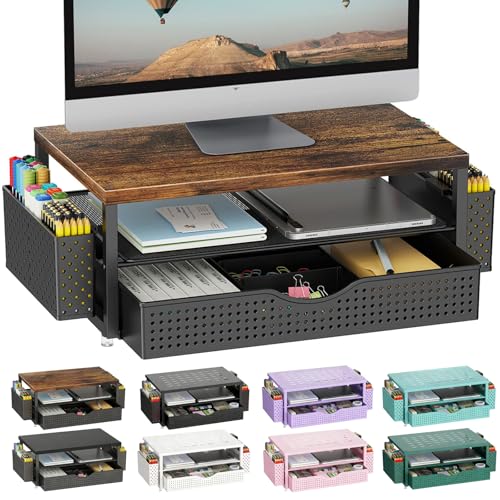
Compact units that sit on your desk surface, often with one to three shallow drawers. Ideal for pens, sticky notes, charging cables, and small accessories. No installation required — just place and use. Best for renters and minimal setups.
Under-Desk Drawer Pedestals
Freestanding units that roll or slide beneath the desk. Typically offer two to four drawers, often including a file drawer. These add substantial storage without consuming work surface. Consider a desk with storage drawers and shelves if you want integrated storage from the start.
Clamp-On and Clip-On Drawers
Drawer units that attach to the front edge or underside of your desk using a clamp or clip mechanism. No drilling needed. These are a smart choice for slim desks and standing desks where a rolling pedestal would interfere with legroom.
Locking Drawer Cabinets
Pedestals with built-in key locks, ideal for confidential documents or shared offices. A desk with lockable drawers combines security with a full workspace. Look for ball-bearing slides and reinforced locks for daily use.
Integrated Desk Drawer Units
Desks built with drawers integrated into the structure, such as a desk with keyboard tray and drawers. These offer the most seamless look and often the best ergonomics, since the drawer depth is designed to match the desk.
Electric Adjustable Desks with Drawers
Height-adjustable desks that include built-in drawer storage, such as an electric height adjustable desk with drawers. These are a long-term investment for users who want ergonomics and storage in one unit.
Materials and Construction: What to Look For
The material of your desktop drawers affects durability, weight capacity, and how the unit looks in your workspace. The drawer slide mechanism matters just as much — a solid cabinet with poor slides will feel flimsy every day.
Metal and Steel Drawers
Steel pedestals are the professional-grade choice for heavy files and frequent use. They typically use ball-bearing slides, support substantial weight, and resist wear over years of daily opening and closing. Powder-coated finishes resist scratches and rust. If you store binders or archives, metal is the safest bet.
Wood and Wood-Composite Drawers
Wood drawers — whether solid wood, MDF, or plywood — match traditional and home-office aesthetics better than metal. A desk with keyboard tray and file drawer often uses wood construction for visual consistency. Check that the drawer bottoms are reinforced and that the slides are rated for the load you plan to store.
Plastic and Resin Drawers
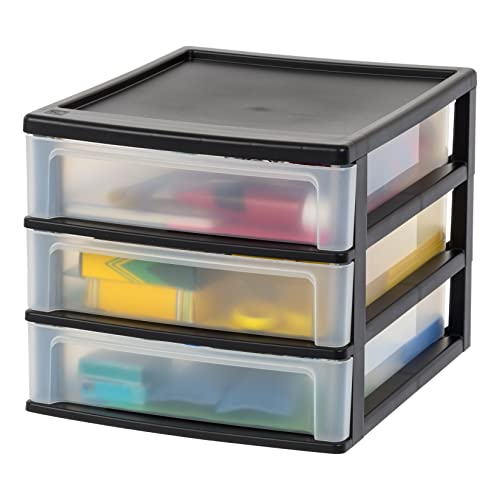
Plastic drawer organizers are lightweight and suited to light-duty storage such as stationery and small electronics. They are easy to move and do not scratch desk surfaces, but they are not designed for heavy files or long-term durability under constant use.
Desktop Drawers Comparison by Tier
Use this comparison to match a drawer type to your workspace and storage priorities. Tiers describe market positioning and build quality, not numeric figures.
| Tier | Drawer Type | Best For | Key Consideration |
|---|---|---|---|
| Entry-Level | On-desk organizer drawers | Small accessories and stationery | Limited load capacity; no installation |
| Entry-Level | Plastic drawer units | Light-duty home organization | Not suited to heavy files |
| Mid-Range | Clamp-on under-desk drawers | Slim desks and standing desks | Verify clamp fit and desk thickness |
| Mid-Range | Rolling drawer pedestals | General office storage with files | Check caster height and legroom |
| Premium | Locking metal pedestals | Confidential documents and shared offices | Confirm lock configuration |
| Premium | Integrated desk drawers | Seamless ergonomic setups | Drawer depth fixed by desk design |
| High-End Tier | Adjustable desks with drawers | Long-term ergonomic investment | Confirm drawer clearance at all heights |
How to Choose the Right Desktop Drawers
Before you order, work through these practical checks. They prevent the most common mistakes — buying a pedestal that does not fit under the desk, or an organizer that crowds out your keyboard.
1. Measure Your Space First
- Under-desk clearance: Measure the distance from floor to the underside of the desk. A rolling pedestal needs to clear this height including casters.
- Legroom: A pedestal should not force your knees into an awkward position. Sit at the desk and check where your legs naturally fall.
- Surface area: For on-desk organizers, confirm there is still room for your keyboard, mouse, and monitor after placing the unit.
- Drawer depth: Letter-size files need deeper drawers than general supplies. Match depth to what you actually store.
2. Match Drawers to Your Workflow
Think about what you reach for most often. If you handle paper documents daily, prioritize a file drawer with smooth slides. If your clutter is small items — cables, pens, adapters — shallow organizer drawers work better. For a desk that must serve as both workspace and document archive, a desk with storage designed around drawers may be more efficient than adding a separate unit.
3. Consider Your Desk Type
Standing desks need clamp-on or under-desk drawers that move with the desk and do not interfere with the height range. A electric adjustable desk with drawers solves this by integrating storage into the frame. For compact rooms, a desk for small spaces with drawer combines footprint efficiency with organized storage.
4. Check Security Needs
If you work in a shared office or store confidential documents, choose a locking unit. A desk with lockable drawers or a lockable pedestal keeps sensitive items secure. For home offices, a basic lock is often sufficient; for commercial settings, look for reinforced locks and keyed-alike options.
Desktop Drawers vs. Other Storage Options
Desktop drawers are one part of a complete storage strategy. Here is how they compare with related solutions so you can decide where to invest.
Drawers vs. Open Desk Organizers
Open organizers keep items visible and quick to grab, but they do not hide clutter. Drawers conceal contents and protect from dust. Many users combine both: open organizers for pens and notes, drawers for documents and cables. A desktop organizer without drawers is a good first step; add drawers when clutter becomes a problem.
Drawers vs. Desk Hutches and Shelves
Hutches and shelves use vertical space, which suits small rooms. A desk with hutch and storage provides both elevated shelving and enclosed storage. Drawers, by contrast, keep items at hand level and out of sight. If your desk already has a hutch, adding a storage drawer and shelf unit can fill the remaining gaps.
Drawers vs. Mobile Filing Cabinets
Mobile filing cabinets are larger and designed primarily for letter and legal files. Desktop drawer pedestals are more compact and blend into the desk footprint. For hybrid setups, a pedestal that rolls out of the way when you need legroom is the most flexible choice.
Installation and Maintenance Tips
- Assembly: Most under-desk pedestals require attaching casters and assembling drawer slides. Follow the manufacturer's instructions and check that all screws are tight before loading the drawers.
- Clamp-on units: Verify the clamp is rated for your desk thickness and that the desk edge can bear the weight when drawers are open.
- Slide care: Wipe slides occasionally and avoid overloading drawers beyond their rated capacity. Overloading is the most common cause of sticking slides.
- Surface protection: Place on-desk drawer units on a desktop computer mat or felt pads to prevent scratches and reduce vibration.
- Weight distribution: Put heavier items in lower drawers and lighter items above. This keeps the unit stable and the slides smooth.
Frequently Asked Questions About Desktop Drawers
What are desktop drawers?
How do I choose the right size desktop drawers?
Are desktop drawers easy to install?
What materials are best for desktop drawers?
Can desktop drawers be locked for security?
Building a Complete Storage System
Desktop drawers work best as part of a layered storage plan. Here is a practical approach for a complete workspace:
- Base layer: An under-desk pedestal or desk with storage for files, binders, and bulk supplies.
- Surface layer: A compact desktop organizer shelf or drawer unit for items you use hourly.
- Vertical layer: A desk with shelves or hutch for books, decor, and reference materials.
- Cable layer: Drawers for adapters and cables, paired with a clean cable routing setup to keep the surface clear.
If you are furnishing a compact room, consider a desk with storage for small spaces that combines drawers and shelves in a single footprint. For shared or family workspaces, a double desk with individual drawer pedestals keeps each user organized.
Ready to Organize Your Workspace?
Explore curated desktop drawer options and find the storage solution that fits your desk, your workflow, and your space.
View Drawer Options