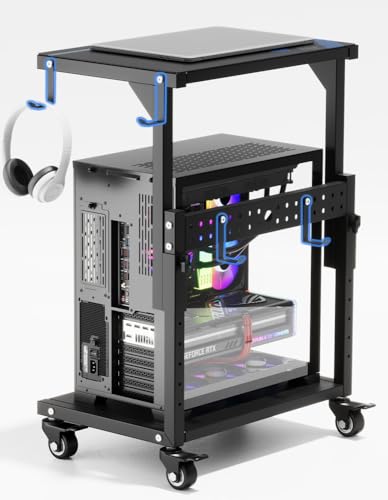
Desktop Stand Guide: Elevate Your Workspace
Discover how the right desktop stand can improve your posture, declutter your desk, and boost productivity. Expert reviews, buying tips, and top-rated risers for every need.
SHOP TOP DESKTOP STANDSWhy a Desktop Stand? A desktop stand (also called a monitor riser, laptop stand, or desk shelf) is one of the most impactful upgrades you can make to your workspace. It elevates your screen(s) to eye level, improves posture, reduces neck and back pain, and creates valuable storage space underneath. Whether you're working from home, gaming, or studying, the right desktop stand transforms your desk into a more comfortable, organized, and productive environment.
Key Benefits of a Desktop Stand
🪑 Ergonomic Posture
Raises your monitor or laptop to eye level, reducing neck and shoulder strain.
📦 Extra Storage
Frees up valuable desk space underneath for a keyboard, notebook, or other essentials.
🧹 Cleaner Setup
Organizes your workspace and helps hide cables for a minimalist, clutter-free look.
💻 Versatility
Supports monitors, laptops, tablets, and even dual-screen setups for maximum flexibility.
How to Choose the Right Desktop Stand
Selecting the perfect desktop stand depends on your specific needs, desk setup, and the devices you use. Here are the most important factors to consider before making a purchase.
1. Stand Type: Monitor Stand vs. Laptop Stand
The first decision is whether you need a desktop stand for a monitor, a laptop, or both. A monitor stand is typically wider and designed to support a single or dual monitors, often with a shelf for storage underneath. A laptop stand is more compact, designed to elevate your laptop for better airflow and ergonomics. Some versatile desktop stands can support both, with adjustable arms or platforms. If you're using a desk with monitor shelf, you may prefer a riser that integrates seamlessly.
2. Height Adjustability
For optimal ergonomics, the top of your screen should be at or slightly below eye level. A desktop stand with adjustable height allows you to fine-tune the position for your specific height and chair setup. Look for models with multiple height settings or telescoping arms. If you're setting up a dual-monitor desktop, ensure the stand can achieve the correct height for both screens simultaneously.
3. Weight Capacity
Check the weight capacity of the desktop stand to ensure it can safely support your monitor(s) or laptop. For a standard 24–27 inch monitor, most stands handle up to 20–30 lbs. For larger ultrawide or heavy gaming monitors, look for a heavy-duty stand with a higher weight limit. For a desktop PC stand, you'll need a model specifically designed for the weight and size of a computer tower.
4. Material & Build Quality
Desktop stands are typically made from wood, metal, acrylic, or a combination. Wood stands offer a warm, classic look and blend well with farmhouse desk aesthetics. Metal stands are durable and modern, often with a sleek, minimalist design. Acrylic stands are lightweight and almost invisible, perfect for a clean, modern desk. Consider the durability, stability, and aesthetic compatibility with your existing desk, whether you have an executive office desk or a gaming desk.
5. Additional Features
Some desktop stands come with built-in USB ports, cable management channels, or even wireless charging pads. These can add convenience and help keep your desk tidy. If you use multiple devices, consider a desktop stand with integrated charging stations to reduce cable clutter. For a desk with monitor mounts, ensure the stand complements the overall setup.
Desktop Stand Comparison
To help you decide, here's a quick comparison of the most popular types of desktop stands based on key features and price ranges.
| Type | Best For | Height Adjustability | Weight Capacity | Price Range |
|---|---|---|---|---|
| Basic Monitor Riser | Single monitor, budget setup | Fixed or 2-3 levels | Up to 25 lbs | $25–$60 |
| Adjustable Laptop Stand | Laptops, tablets | Multiple angles & heights | Up to 15 lbs | $30–$80 |
| Dual Monitor Stand | Dual-screen setups | Height & tilt adjustable | Up to 40 lbs total | $60–$150 |
| Premium Wood Shelf | Aesthetic, storage | Fixed height | Up to 50 lbs | $70–$200 |
| Heavy-Duty PC Stand | Desktop computer towers | Fixed or caster wheels | Up to 80 lbs | $50–$120 |
Top Desktop Stand Recommendations
Based on our research and expert reviews, here are the best desktop stands across different categories. Each option has been selected for its build quality, ergonomics, and value. For a more specialized setup, you might also explore options like a desktop riser or a desktop computer shelf for additional storage.
- Best Overall: A versatile, height-adjustable metal stand with a weight capacity of 30 lbs, perfect for most monitors and laptops. (Price range: $50–$80)
- Best for Dual Monitors: A sturdy, adjustable stand that supports two screens up to 27 inches each, with excellent cable management. (Price range: $90–$140)
- Best Budget Option: A simple, fixed-height wooden riser that adds a warm touch while elevating your screen. (Price range: $25–$40)
- Best for Laptops: A portable, foldable stand with multiple tilt angles and excellent airflow for your laptop. (Price range: $35–$60)
- Best for Aesthetics: A premium bamboo or walnut shelf with a sleek design and extra storage space underneath. (Price range: $80–$150)
Ready to upgrade your workspace? Browse the top-rated desktop stands below. Each product is carefully selected to help you find the perfect riser for your desk, budget, and style. Investing in a quality desktop stand is a small change that makes a big difference in your daily comfort and productivity.