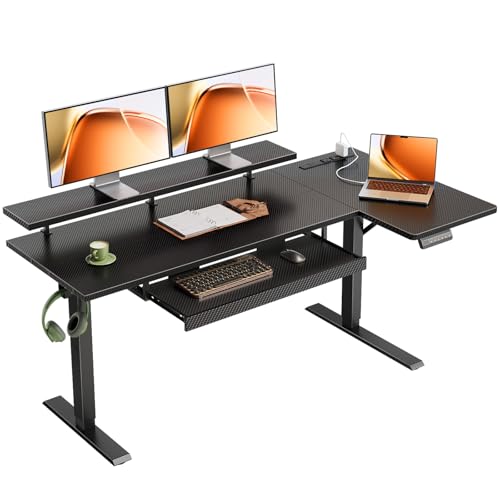
Electric Sit Stand Desk with Keyboard Tray: The Complete Guide
Discover how an electric sit stand desk with a keyboard tray transforms your workspace by combining seamless height adjustment with proper typing ergonomics. This comprehensive guide covers everything you need to know before making your decision.
Why this matters: An electric sit stand desk with a keyboard tray addresses two critical ergonomic challenges at once — the ability to alternate between sitting and standing throughout the day, and the proper positioning of your keyboard and mouse at a comfortable typing height. When these two features work together, you get a workspace that supports your posture, reduces strain, and adapts to your body rather than forcing your body to adapt to it.
What Is an Electric Sit Stand Desk with Keyboard Tray?
An electric sit stand desk with keyboard tray is a height-adjustable workstation that uses motorized legs to move the desktop up and down at the push of a button. The keyboard tray is a separate surface, typically mounted underneath the main desktop, that slides out or is fixed at a lower level specifically for your keyboard and mouse. Together, these two components create a workspace where your screen can stay at eye level while your hands rest at a natural, relaxed angle.
This combination is particularly valuable because it solves a common problem: when you raise a standard desk to standing height, your keyboard and mouse rise with the entire surface. If your monitor is also on the same surface, you may find yourself reaching upward or hunching your shoulders. A keyboard tray decouples your typing surface from your screen surface, giving you independent control over both.
Core Benefits of Combining Electric Adjustment with a Keyboard Tray
Understanding the benefits helps you evaluate whether this type of desk matches your work style and physical needs. Here are the main advantages:
Proper Typing Posture
A keyboard tray allows your forearms to stay parallel to the floor with your elbows at roughly a 90-degree angle. This reduces strain on your wrists, shoulders, and neck compared to typing on a desktop surface that may be too high.
Independent Screen and Keyboard Positioning
Because the keyboard tray moves separately from the main desktop, you can keep your monitor at the correct viewing height regardless of whether you are sitting or standing. This eliminates the compromise many people make when using a single-surface height-adjustable desk.
Seamless Sit-Stand Transitions
Electric motors make height changes effortless — typically with memory presets that let you return to your preferred sitting and standing positions with one touch. This encourages more frequent position changes throughout the day.
Reduced Repetitive Strain
Alternating between sitting and standing, combined with a properly positioned keyboard tray, can help reduce the repetitive strain associated with prolonged static postures. The tray keeps your input devices at a consistent height even as the desk moves.
Better Desk Surface Organization
Moving your keyboard and mouse to a dedicated tray frees up the main desktop for monitors, documents, and other accessories. Many users find this creates a cleaner, more focused workspace.
Accommodates Different Body Types
Because both the desk height and the keyboard position can be adjusted, this setup works well for people of varying heights, including those who are taller or shorter than average. It also supports shared workspaces where multiple people use the same desk.
Key Features to Evaluate
When researching an electric sit stand desk with keyboard tray, pay attention to these feature categories. They determine how well the desk will perform over time and how comfortable it will be for your specific needs.
Height Adjustment Range and Motor Quality
The height range determines who the desk can accommodate. A broader range — for example, a low point suitable for seated work and a high point suitable for standing — is generally more versatile. Motor quality affects speed, smoothness, and noise level. Mid-range and premium models typically offer dual motors that operate more quietly and handle heavier loads with less strain than single-motor designs. Look for memory presets and anti-collision sensors, which pause or reverse the desk if it encounters an obstacle.
For a comparison of adjustment mechanisms across different desk styles, our guide on the work desk that moves up and down provides useful context on what to expect at each tier.
Keyboard Tray Design and Mechanism
The keyboard tray itself deserves close attention. Consider these factors:
- Slide mechanism: Ball-bearing slides offer smoother movement than basic friction slides. Some trays also offer tilt adjustment and swivel, which can help fine-tune your wrist angle.
- Size and weight capacity: Ensure the tray is wide enough for your keyboard and mouse side by side, and check that it can support the combined weight of your devices.
- Height adjustability: Some keyboard trays mount at a fixed height beneath the desktop; others can be adjusted up or down within a limited range. An adjustable tray gives you more control over your typing posture.
- Retractability: A tray that slides fully under the desk when not in use keeps your workspace clear and protects the keyboard from dust.
If you prefer a standalone tray solution, our article on the under desk keyboard tray mount covers mounting options and compatibility considerations that apply equally to integrated tray systems.
Desktop Material and Surface
The desktop material affects durability, appearance, and how the desk feels under your hands. Common options include laminate, engineered wood, bamboo, and solid wood. Laminate surfaces are easy to clean and resist scratches; solid wood offers a warmer feel and can be refinished over time. For a broader comparison of surface options, see our guide to wooden desk tops, which explains how different wood species and finishes behave in daily use.
Stability and Load Capacity
A desk that wobbles at standing height undermines the entire purpose of the investment. Stability depends on the frame design, the number of legs, and the quality of the lifting columns. Three-stage columns typically offer better stability at taller heights than two-stage designs. Check the load capacity rating and consider whether it accounts for the weight of monitors, accessories, and the keyboard tray itself.
How the Keyboard Tray Interacts with the Sit-Stand Mechanism
One of the most important considerations is how the keyboard tray is mounted and whether it moves with the desk or stays fixed. There are two common approaches:
- Tray mounted to the desktop: The tray moves up and down with the desk. This keeps the relationship between your keyboard and monitor consistent as you change positions, which is generally the preferred setup for ergonomic consistency.
- Tray mounted to a fixed frame or separate surface: Less common in electric sit-stand desks, but some designs use a fixed tray while the main surface moves. This can create a mismatch between screen height and keyboard height as the desk moves, so it requires careful evaluation.
For most users, a tray that moves with the desk is the better choice because it preserves your carefully tuned ergonomic setup whether you are sitting or standing. This is the same principle that makes adjustable computer desks with keyboard trays popular for users who prioritize consistent input positioning.
Comparing Desk Tiers: What to Expect
Electric sit stand desks with keyboard trays are available across a range of quality tiers. The table below summarizes typical characteristics so you can align your expectations with the tier that fits your needs.
| Tier | Typical Motor and Frame | Keyboard Tray | Best For |
|---|---|---|---|
| Entry-level | Single motor, two-stage columns, basic control panel | Fixed-height tray, friction slide, limited size | Light daily use, occasional height changes, smaller workspaces |
| Mid-range | Dual motor, three-stage columns, memory presets, anti-collision | Adjustable-height tray, ball-bearing slide, tilt option | Full-time office work, frequent sit-stand transitions, multi-device setups |
| Premium | Dual motor with advanced control, quiet operation, high load capacity | Ergonomic tray with swivel, tilt, and height adjustment | Heavy monitor setups, professional use, shared workspaces |
| Commercial-grade | Heavy-duty dual motor, extended height range, reinforced frame | Reinforced tray, high weight capacity, precision slide | Corporate environments, multi-user deployment, demanding daily cycles |
As you move up in tier, the improvements are usually incremental but meaningful: smoother and quieter motors, more stable frames at standing height, and keyboard trays with better adjustment options. Mid-range models often represent the most balanced combination of features for typical home office use, while premium and commercial-grade options are appropriate when the desk will see constant use or support heavy equipment.
Ergonomic Setup Tips
Once you have an electric sit stand desk with keyboard tray, setting it up correctly is essential to get the full benefit. Follow these guidelines:
- Set your seated position first. Adjust your chair so your feet rest flat on the floor and your thighs are roughly parallel to the ground. Then set the keyboard tray height so your elbows are at about 90 degrees and your wrists are neutral — not bent up or down.
- Position your monitor at eye level. With the desk at seated height, adjust the monitor so the top of the screen is at or slightly below eye level. The keyboard tray should not change this relationship.
- Save a standing preset. Raise the desk to standing height and adjust the keyboard tray (if it is independently adjustable) so your elbows remain at roughly 90 degrees and your wrists stay neutral. Save this position as a memory preset.
- Alternate regularly. Use the memory presets to switch between sitting and standing every 30 to 45 minutes. Frequent, shorter standing intervals are generally more comfortable than long standing sessions.
- Accessorize for comfort. A wrist rest can help keep your wrists neutral during pauses. Our guide to wrist rests covers materials and shapes that support neutral wrist alignment.
Who Should Consider This Setup?
An electric sit stand desk with keyboard tray is particularly well-suited to:
- Remote and hybrid workers who spend six or more hours per day at a desk and want to reduce the physical toll of prolonged sitting.
- Users with existing discomfort in the wrists, shoulders, or lower back who need more control over their typing posture.
- Taller or shorter individuals who struggle to find a standard desk that accommodates their proportions.
- Shared workspaces where two or more people use the same desk and need quick, repeatable height changes.
- Multi-monitor users who want to keep screens at eye level while keeping input devices at a comfortable lower height.
If you are building a complete home office from scratch, our guide to the work from home desk and chair set can help you coordinate your desk choice with seating and accessories. For smaller spaces, the work from home desk setup for small spaces offers layout ideas that pair well with height-adjustable desks.
Potential Drawbacks to Keep in Mind
No product category is perfect, and it is worth understanding the trade-offs before you commit:
- Reduced legroom: A keyboard tray adds hardware beneath the desktop, which can reduce knee clearance, especially in the seated position. If you have long legs, check the tray's mounting depth and the desk's clearance.
- Keyboard tray weight limits: Heavier mechanical keyboards, large mousepads, and additional devices can exceed the tray's rating on entry-level models. Check the specification carefully.
- Learning curve for tray adjustment: If the tray has tilt or height adjustments, it may take a few sessions to find your ideal setting. Marking your preferred position can help.
- More components to maintain: The tray slide mechanism and the desk motors are separate systems. Both benefit from periodic inspection and cleaning.
Frequently Asked Questions
Can I add a keyboard tray to an existing electric standing desk?
In many cases, yes. Aftermarket under-desk keyboard tray mounts are available and can be attached to most desktops with sufficient clearance. However, you need to verify that the desk frame and desktop material can support the added weight and that the tray's mounting hardware does not interfere with the desk's lifting mechanism or crossbar. Our guide on the under desk keyboard tray mount explains the compatibility checks in detail.
Should the keyboard tray move with the desk or stay fixed?
For most users, a tray that moves with the desk is preferable because it preserves the ergonomic relationship between your keyboard, mouse, and monitor as you change positions. A fixed tray can work in specialized setups, but it requires more careful planning to avoid mismatched heights when standing.
How often should I switch between sitting and standing?
Many ergonomics guidelines suggest alternating every 30 to 45 minutes, but the ideal interval varies by individual. The key is to avoid long static periods in either position. Memory presets on electric desks make it easy to switch frequently without disrupting your workflow.
What weight capacity should I look for?
Consider the total weight of your monitors, monitor arms, desktop accessories, keyboard tray, and input devices, then add a margin for future additions. Mid-range and premium desks typically offer higher capacities, which provide more flexibility and often correlate with sturdier frames. Check both the desktop load rating and the keyboard tray's separate weight limit.
Is a keyboard tray necessary if I already have an electric standing desk?
Not strictly necessary, but it can significantly improve ergonomics. Without a tray, your keyboard sits at desktop height, which may be too high for comfortable typing, especially when standing. A tray lets you lower your input devices independently, keeping your wrists neutral and your shoulders relaxed. If you already own a standing desk, an aftermarket tray is a practical upgrade. If you are buying new, models that include a tray simplify the decision.
Can I use a keyboard tray with a laptop?
Yes, but consider your setup. A laptop on a keyboard tray puts the screen at a low height, which can strain your neck. Many users place the laptop on the main desktop (often on a stand) and use an external keyboard and mouse on the tray. This approach combines proper screen height with comfortable input positioning.
How do I maintain the keyboard tray slide mechanism?
Keep the slide tracks free of dust and debris. A dry cloth or a small brush can clear dust from the tracks. If the slide becomes stiff, check the manufacturer's guidance — some ball-bearing slides benefit from a small amount of appropriate lubricant, while others are designed to run dry. Avoid over-lubricating, which can attract dust.
Ready to Upgrade Your Workspace?
An electric sit stand desk with keyboard tray is one of the most effective investments you can make in your daily comfort and long-term health. Explore the recommended models below to find the configuration that fits your workspace and work style.
Explore Recommended Models