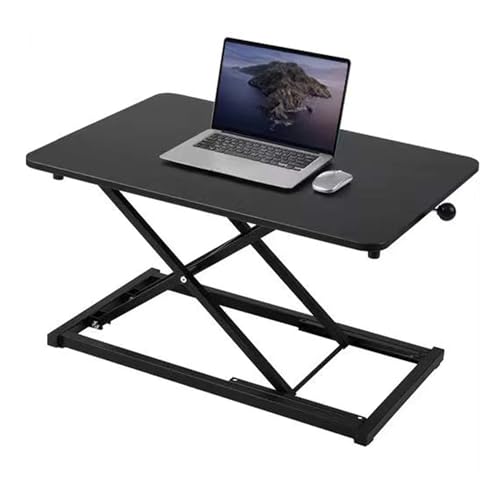
Height Adjustable Standing Desk Converter: The Complete Guide
Transform your existing desk into a healthy, ergonomic workspace. Discover the best standing desk converters, key features, and expert tips to boost your productivity and well-being.
Explore Top ConvertersWhat Is a Height Adjustable Standing Desk Converter?
A height adjustable standing desk converter (also called a sit-stand desk converter or desk riser) sits on top of your existing desk. It allows you to easily switch between sitting and standing positions throughout the day, promoting better posture, reducing back pain, and increasing energy levels. Unlike a full standing desk, a converter is a cost-effective and portable solution that works with almost any desk surface.
Whether you're setting up a home office, upgrading your corner computer desk, or looking for a space-saving solution, a desk converter offers flexibility without the need for a complete desk replacement. Many models feature pneumatic or spring-assisted lift mechanisms for smooth, effortless height adjustment.
Top Benefits of Using a Standing Desk Converter
💪 Improved Posture
Reduce slouching and neck strain by alternating between sitting and standing.
🔥 Increased Energy
Standing boosts circulation and helps you stay alert during long work hours.
💰 Cost-Effective
Get the benefits of a standing desk at a fraction of the cost of a full electric desk.
📦 Portable & Flexible
Easily move it between workstations or take it to the office. Works with any desk.
For those with a compact L-shaped desk or a budget-friendly desk, a converter is an ideal upgrade. It also pairs perfectly with ergonomic chairs and keyboard trays for a complete healthy workspace.
Key Features to Consider
When choosing a height adjustable standing desk converter, pay attention to these essential features:
- Weight Capacity: Ensure the converter can safely support your monitors, laptop, and other desk accessories. Most models hold 15–35 lbs.
- Height Range: Look for a converter that extends high enough for your height (typically 15–20 inches of lift).
- Lift Mechanism: Pneumatic (gas spring) or manual (spring-assisted) – both offer smooth adjustment. Pneumatic is preferred for ease of use.
- Surface Size: Choose a platform large enough to accommodate your primary workspace. Some have dual-tier designs for monitors and keyboard.
- Stability: A sturdy base prevents wobbling, especially when typing or using a mouse.
- Ease of Assembly: Most converters come pre-assembled or require minimal setup.
If you're using a gaming desk or a large writing desk, ensure the converter's footprint fits comfortably on your surface.
Top Height Adjustable Standing Desk Converters
Based on expert reviews and user feedback, these are the best converters in 2026. Prices range from $120 to $450, with premium models offering additional features like USB ports and memory presets.
| Model | Weight Capacity | Height Range | Lift Type | Price |
|---|---|---|---|---|
| ErgoRise Pro | 35 lbs | 16.5" | Pneumatic | $249 |
| FlexiSpot Comhar | 33 lbs | 17.7" | Pneumatic | $199 |
| VIVO Dual Monitor | 44 lbs | 15.8" | Spring-assisted | $159 |
| Stand Steady | 40 lbs | 18" | Pneumatic | $299 |
For dual-monitor setups, consider models with a wider platform or a dedicated second tier. A stand-up desk converter for 2 monitors is specifically designed to handle the extra weight and width.
How to Choose the Right Converter for Your Desk
Follow these steps to find the perfect fit:
- Measure Your Desk: Check the available depth and width. Most converters need at least 20" depth.
- Check Monitor Weight: Add up the weight of your monitors, laptop, and any other items you'll place on the converter.
- Consider Your Height: For tall users (over 6'0"), look for a converter with extra height extension.
- Think About Typing: Some converters have a separate keyboard tray for ergonomic typing angles.
- Read Reviews: User feedback on stability and ease of use is invaluable.
If you have a desk with drawers or a multi-monitor setup, choose a converter with a sturdy base and sufficient surface area.
Assembly Tips & Maintenance
Most converters require minimal assembly. Here are some tips to ensure a smooth experience:
- Read the Manual: Even if assembly seems straightforward, follow the manufacturer's instructions.
- Secure All Screws: Loose screws can cause wobbling. Double-check all connections.
- Test the Lift: Before placing your equipment, test the lift mechanism a few times to ensure smooth operation.
- Clean Regularly: Wipe down the platform and frame with a soft cloth. Avoid harsh chemicals.
- Adjust Desk Height: For optimal ergonomics, your elbows should be at a 90-degree angle when typing, and your monitor should be at eye level.
For added comfort, consider pairing your converter with a desk chair and an anti-fatigue mat to reduce leg strain.
Frequently Asked Questions
Can I use a converter on any desk?
Yes, most converters are designed to sit on any flat, stable desk surface. However, ensure your desk can handle the combined weight of the converter and your equipment.
Is a converter as good as a full standing desk?
Converters offer the same health benefits as full standing desks but are more affordable and portable. The main difference is that they sit on top of an existing desk, so they take up some surface space.
How much weight can a converter hold?
Most models support between 15 and 44 pounds. Always check the weight limit before placing your equipment.
Can I use a converter with a laptop and external monitor?
Absolutely. Many converters are designed for dual-monitor setups. Just make sure the platform is wide enough and the weight capacity is sufficient.
For specific setups, you might also be interested in a desk for 3 monitors or a large L-shaped desk if you need more space.
Ready to improve your workspace? Browse our top-rated height adjustable standing desk converters and find the perfect fit for your home office.