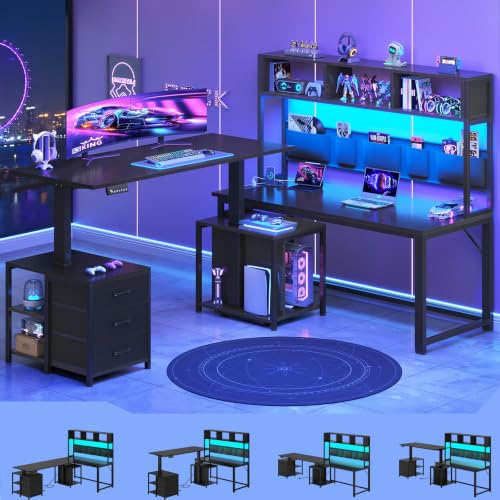
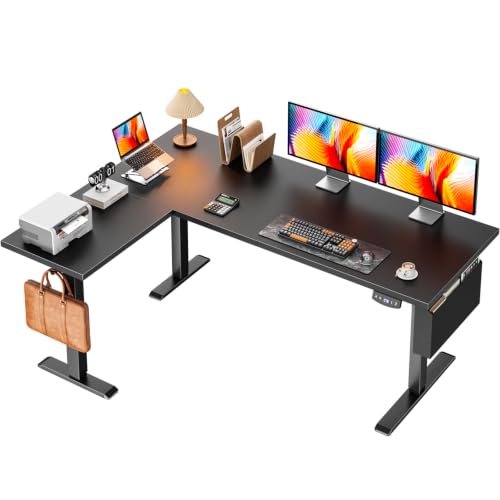
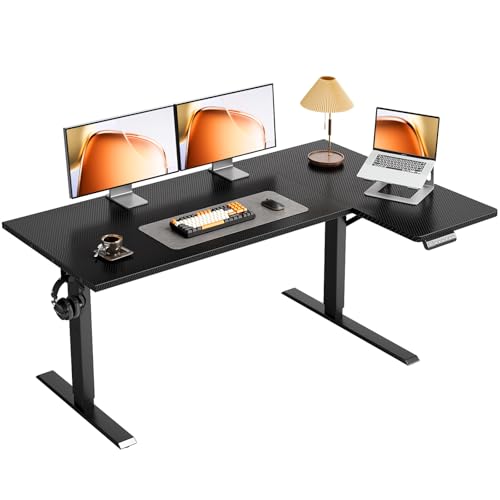
L-Shaped Gaming Desk with Adjustable Height: Complete Buyer Guide
Everything you need to evaluate a height adjustable L-shaped gaming desk — from corner layout and lift range to frame stability, cable routing, and multi-monitor planning — so you can choose a sit-stand corner setup that fits your room and your play style.
Why this combination works: An L-shaped gaming desk wraps around a corner to give you a wider surface for multi-monitor layouts, while adjustable height adds the option to switch between sitting and standing. Together they solve two common problems at once: limited floor space and long sessions in a single posture. This guide explains the mechanisms, the layout principles, and the features that separate a solid mid-range model from a premium one.
What Is an L-Shaped Gaming Desk with Adjustable Height?
It is a corner gaming desk that spans two adjoining walls in an L configuration and includes a height adjustment mechanism. The two wings create a wider usable surface than a straight desk of the same footprint, and the height adjustment lets you raise or lower the entire surface — usually with an electric motor, though manual crank and gas-lift options exist at the entry-level tier.
The L-shape is particularly useful for gaming because it allows one wing for the primary monitor and the other wing for a secondary display, a console, or accessories. The height adjustment matters because gaming sessions are often long, and alternating between sitting and standing reduces fatigue. If you are new to height adjustable desks in general, our standing desk height guide explains how to match the range to your body measurements.
Electric vs Manual Adjustment
Electric dual-motor frames are the most common choice at the mid-range and premium tiers. They lift the full L-shaped surface smoothly and keep both wings level. Single-motor frames are simpler and appear at the entry-level and lower mid-range tiers; they work well for lighter setups. Manual crank desks exist but are less common for L-shaped gaming desks because the wide surface requires more effort to raise. Gas-lift mechanisms are rare for corner configurations because they struggle to support the heavier, wider surface.
Who Should Consider a Height Adjustable L-Shaped Gaming Desk?
This desk type serves a specific set of users. If any of the following describe you, it is worth a closer look.
- Multi-monitor gamers: The two wings accommodate a primary monitor and a secondary display without crowding the keyboard area. See our guide to L-shaped gaming desks with storage and hutch for storage-heavy variations.
- Remote workers who also game: The height adjustment supports a workday of sitting and standing, and the corner layout suits a work-and-play setup in one room.
- Streamers: The wider surface leaves room for a microphone arm, lighting, and a secondary display for chat. Our guide to L-shaped gaming desks with LED lights and storage covers lighting-friendly layouts.
- Small-room users: A corner desk uses floor space more efficiently than a long straight desk. If floor space is very tight, consider small corner computer desks with monitor shelf or a corner desk for small space instead of a full L-shape.
- Users with back or posture concerns: Alternating between sitting and standing is one of the most effective ways to reduce strain during long sessions. See our guide to the best desk chair for a bad back for chair pairing advice.
Comparing L-Shaped Gaming Desks by Tier
The table below summarizes what you can typically expect at each tier. Use it to set expectations before comparing specific models.
| Tier | Adjustment Mechanism | Frame Build | Best For | Typical Extras |
|---|---|---|---|---|
| Entry-level / starter tier | Single-motor electric or manual | Lighter steel tubing | Casual players, lighter setups | Basic grommets, cup holder |
| Mid-range / balanced tier | Dual-motor electric | Reinforced steel frame | Daily players, multi-device setups | Memory presets, rear cable channel, LED accents |
| Premium / high-end tier | Dual-motor electric with anti-collision | Heavy-duty high-grade steel | Enthusiasts, streamers, long sessions | Under-desk tray, monitor arm compatibility, controller stand |
| Professional-grade / commercial-grade | Dual-motor with high load rating | Commercial-rated frame | Competitive players, shared setups | Integrated power, heavy-duty casters, extended lift range |
Tier note: A mid-range dual-motor model is usually the sweet spot for an L-shaped gaming desk with adjustable height. Dual motors lift both wings evenly and support a wider load, which matters because the L-surface is heavier and less balanced than a straight desk. Entry-level single-motor models are a reasonable starting point for lighter setups, while premium and professional-grade tiers target users who spend many hours at the desk and want finer control.
Key Features to Evaluate Before Buying
Beyond the tier, specific features determine how well the desk fits your routine and your equipment. These are the details worth checking in the product specifications and reviews.
Lift Range and Stability
- Lift range: Check that the range comfortably covers your sitting height and a standing height with your elbows near the surface. Our standing desk height guide walks through the measurement process.
- Stability at height: An L-shaped desk has a wider surface and less central support than a straight desk, so stability at the top of the range matters. Look for a reinforced frame and a crossbar or brace between the two legs. Reviews that mention wobble at standing height are a warning sign.
- Load rating: The frame should support your monitors, peripherals, and the weight of your arms during use. A heavy-duty rating is worth prioritizing if you plan to mount multiple monitors on arms.
- Anti-collision: Common on premium dual-motor frames, this feature stops the desk if it meets an obstacle — useful in a corner where the desk may come close to a wall or a shelf.
Surface and Layout
- Wing dimensions: Measure each wing against your monitor and keyboard footprint. A corner desk with two equal wings is flexible; a model with one long wing and one short wing suits a primary-plus-secondary layout.
- Reversible orientation: Some models allow the L to face left or right. This makes it easier to fit the desk to the room's window and door positions.
- Surface material: Laminate surfaces resist scratches and are easy to clean; solid wood surfaces can be refinished over time. See our notes on wood surfaces for a material comparison.
- Monitor arm compatibility: If you plan to mount a monitor arm, confirm the desk thickness and whether the surface supports clamping. Some L-shaped desks have a hollow core that is not suitable for clamping. A monitor arm desk mount guide covers the key considerations.
Cable Management
An L-shaped desk accumulates cables across both wings, so cable management matters more than it does on a straight desk. Look for grommets on both wings and a rear channel that routes cables to a single point. If the desk lacks built-in routing, plan for a cable management box or an under-desk tray. Our cable management desk guide covers routing options in more detail.
Layout and Multi-Monitor Planning
The L-shape offers more layout flexibility than a straight desk, but it also requires more planning. A few principles help you get the most from the corner footprint.
Place the Primary Monitor in the Corner
Positioning the primary monitor at the corner, angled toward the seating position, lets you use both wings without twisting. A monitor arm makes this easier because it frees the surface and allows the monitor to float above the corner. If you prefer a freestanding stand, a monitor stand with storage adds usable space underneath.
Use One Wing for Secondary Devices
The second wing is a natural home for a console, a laptop, or a secondary display. Keeping the secondary devices on one wing leaves the primary wing clear for the keyboard, mouse, and a desk mat with wrist rest.
Plan for Lighting and Eye Comfort
A corner desk often sits in a dimmer part of the room. A monitor light bar reduces eye strain without adding surface clutter, and a desk LED light strip can brighten the corner. If you prefer a traditional lamp, our guide to the best desk lamps for eye strain covers the key considerations.
Match the Chair to the Desk
An adjustable height desk is most effective when paired with a chair that supports both sitting and standing. A chair with a synchronized tilt and adjustable lumbar support works well for sitting, and a standing desk stool or an adjustable chair for standing desk supports the standing phases. Our ergonomic desk chair for standing desk guide covers the pairing in more detail.
Corner placement tip: Leave a few inches of clearance between the desk and the walls on both sides. This reduces wobble at standing height and gives you room to route cables behind the desk. It also makes it easier to reach the rear of the desk for maintenance.
Upgrades and Accessories Worth Adding
A height adjustable L-shaped gaming desk covers the essentials, but a few accessories can materially improve the experience.
- Monitor arm: Frees surface space and improves viewing height in the corner. See our monitor arm desk mount guide.
- Cable management box: A cable management box hides power strips and adapters in one place.
- Desk mat: A desk mat with wrist rest protects the surface and improves comfort during long sessions.
- Lighting: A monitor light bar or a desk LED light strip brightens the corner without surface clutter.
- Chair mat: If the desk sits on a hardwood floor, an office chair mat for hardwood floor protects the surface and improves rolling.
- Keyboard tray: For added ergonomic control, a height adjustable keyboard tray or a under-desk keyboard tray mount can complement the sit-stand range.
- Storage: A desk with hutch and storage or a monitor stand with storage keeps the surface clear.
Frequently Asked Questions
What is an L-shaped gaming desk with adjustable height?
It is a corner gaming desk that spans two adjoining walls and includes a height adjustment mechanism, usually electric dual-motor or single-motor. The L-shape wraps the desk around a corner for a wider surface, while the height adjustment lets you switch between sitting and standing during long sessions.
What height range should I look for in an adjustable height L-shaped gaming desk?
Look for a range that comfortably covers sitting height for your body and a standing height that keeps your elbows near the desk surface. Most mid-range and premium models provide a range that suits a wide span of users. Use our standing desk height guide to match the range to your body measurements before choosing.
Is an electric L-shaped gaming desk more stable than a manual one?
Electric dual-motor frames generally provide smoother motion and more consistent lift across both wings of an L-shaped desk. Manual frames can be stable when well-built, but they require more effort to adjust and may not lift evenly across a wide corner surface. The best choice depends on how often you switch positions.
How do I plan a multi-monitor layout on an L-shaped gaming desk?
Use one wing for the main gaming monitor and the other wing for a secondary display or a console and accessories. Keep the corner itself free for a keyboard and mouse, or place the primary monitor in the corner on a monitor arm to angle both wings toward the seating position. Cable routing along the rear of both wings keeps the setup clean.
Can I fit a height adjustable L-shaped gaming desk in a small room?
It depends on the room shape and the desk dimensions. An L-shaped desk uses floor space efficiently because it wraps around a corner, but the wings still require a certain length of wall on both sides. Measure the walls and the clearance around doors and windows before choosing. If the room is very tight, a smaller corner desk may be a better fit than a full L-shape.
Ready to Choose Your Height Adjustable L-Shaped Gaming Desk?
Browse curated L-shaped gaming desks with adjustable height at the starter tier, mid-range, and premium level. Compare lift range, frame stability, and layout features side by side.
Explore L-Shaped Gaming DesksRelated Reading
If you are still weighing options, these guides can help you compare adjacent solutions:
- L-shaped gaming desk with storage and hutch — storage-heavy configurations.
- L-shaped gaming desk with LED lights and storage — lighting-friendly layouts.
- Mid-century modern L-shaped desks for home office — a cleaner aesthetic outside the gaming category.
- A desk that moves up and down — the broader category of height adjustable desks.
- Electric height adjustable standing desk with monitor mount — for a straight-desk alternative.
- Compact standing desks — for smaller rooms.
- Standing desk with monitor mount — for mounting considerations.
- Heavy-duty desk — for multi-monitor and heavy equipment setups.