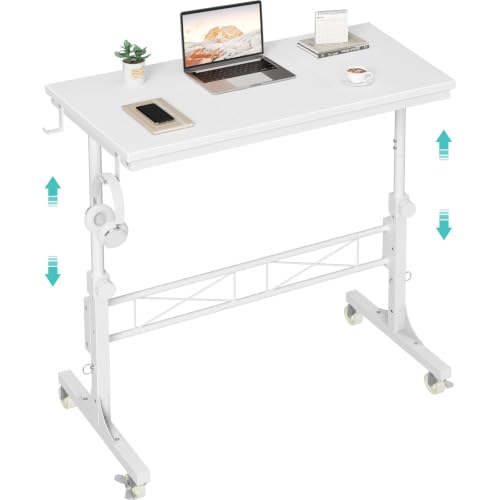
Manual Standing Desk: The Complete Guide
Discover the benefits of manual standing desks — from hand-crank to pneumatic designs. Learn how to choose, set up, and get the most from your non-electric sit-stand desk.
SHOP TOP MANUAL STANDING DESKSA manual standing desk offers the health benefits of a sit-stand workstation without the need for electricity or complex electronics. Whether you prefer a manual adjustable desk with a crank, a pneumatic gas-spring model, or a manual standing desk converter that sits on your existing table, this guide covers everything you need to know. We'll explore the types, key features, ergonomic benefits, and our top recommendations to help you make an informed purchase.
What Is a Manual Standing Desk?
A manual standing desk is a height-adjustable workspace that relies on human power—not a motor—to move between sitting and standing positions. Common mechanisms include:
- Hand-Crank: Turn a handle to raise or lower the desk. Durable, affordable, and requires minimal effort.
- Pneumatic (Gas Spring): Uses a gas cylinder and a lever or trigger for smooth, near-instant height changes.
- Counterbalance Spring: Similar to pneumatic, uses mechanical springs to offset the weight.
- Converter (Desktop Riser): A platform that sits on your current desk, allowing you to raise your keyboard and monitor.
These desks are ideal for home offices, shared workspaces, and anyone who wants a mobile standing desk that is easy to move and doesn't require a power outlet.
Top Benefits of a Manual Standing Desk
💰 Cost-Effective
Manual desks are significantly cheaper than electric models. Prices typically range from $200 to $800, making them accessible for most budgets.
🔌 No Electricity Needed
Place your desk anywhere—no need for nearby outlets. Perfect for temporary setups, trade shows, or rooms with limited power access.
🛠️ Reliable & Durable
With fewer electronic components, manual desks are less prone to failure. Mechanical parts like cranks and gas springs are built to last for years.
⚡ Fast Adjustment
Pneumatic desks allow you to change height in seconds. Cranks take a bit longer but offer precise control.
🌱 Eco-Friendly
Zero energy consumption means a smaller carbon footprint compared to electric standing desks.
🧳 Portable & Lightweight
Many manual desks are lighter than their electric counterparts, making them easy to move or reconfigure.
How to Choose the Right Manual Standing Desk
When selecting a manual standing desk, consider the following factors:
1. Mechanism Type
- Crank: Best for those who adjust height a few times a day. Quiet and durable.
- Pneumatic: Ideal for frequent changes. Smooth and fast, but may require slightly more maintenance.
- Converter: Excellent if you already have a desk you love and want a cost-effective upgrade.
2. Height Range & Capacity
Check the minimum and maximum height to ensure it suits your stature. Most manual desks range from 28" to 48". Also, verify the weight capacity—typically 50–150 lbs. If you have a dual-monitor setup, opt for a model with higher capacity.
3. Build Quality & Materials
Look for sturdy steel frames, high-quality MDF or solid wood tops, and smooth-gliding mechanisms. Read reviews to ensure the desk is stable at standing height—wobble can be a dealbreaker.
4. Workspace Size
Consider the desktop dimensions. A large standing desk offers more room for multiple monitors, while compact models are great for small spaces. Measure your available area before buying.
Manual vs. Electric Standing Desk
| Feature | Manual Standing Desk | Electric Standing Desk |
|---|---|---|
| Price | $200 – $800 | $400 – $2,500 |
| Adjustment Speed | Slow (crank) to Fast (pneumatic) | Very Fast (motorized) |
| Power Required | No | Yes (outlet needed) |
| Reliability | High (fewer moving parts) | Moderate (motor can fail) |
| Weight | Lighter (40–80 lbs) | Heavier (80–150+ lbs) |
| Best For | Budget-conscious, frequent movers, eco-friendly users | Heavy lifting, frequent adjustment, tech enthusiasts |
💡 Pro Tip: If you choose a manual crank desk, keep the handle in a nearby drawer. For pneumatic models, test the lift mechanism before buying—some require more force than others. Always prioritize desk height calculator ergonomics: your elbows should rest at 90° when typing and your monitor at eye level.
Setup, Use, and Maintenance
Setting up a manual standing desk is straightforward. Follow the manufacturer's assembly instructions, and use a level to ensure the desktop is flat. For crank desks, lubricate the gears occasionally with dry lubricant to keep the mechanism smooth. Pneumatic models may need the gas cylinder replaced after 5–10 years of heavy use. Clean the desktop with a damp cloth and avoid harsh chemicals.
To build a healthy routine, alternate between sitting and standing every 30–60 minutes. Use a anti-fatigue mats to reduce leg strain, and pair your desk with a most comfortable desk chair for your sitting sessions. Proper monitor placement is key—consider a monitor mount for desk to free up surface space and achieve the ideal viewing angle.
Frequently Asked Questions
Is a manual standing desk hard to adjust?
Not at all. Hand-crank models require a few turns (typically 20–30 cranks) to go from sitting to standing. Pneumatic desks adjust with a simple lever press—it takes just seconds.
Can I use a manual standing desk with a heavy monitor setup?
Yes, but check the weight capacity. Most standard manual desks support up to 100–150 lbs, which is enough for two monitors, a laptop, and accessories. For heavier setups, look for "heavy-duty" models.
Are manual desks quieter than electric ones?
Yes. Crank desks make only a soft clicking sound, while pneumatic desks are nearly silent. Electric desks produce motor noise, which can be disruptive in quiet environments.
Which is better: crank or pneumatic?
It depends on your needs. Crank is more durable and cheaper, while pneumatic offers faster adjustment and is easier to use if you change height frequently. Both are excellent choices.
Ready to Elevate Your Workspace?
A manual standing desk is a smart, sustainable, and budget-friendly way to improve your health and productivity. Browse our curated selection below to find the perfect model for your home or office. Whether you need a manual standing desk converter or a full-size manual adjustable desk, you'll find reliable options that deliver excellent value.
SHOP NOW