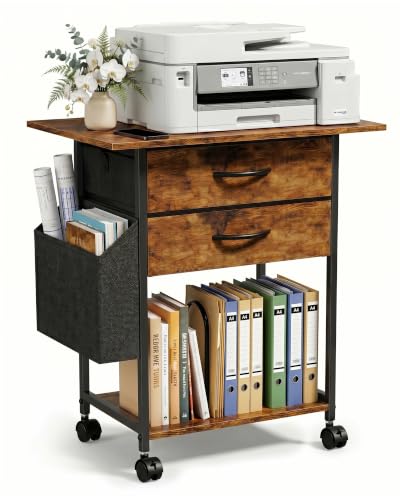
Printer Desk Guide: The Perfect Home Office Workstation
Discover the best printer desks, stands, and workstations. Expert advice on features, space-saving designs, and ergonomic setups for your home office.
🖨️ Why a dedicated printer desk matters: A well-chosen printer desk keeps your equipment organized, reduces clutter, and improves workflow. Whether you need a compact stand for a small office or a spacious workstation with storage, the right desk makes printing, scanning, and document management effortless.
What to Look for in a Printer Desk
Size & Capacity
Ensure the desk can accommodate your printer's dimensions (width, depth, height) with extra space for paper trays and easy access. Standard printer desks offer widths from 30 to 48 inches.
Durability & Weight Support
Printers can weigh 20–50+ lbs. Look for solid construction (steel frames, high-quality MDF or solid wood) with a weight capacity of at least 50 lbs for stability.
Storage & Organization
Integrated shelves, drawers, or cabinets help store paper, ink cartridges, and cables. A desk with drawers keeps supplies tidy and within reach.
Cable Management
Keep power and USB cables organized to prevent tangles and accidents. Look for desks with built-in cable trays or grommets, or use cable management accessories.
Mobility
If you share a printer or need to move it, consider a rolling printer desk with lockable casters for flexibility and stability.
Design & Aesthetics
Choose a style that complements your home office. From rustic wood to modern minimalist, the right look enhances your workspace.
Types of Printer Desks
Compact Printer Stands
Ideal for small spaces. These lightweight stands hold a single printer and basic supplies. Often portable and easy to tuck away.
Workstation Printer Desks
Larger desks with ample surface space for a printer, monitor, and keyboard. Great for home offices where printing is a frequent task.
Rolling Printer Carts
Mobile solutions with shelves for printers and supplies. Perfect for shared spaces or standing desk setups that require flexibility.
Corner Printer Desks
Maximize unused corner space. A corner desk with a dedicated printer shelf keeps your workstation organized and efficient.
Top Considerations Before Buying
- Measure your printer: Note width, depth, and height, including when the paper tray is extended.
- Check weight capacity: Ensure the desk or stand can support your printer's weight safely.
- Assess your workspace: Measure the area where you plan to place the desk, considering doorways and walkways.
- Think about access: You'll need to load paper, replace cartridges, and access the control panel easily.
- Consider future needs: If you plan to upgrade to a larger printer or add a scanner, choose a desk with extra space.
For a complete office setup, explore our guides on office desk furniture and computer desks.
Setting Up Your Printer Desk for Maximum Productivity
Ergonomic Placement
Position the printer at a comfortable height to avoid bending or reaching. A proper desk height reduces strain.
Organize Supplies
Use desk organizers for pens, sticky notes, and small accessories. Keep paper and ink in nearby drawers.
Lighting
Good desk lighting reduces eye strain and helps you see print quality clearly.
Maintain Cleanliness
Dust can affect print quality. Use a desk mat and clean surfaces regularly.
💡 Expert Tip: If you use multiple devices (laptop, desktop, tablet) with your printer, consider a KVM switch desk setup to manage them seamlessly.
📌 Related Guides: Explore our desk organization tips, desk accessories reviews, and desk setup layouts for a complete workspace transformation.