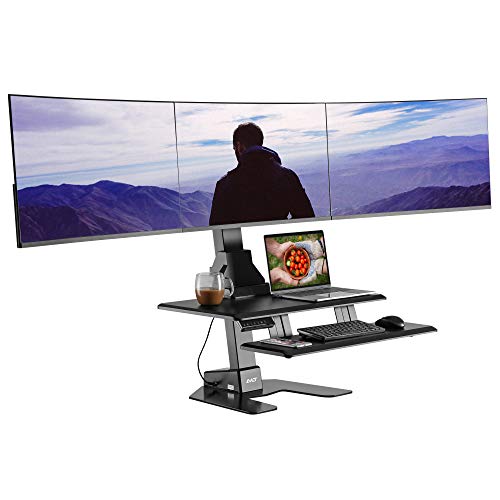
Stand Up Desk Converter for 3 Monitors: The Complete Guide
Everything you need to choose a stable, ergonomic, and durable triple monitor standing desk converter — from weight capacity and lift mechanisms to the best configuration for your workspace.
Explore Recommended ConvertersWhy a triple monitor setup needs a dedicated converter: Running three displays multiplies your screen real estate, but it also adds significant weight and width to your workstation. A standard standing desk converter may flex, wobble, or fail under the load of three monitors plus arms and accessories. This guide breaks down exactly what to look for in a stand up desk converter for 3 monitors so you can transition between sitting and standing with confidence and keep your displays rock-solid at every height.
Why a Standard Converter Often Falls Short for Three Monitors
Most entry-level converters are designed for a single laptop or a monitor plus a keyboard. When you add a second and third display — along with monitor arms, a webcam, speakers, and cable management — the total load climbs quickly. The most common failure points are:
- Insufficient weight capacity: Many lightweight risers are rated for a single monitor, and stacking three displays plus arms can exceed their limit, causing the platform to sag or the lift mechanism to strain.
- Narrow platform width: Three monitors arranged side by side demand a wide, deep work surface. A platform that is too shallow forces you to angle screens awkwardly or let them overhang the edge.
- Wobble at standing height: A gas-spring or Z-lift column that is stable for one screen can develop noticeable sway with three, especially if the frame is thin-gauge steel.
- Inadequate keyboard tray: When the main platform is packed with monitors, the keyboard and mouse need a dedicated, spacious tray that does not crowd your typing area.
Understanding these constraints is the first step toward choosing a converter that will actually support your triple-display workflow over the long term.
Key Specs to Evaluate Before You Buy
When shopping for a stand up desk converter for 3 monitors, treat the following specifications as non-negotiable checkpoints. Compare each candidate against your real-world load and workspace dimensions.
1. Weight Capacity
Add up the weight of all three monitors, any monitor arms or mounts, a webcam, speakers, and cable management hardware. Then add a safety margin of at least 20–30%. A converter rated comfortably above your total load will feel more stable and last longer. Heavy-duty models with reinforced steel frames are the safest bet for triple setups.
2. Platform Width and Depth
Three 24-inch monitors side by side span roughly 60–66 inches. Even with a slight curve or angle, you need a platform wide enough to accommodate the outer edges without overhang. Depth matters too: a deeper platform lets you position monitors at a comfortable viewing distance and still leaves room for a keyboard tray in front.
3. Lift Mechanism and Stability
Gas-spring and electric lift mechanisms are the two main options. Electric converters offer smoother, more precise height adjustment and are generally more stable under heavy loads. Gas-spring models are often more compact but can develop a slight bounce with three monitors. Look for dual-column or reinforced single-column designs with a locking mechanism at your standing height.
4. Keyboard Tray Size and Ergonomics
A separate, wide keyboard tray keeps your typing area clear when the main platform is filled with displays. The tray should be deep enough for a full-size keyboard and a mouse, and it should sit at a comfortable height relative to your monitors. An adjustable or removable tray adds flexibility.
5. Cable Management and Access
Three monitors mean at least three display cables, plus power, USB, and peripherals. Integrated cable management channels or grommets keep the setup tidy and prevent cables from snagging as the converter moves up and down. If your desk lacks built-in routing, consider a separate standing desk cable management solution.
6. Desk Compatibility and Footprint
Measure your existing desk surface and clearance. A converter for three monitors has a larger footprint than a single-screen model, so confirm it fits your desk without blocking drawers or overhanging the edge. Also check that the base clears any pull-out keyboard tray or under-desk storage you already use.
Converter Categories Compared
The table below summarizes the main categories of triple-monitor converters by tier, so you can match the product class to your workflow and durability expectations. Tiers are relative market positions, not absolute ratings.
| Tier | Best For | Typical Strengths | Trade-offs |
|---|---|---|---|
| Entry-Level | Light triple setups, occasional standing | Compact footprint, simple gas-spring lift, straightforward assembly | Lower weight capacity, more wobble at full height, narrower platform |
| Mid-Range | Daily sit-stand use with three standard monitors | Reinforced frame, wider platform, dedicated keyboard tray, better stability | Heavier unit, may require more desk depth |
| Premium | Heavy monitors, frequent height changes | Electric lift, dual-column stability, high weight capacity, premium materials | Larger footprint, more complex setup |
| Top-Tier / Commercial-Grade | Professional multi-monitor workstations | Commercial-grade steel, near-zero wobble, expansive platform, advanced cable routing | Bulky, requires a substantial desk, longer assembly |
Editorial tip: If you already own a motorized standing desk, a converter may be unnecessary — a full electric desk with a triple monitor arm gives you the most stable and spacious triple-display experience. Converters are ideal when you want to keep your existing desk and add standing capability without replacing furniture.
How to Configure Three Monitors on a Converter
Once you have a converter that meets the weight and width requirements, the next step is arranging the displays for comfort and productivity. A few proven configurations:
- Flat side-by-side: The simplest layout. Place the primary monitor directly in front of you and angle the outer two slightly inward. This works best with a wide platform and monitors of 24 inches or smaller.
- Curved arrangement: Angle all three monitors toward your seating position in a gentle arc. This reduces head turning and keeps all screens at a similar viewing distance.
- Primary plus two verticals: Use one large horizontal display in the center and two smaller monitors in portrait orientation on the sides — ideal for reading code, documents, or chat feeds.
Whichever layout you choose, keep the top of your primary monitor at or slightly below eye level when standing, and position the keyboard tray so your elbows rest near 90 degrees. If you need help calculating the right heights, use a standing desk height calculator before you set up.
Stability and Safety Checklist
Three monitors create a top-heavy load, so stability is the single most important safety factor. Run through this checklist before and after setup:
- Confirm the converter's rated capacity exceeds your total load with a margin.
- Place the heaviest monitor in the center and distribute weight evenly.
- Tighten all monitor arm and platform screws after the first week of use.
- Test the lift through its full range with the monitors mounted — there should be no sudden drops or excessive sway.
- Keep cables slack enough to accommodate the full height range without pulling on the converter.
- If the converter sits on a standing desk on top of a regular desk arrangement, verify the base desk is level and rated for the combined load.
Who Should Choose a Triple-Monitor Converter?
A stand up desk converter for 3 monitors is the right fit if you fall into one or more of these groups:
- Traders and analysts who need multiple charts and data feeds visible at once.
- Developers and designers who keep code, documentation, and preview windows side by side.
- Remote workers who want to add standing intervals to an existing desk without buying a full standing desk.
- Gamers and streamers running a triple-display cockpit with chat and control panels.
If you only use one or two monitors and want a lighter, more compact solution, a stand up desk converter for 2 monitors or a converter for a laptop and monitor will be more appropriate.
Pairing Your Converter With the Right Accessories
A well-chosen converter is the foundation, but a few accessories complete the triple-monitor experience:
- Monitor arms: A sturdy triple monitor arm or individual arms let you fine-tune height, tilt, and swivel independently of the platform.
- Ergonomic seating: For your seated intervals, a supportive chair with a memory foam cushion for desk chair helps maintain comfort through the workday.
- Desk mat: An anti-fatigue desk mat with wrist rest reduces strain when you stand and type for extended periods.
- Lighting: Even, glare-free lighting keeps three screens comfortable to view. A modern desk light with adjustable brightness is a practical addition.
Common Mistakes to Avoid
- Overloading the platform: Ignoring the weight rating is the fastest way to a sagging or unstable converter.
- Skipping the keyboard tray: Typing directly on the main platform with three monitors leaves no room and strains your wrists.
- Ignoring desk depth: Three monitors need more front-to-back space than most people expect — measure before committing.
- Neglecting cable management: Loose cables snag, pull, and look messy; route them before the first lift.
- Buying before measuring: Confirm both the converter footprint and your monitor span fit your desk.
Frequently Asked Questions
Can a stand up desk converter support three monitors safely?
Yes — provided the converter is rated for the combined weight of all three monitors plus arms and accessories. Choose a model with a reinforced frame, a wide platform, and a capacity that exceeds your total load with a healthy margin. Mid-range and premium converters are specifically designed for heavier multi-display setups.
What weight capacity should I look for?
Add the weight of your three monitors, monitor arms, webcam, speakers, and cable hardware, then add 20–30% as a safety buffer. A converter rated comfortably above that total will remain stable and durable over years of daily sit-stand use.
Is an electric or gas-spring converter better for triple monitors?
Electric converters generally offer smoother, more precise height changes and better stability under heavy loads, making them the safer choice for three displays. Gas-spring models can work well if they are heavy-duty and rated for the load, but they may show more bounce at full standing height.
How wide does my desk need to be?
Measure your monitor span and add clearance on both sides for the converter base and any cable routing. A desk at least as wide as your three-monitor span plus a few inches of margin on each side keeps the converter stable and prevents overhang.
Can I use my existing monitor arms with a converter?
In most cases yes, as long as the converter platform is solid and the combined weight of the arms and monitors stays within the converter's rating. Clamp-style arms work best on thicker platforms; check that the platform edge is compatible with your arm's clamp before mounting.
Should I choose a converter or a full standing desk for three monitors?
If you want maximum stability, space, and a cleaner look, a full standing desk with monitor mount is the premium solution. A converter is ideal when you want to keep your current desk and add standing capability without replacing your furniture.
Final Buying Checklist
Before you commit to a stand up desk converter for 3 monitors, confirm each of the following:
- Weight capacity exceeds your total load by at least 20–30%.
- Platform width and depth accommodate your monitor span and a keyboard tray.
- Lift mechanism is stable and locks securely at your standing height.
- Keyboard tray is wide and deep enough for a full-size keyboard and mouse.
- Cable management is built in or easy to add.
- Converter footprint fits your desk without blocking drawers or overhanging.
- Monitor arms and accessories are compatible with the platform.
With these checkpoints cleared, you are ready to choose a converter that keeps your three displays stable, your posture healthy, and your workspace productive through every sit-stand transition.
Ready to Compare Triple-Monitor Converters?
Explore our curated selection of recommended stand up desk converters for 3 monitors, selected for stability, capacity, and ergonomic design.
View Recommended Options