
Stand Up Desk with Monitor Mount: The Ultimate Ergonomic Setup
Discover how combining a height-adjustable standing desk with a premium monitor mount can transform your workspace, improve posture, and boost productivity. This guide covers everything you need to know.
Why Choose a Stand Up Desk with Monitor Mount?
A stand up desk with monitor mount is more than just a trend—it's a smart investment in your health and efficiency. By allowing you to alternate between sitting and standing, these desks combat the dangers of a sedentary lifestyle. When paired with a dedicated monitor mount, you gain the freedom to position your screen at the perfect height and distance, reducing neck and eye strain.
Whether you're working from home, managing a home office, or setting up a gaming station, the combination of a standing desk and monitor arm offers unparalleled flexibility. You can easily adjust your setup for different tasks, share your workspace with others, and maintain a clean, organized surface.
✔ Improved Posture
Promotes a neutral spine alignment and reduces back pain.
✔ Reduced Eye Strain
Position your monitor at eye level for comfortable viewing.
✔ More Desk Space
A monitor mount frees up valuable surface area on your desk.
✔ Increased Energy
Alternating between sitting and standing keeps you active.
What to Look For in a Stand Up Desk with Monitor Mount
When shopping for a stand up desk with monitor mount, there are several critical factors to consider. The ideal setup should be stable, easy to adjust, and compatible with your existing equipment. Here’s a breakdown of the most important features:
- Height Range: Ensure the desk adjusts to a comfortable sitting and standing height for your stature.
- Weight Capacity: Check the desk's maximum load and the monitor mount's weight limit for your screen(s).
- Monitor Mount Type: Choose between a single arm, dual-arm, or gas-spring mount for smooth adjustments.
- Desk Surface: Look for durable materials like bamboo, solid wood, or high-quality laminate.
- Stability: A sturdy frame with a wide base prevents wobbling, especially at taller heights.
- Ease of Assembly: Opt for desks with clear instructions and pre-drilled holes for mounting.
- Cable Management: Built-in trays or clips help keep wires organized and out of sight.
💡 Expert Tip: For a seamless experience, consider a standing desk with cable management to keep your workspace tidy. A monitor mount for desk without lip offers versatile clamping options if your desk has a unique edge.
How to Set Up Your Standing Desk and Monitor Mount for Optimal Ergonomics
Proper setup is crucial to reap the full benefits of a stand up desk with monitor mount. Follow these steps to create a workspace that supports your body and enhances your workflow.
- Adjust Desk Height: When standing, your elbows should be at a 90-degree angle, and your wrists should be straight. When sitting, your feet should rest flat on the floor.
- Position the Monitor: The top of your screen should be at or slightly below eye level. The monitor should be an arm's length away.
- Mount the Monitor Arm: Attach the mount securely to the back or edge of your desk. Use the gas-spring mechanism to fine-tune the screen's position.
- Organize Your Cables: Route cables along the arm and desk frame to prevent tangling and maintain a clean look.
- Test Your Setup: Spend a few minutes checking the height and angle of everything. Make small adjustments as needed.
Remember to alternate between sitting and standing every 30–60 minutes. A sit-stand desk with keyboard tray can further enhance your ergonomic setup by keeping your keyboard and mouse at the correct height.
Top Stand Up Desk with Monitor Mount Picks
⚠️ AFFILIATE DISCLOSURE: This website contains affiliate links. As an Amazon Associate, we earn from qualifying purchases. If you make a purchase through these links, we may receive a small commission at no additional cost to you. Read our full affiliate policy.

HUANUO 48″ x 24″ Electric Standing Desk with 2 Drawers, C-Clamp Mount Compatible, Height Adjustable Computer Desk, Home Office Stand Up Desk with 4 Preset Heights & 2 Hooks, Black

Veken 47.2 Inch Large Electric Standing Desk, Gaming Table, Brown | Height Adjustable Sit Stand Up Computer Tables for Home Office, Study , Writing, Suit students, employees and group work

VIVO Standing Desk Converter with Dual Monitor Stand, 32" Black Top | Desktop Holds 33 lbs, Height Adjustable, Wide Keyboard Tray, With Dual 13" to 30" Monitor Mount, Black Frame, DESK-V000K-M2

Klicelor Electric Standing Desk with Shelf, 48 Inch Height Adjustable Desk with Power Outlets & LED, Sit Stand Up Table with Monitor Stand, Computer Workstation for Home Office, White

SIAGO Electric Standing Desk Adjustable - 48 x 24 Inch Sit Stand up Desk with Cable Management - 3 Memory Preset Adjustable Height Table

OffiGo 55 Inch U Shaped Electric Standing Desk with Keyboard Tray, White | Power Outlet, Dual-Monitor Stand, LED Light, 3 Presets, 28.3"-46.5"in Range, 154 lb Capacity
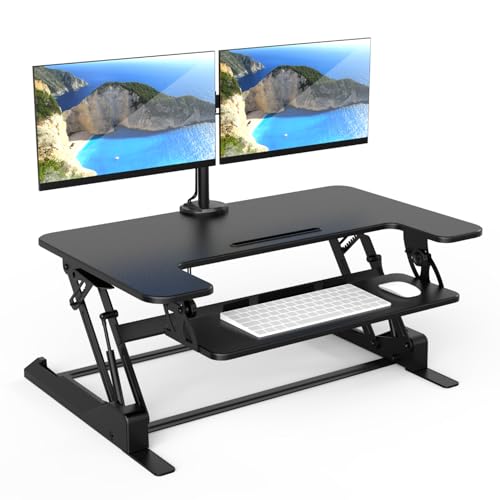
Mount-It! Standing Desk Converter Dual Monitor, 2 Screen Mounts Included, Height Adjustable Desk Riser in Black, Stand Up Desk Convertor Large 36" Wide, Sit Stand Convertor with Manual Lift Gas Spring

Huuger 55 x 28 Large Electric Standing Desk, Height Adjustable Computer Desk, 27.6" Deep Desktop, Stand up Gaming Office Desk with 2 Hooks, 3 Preset Heights, for Home Office, Rustic Brown
Maximizing Your Desk Setup
A stand up desk with monitor mount is the centerpiece of a modern, ergonomic workspace. To complete your setup, consider adding a few complementary accessories. A most comfortable desk chair for long hours ensures you have proper support when sitting. For added surface protection and comfort, a desk mat can provide a smooth, durable surface for your keyboard and mouse.
If you're working with multiple monitors, a stand-up desk converter for dual monitors can be a cost-effective alternative to a full desk replacement. For those who prefer a more traditional feel, a solid wood computer desk with drawers offers a classic look with built-in storage.
Ultimately, the best stand up desk with monitor mount is one that fits your specific needs, space, and budget. By focusing on quality, adjustability, and ergonomic design, you'll create a workspace that supports your health and productivity for years to come.
Ready to Upgrade Your Workspace?
Browse our top recommendations above and find the perfect stand up desk with monitor mount for your home or office.
Shop Now