
Standing Desk with Electric Height Adjustment
Discover how a motorized standing desk can transform your workspace, improve posture, and boost daily energy. Your complete guide to choosing, using, and maintaining an electric height-adjustable desk.
Why electric height adjustment matters: A standing desk with electric height adjustment lets you switch between sitting and standing with the push of a button. Unlike manual desks, motorized models deliver smooth, precise movement, memory presets, and the convenience that makes sit-stand routines actually sustainable. This guide covers everything you need to know before choosing one.
In this guide:
How Electric Height Adjustment Works
A standing desk with electric height adjustment relies on motorized lifting columns built into each leg. When you press a control button, the motor turns a threaded rod inside the column, extending or retracting it to raise or lower the desktop. The control panel can be a simple up/down switch or a digital keypad with programmable memory presets.
Most electric models offer a height range that accommodates both seated and standing positions for a wide variety of users. Memory presets let you save your ideal sitting height and standing height, so transitions take seconds instead of manual cranking. Anti-collision sensors on higher-tier models stop and reverse the desk if it meets an obstacle, protecting both the desk and your belongings.
For a broader overview of how these desks fit into different workspace categories, explore our guide to stand-up desks and see how electric models compare to fixed-height options.
Key Features to Evaluate
Not all electric standing desks are built the same. Understanding the core features helps you match a desk to your workflow, equipment load, and space.
Height Range and Memory Presets
A generous height range covers more users and more use cases. Memory presets are a practical necessity for anyone who switches between sitting and standing multiple times a day. Look for at least three to four presets, plus a sit-stand reminder feature on more advanced control panels.
Weight Capacity
Your desk needs to support your monitor setup, peripherals, and anything else you keep on the surface. Entry-level models typically handle lighter loads, while mid-range and high-end dual-motor desks support heavier multi-monitor rigs. If you use a monitor arm or dual-monitor mount, factor that load into your capacity needs. See our guide to a standing desk with monitor mount for setup ideas.
Control Panel and Connectivity
Control panels range from basic push-button switches to digital displays with USB charging ports and Bluetooth connectivity. Some models integrate with apps that track your sit-stand activity. Consider whether you want a simple, durable switch or a feature-rich panel with reminders and child-lock functions.
Desktop Material and Size
The desktop itself matters as much as the frame. Laminate and MDF surfaces are common in the entry-level and mid-range tiers, while solid wood, bamboo, and butcher block tops appear in premium models. If you prefer a natural finish, explore options like a wooden desk top that pairs with an electric frame.
Single Motor vs. Dual Motor Systems
The motor configuration is one of the most important differences between tiers of electric standing desks.
Dual-motor desks synchronize two motors to lift both legs evenly, which improves stability and reduces wobble at standing height. If your routine involves frequent transitions or a heavier monitor setup, a dual-motor motorized standing desk is the more robust long-term investment.
Stability and Build Quality
Wobble is the most common complaint about electric standing desks, especially at maximum height. Build quality determines how stable the desk feels when you type, write, or lean on it.
Look for heavy-duty steel legs, a sturdy crossbar or reinforced frame, and a wide foot base. Three-stage lifting columns generally offer better stability across a wider height range than two-stage columns. Premium and commercial-grade models often include thicker gauge steel and improved bracing to minimize side-to-side sway.
Desktop thickness also contributes to stability. Thicker tops resist flexing and dampen vibration. If you plan to add a keyboard tray or other under-desk hardware, check that the frame and surface can accommodate it. Our guide to a sit and stand desk with keyboard tray covers ergonomic add-ons.
Health and Productivity Benefits
The main reason people choose an electric standing desk is the ability to break up long periods of sitting. Research consistently links prolonged sitting with discomfort and reduced energy. A sit-stand routine that alternates between positions can help reduce stiffness and keep you more alert through the day.
However, standing all day is not the goal. The benefit comes from movement and variety. A standing desk with electric height adjustment makes that variety practical because switching positions takes seconds. Set a reminder on your control panel or phone to stand for part of each hour, and pair it with an anti-fatigue mat and supportive footwear for comfort.
Ergonomics matter just as much. Pair your desk with a supportive chair for seated periods, and use a memory foam cushion for desk chair if you sit for extended stretches. Proper monitor height and keyboard placement complete the setup.
Setup and Ergonomic Tips
Getting the most from an electric standing desk starts with correct setup. Here is a practical sequence:
- Set your seated height first. Adjust your chair so your feet are flat and thighs parallel to the floor, then raise the desk until your elbows rest at roughly 90 degrees.
- Set your standing height next. Stand with feet hip-width apart and raise the desk until your elbows are at a comfortable 90 to 100 degrees. Your monitor top should be near eye level.
- Save both positions as memory presets. Label them mentally or on the panel so transitions are effortless.
- Add a footrest or anti-fatigue mat for standing periods, and keep frequently used items within easy reach of both positions.
- Manage cables. Electric desks move, so cables need slack and routing. See our guide to standing desk cable management for clean solutions.
If you are unsure about your ideal heights, a standing desk height calculator can provide a starting point based on your body measurements.
Maintenance and Troubleshooting
Electric standing desks are low-maintenance, but a few habits keep them running smoothly for years.
- Keep the columns clean. Wipe dust from the lifting columns periodically and avoid spills near the motors.
- Do not exceed the weight capacity. Overloading strains the motors and can cause premature failure.
- Re-calibrate if needed. Many desks have a reset procedure in the manual to restore full range after a power interruption.
- Check connections. If the desk stops responding, verify the control cable and power connections before assuming a motor fault.
- Address issues early. If your desk won't go up, consult the troubleshooting guide before forcing the mechanism.
Buying Checklist
Before you commit to an electric standing desk, run through this checklist to make sure the model fits your needs.
- Height range covers both your seated and standing positions comfortably.
- Weight capacity exceeds your total desktop load, including monitors and accessories.
- Motor type matches your usage frequency and load (dual-motor for heavy daily use).
- Stability features such as a crossbar, three-stage columns, and wide feet.
- Memory presets and a control panel that suits your workflow.
- Desktop material that fits your aesthetic and durability needs.
- Warranty and support from the manufacturer.
- Space and assembly requirements fit your room and comfort level with tools.
If you work with multiple monitors or a laptop-plus-monitor setup, explore dedicated configurations like a mobile standing desk with dual monitor mount or a small standing desk with keyboard tray to match your workspace size.
Frequently Asked Questions
How does a standing desk with electric height adjustment work?
An electric standing desk uses motorized legs controlled by a switch or control panel. When you press a button, the motors drive the lifting columns up or down, allowing you to transition between sitting and standing positions smoothly and precisely.
What is the ideal height range for an electric standing desk?
A good electric standing desk should cover the full range from a comfortable seated position to a proper standing position for most users. Look for a range that spans roughly 24 to 50 inches (61 to 127 cm), with memory presets so you can save your perfect sit and stand heights.
How much weight can a motorized standing desk support?
Weight capacity varies by tier. Entry-level models typically support around 150 lbs (68 kg), mid-range desks often handle 200 to 250 lbs (90 to 113 kg), and high-end or commercial-grade dual-motor desks can support 300 lbs (136 kg) or more.
Are electric standing desks noisy?
Modern electric standing desks are generally quiet. Most quality models operate below 50 decibels, which is comparable to a quiet conversation. Dual-motor systems tend to be smoother and quieter than single-motor designs.
Do I need a dual-motor or single-motor electric standing desk?
Dual-motor desks offer better stability, faster adjustment, and higher weight capacity, making them ideal for heavier setups and daily use. Single-motor desks are a solid choice for lighter loads and occasional height changes, especially in the entry-level tier.
Final thoughts: A standing desk with electric height adjustment is a practical, long-term investment in your workspace. Focus on the right height range, motor configuration, and stability for your setup, and pair the desk with good ergonomic habits. With the right model, you will move more, sit less, and work more comfortably every day.
Recommended Standing Desks with Electric Height Adjustment
⚠️ AFFILIATE DISCLOSURE: This website contains affiliate links. As an Amazon Associate, we earn from qualifying purchases. If you make a purchase through these links, we may receive a small commission at no additional cost to you. Read our full affiliate policy.

Veken 55 Inch Large Electric Standing Desk, Gaming Table, White | Height Adjustable Sit Stand Up Computer Tables for Home Office, Study , Writing, Suit students, employees and group work
Check price on Amazon
Huuger 47 X 24 Inch Electric Standing Desk with Power Outlets and USB-C Port, Height Adjustable Desk, Sit Stand Desk for Home Office, Computer & Gaming Desk with 3 Presets, Stable Steel Frame, Black
Check price on Amazon
DeskShow Black 60x28 In Electric Standing Desk, 1 Inch Thick Tabletop | Double Beam Frame, Holds 220lbs, Sit Stand, 3 Memory Height Adjustment, Extra Deep Table Top, Black Frame
Check price on Amazon
Claiks Electric Height Adjustable Standing Desk, 48x24 Inch, Rustic Brown | Smooth Height Adjustment, 3 Memory Presets, Cable Management Hub&Hook, Stable Steel Frame, 176lbs Capacity, Easy Assembly
Check price on Amazon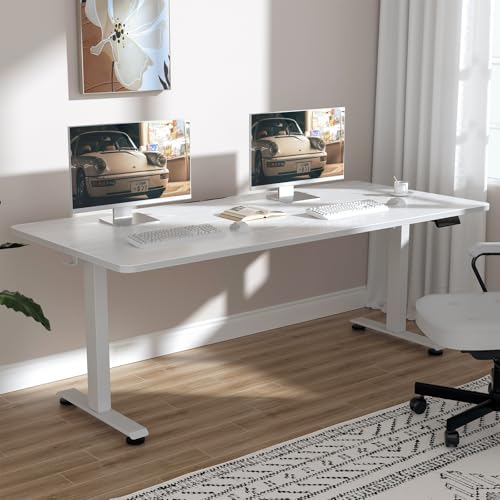
Veken 63×27.6 Inch Large Electric Standing Desk, Gaming Table, White | Height Adjustable Sit Stand Up Computer Tables for Home Office, Study , Writing, Suit students, employees and group work
Check price on Amazon
Veken 63"x28" Wider Large Standing Desk, Electric Height Adjustable, Brown | Modern Workstation Computer Desk, Sit to Stand Up, Conference Room Tables for Home Office, Writing, Gaming Study
Check price on Amazon
HUANUO 32x19 Inch Small Electric Standing Desk, Adjustable, Light Walnut | 176 Lbs Capacity, Rounded Corners, Wheel-Ready Feet, Compact Desktop, Apartment Workspace, 28.3–46.5 Inch Height Range
Check price on Amazon